Introduction
Discover Flowith AI, the ultimate agentic workspace for deep work and next-gen AI collaboration.
What is Flowith AI?
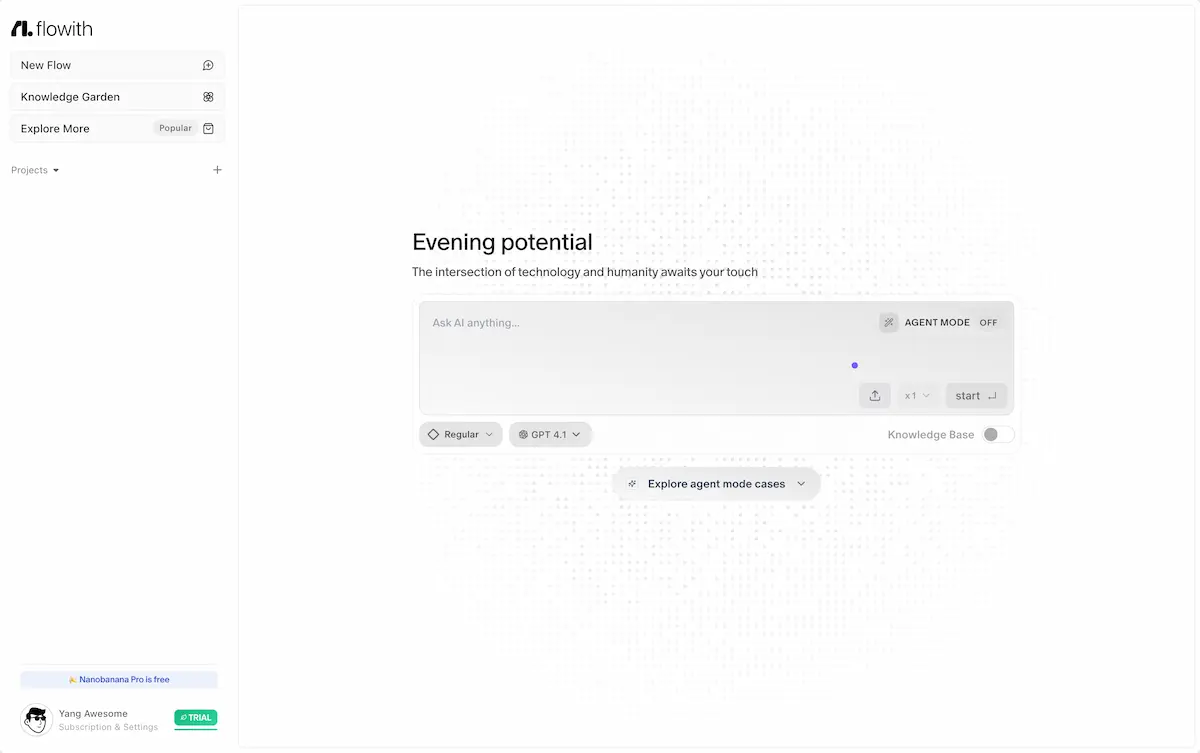
Flowith AI is an innovative AI workspace designed to facilitate deep work and collaborative brainstorming. It functions as a digital whiteboard where users can interact with multiple AI models, including ChatGPT, Claude, and DeepSeek, in a unified environment. This platform solves the problem of fragmented AI tool usage by providing a single, organized space for creative workflows, complex problem-solving, and knowledge management. It is suitable for professionals, creators, and teams who need to harness the power of various AI agents for enhanced productivity and idea generation. By centralizing AI interactions, Flowith AI enables users to build a persistent knowledge base and execute multi-step, agentic workflows more efficiently.
Key Features of Flowith AI
Agentic Workspace
The platform offers a dedicated workspace where multiple AI agents can be deployed and managed simultaneously for collaborative tasks.
Multi-AI Model Integration
Users can seamlessly interact with leading AI models like GPT-4, Claude, and DeepSeek from a single interface, comparing outputs and leveraging different strengths.
Interactive AI Whiteboard
The core of the experience is a visual, infinite canvas that serves as an AI whiteboard for brainstorming, mind mapping, and organizing complex thoughts with AI assistance.
Persistent Knowledge Base
Flowith AI allows users to create and connect a personal or project-specific knowledge base, enabling AI agents to reference past work and maintain context across sessions.
Agent Mode for Advanced Workflows
A specialized Agent Mode unlocks the ability to create automated, multi-step processes where AI agents can perform sequential tasks, research, and synthesis.
Visual Organization with Gardens
Ideas and projects can be cultivated in structured spaces called "Gardens," such as the "Knowledge Garden," helping users visually manage and grow their work.
Use Cases for Flowith AI
Strategic Brainstorming and Planning
Teams can use the AI whiteboard to visually map out strategies, campaign ideas, or product roadmaps with real-time input from various AI models.
Academic and Research Synthesis
Researchers and students can leverage the platform to gather information from different sources, analyze data with AI, and synthesize findings into coherent reports.
Creative Content Development
Writers, marketers, and designers can collaborate with AI to generate content ideas, draft copy, refine narratives, and overcome creative blocks within a unified creative workflow.
Complex Problem-Solving
Engineers, analysts, and consultants can deconstruct complex problems on the canvas, using different AI agents to tackle various aspects and build a comprehensive solution.
Personal Knowledge Management
Individuals can build a personal knowledge base, connecting notes, insights, and resources, and use AI to query and expand upon their accumulated knowledge.
How to Use Flowith AI
- Sign Up: Create a free account on the Flowith AI website using an email, Google, X (Twitter), or GitHub account.
- Create a New Flow: Start a new project by clicking "New Flow" to open a fresh AI whiteboard canvas.
- Select Your AI Models: Choose which AI models (like ChatGPT or Claude) you want to interact with from the available options on your workspace.
- Begin Collaboration: Start a conversation with an AI, drag and drop elements on the canvas, create notes, or activate Agent Mode to automate a sequence of tasks.
- Organize and Grow: Save your work, organize related flows into "Gardens," and connect resources to your knowledge base for future reference.
Target Audience for Flowith AI
- Product Managers and Strategists for roadmap planning.
- Content Creators, Writers, and Marketers for ideation and drafting.
- Researchers, Academics, and Students for synthesis and analysis.
- Software Developers and Engineers for technical design and problem-solving.
- Consultants and Analysts for data interpretation and client reporting.
- Creative Professionals and Designers for visual brainstorming.
Is Flowith AI Free?
Flowith AI offers a generous free plan that allows users to explore the core functionalities of the platform, including access to basic AI models and the AI whiteboard. This makes it an excellent tool for individuals to start experimenting with agentic workflows. For users requiring more advanced features, higher usage limits, or access to premium AI models, Flowith AI provides affordable premium subscription options. Specific details on the tiers and pricing are available on their official website.
Frequently Asked Questions about Flowith AI
What AI models does Flowith AI support?
Flowith AI integrates with several popular AI models, including OpenAI's ChatGPT (like GPT-4), Anthropic's Claude, and DeepSeek, allowing for versatile AI collaboration within one workspace.
What is the "Agent Mode" in Flowith AI?
Agent Mode is a powerful feature that enables the creation of automated, multi-step agentic workflows. Users can program a sequence of tasks for AI agents to execute autonomously, significantly enhancing productivity for complex projects.
Can I use Flowith AI for team collaboration?
While the platform excels as a personal agentic workspace, its core design focuses on individual deep work and AI interaction. Team features may be part of its development roadmap.
How does the Knowledge Base feature work?
The Knowledge Base allows users to upload, store, and connect documents, notes, and data. AI agents within Flowith AI can then reference this information to provide more contextual and informed assistance during your creative workflows.
Is my data secure on Flowith AI?
According to their website, Flowith AI is committed to user privacy and security. Users should review the platform's Privacy Policy and Terms of Service for detailed information on data handling and security practices.
Do I need coding skills to use Flowith AI?
No, Flowith AI is designed with a user-friendly, visual interface. The AI whiteboard and conversational interactions are built to be accessible to users without any programming expertise.
Flowith AI Tags
Flowith AI, agentic workspace, AI whiteboard, AI collaboration, ChatGPT workspace, Claude integration, DeepSeek, creative workflow, productivity tool, brainstorming software, knowledge base, Agent Mode, AI agents, deep work tool, visual collaboration platform