Introduction
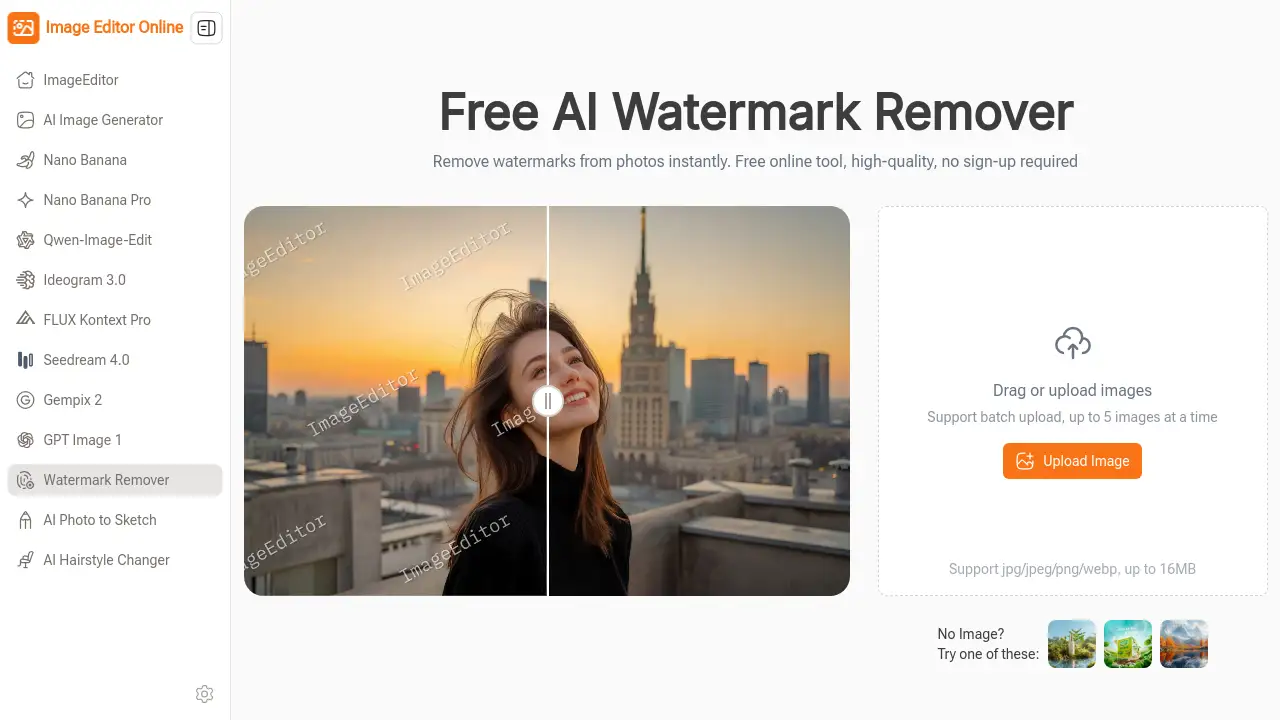
AI Watermark Remover is a free online tool that uses artificial intelligence to clean watermarks from images instantly.
What is AI Watermark Remover?
AI Watermark Remover is a web-based application designed to automatically detect and erase unwanted watermarks from digital photos. The tool solves the common problem of having images cluttered with logos, text stamps, or date marks, which can detract from their visual appeal and usability. It is suitable for a wide range of users, from professionals managing social media content to individuals cleaning personal photos. This watermark remover matters because it provides a quick, accessible, and free online tool that requires no technical editing skills or software installation, making image cleanup a simple task for anyone.
Key Features of AI Watermark Remover
AI-Powered Precision
The tool utilizes advanced artificial intelligence to automatically identify watermarks and intelligently reconstruct the underlying image area, ensuring clean edges and natural-looking textures without degrading the original high-quality photo.
Fast, One-Click Workflow
Users can remove watermarks with minimal effort; the process involves simply uploading an image, after which the AI Watermark Remover handles all the complex processing automatically, delivering results in seconds.
Free Online, No Sign-Up
This service is completely free to use directly within a web browser, with no requirement to create an account, install software, or enter payment information, offering instant and hassle-free access.
Batch Image Support
For efficiency, the online tool supports uploading up to five images simultaneously, allowing users to process multiple photos in one go rather than handling them individually.
Broad Format Compatibility
It accepts common image formats including JPG, JPEG, PNG, and WebP, with each file being up to 16MB in size, catering to a wide variety of user needs.
Use Cases for AI Watermark Remover
Social Media Content Preparation
Social media managers and content creators can use this watermark remover to quickly clean branded visuals or stock photos, creating polished posts ready for platforms like Instagram or Facebook.
E-commerce Product Listings
Online store owners can refresh older product images that contain photographer logos or watermarks, allowing them to maintain a professional and consistent catalog without reshooting items.
Personal Photo Restoration
Individuals can remove watermarks from personal photographs, such as those from online printing services or old scanned images, to preserve clean copies for albums or gifts.
Professional Presentations and Reports
Marketing specialists and administrative staff can prepare clean, unmarked images for client decks, reports, and internal presentations, ensuring a professional appearance.
How to Use AI Watermark Remover
Using the AI Watermark Remover is a straightforward process completed in three steps.
- Upload Your Image: Navigate to the tool's website. Drag and drop your image into the upload area or click to select a file from your device. For optimal results, use a clear image where the watermark is distinctly visible.
- Automatic AI Processing: Once uploaded, the AI Watermark Remover immediately begins analyzing the photo. Its AI automatically detects the watermark—whether it's text, a logo, or a date stamp—and removes it, reconstructing the background seamlessly. No manual selection is required.
- Download the Result: After a brief processing time, a preview of the clean image is displayed. You can then download the high-quality, watermark-free photo directly to your device with a single click.
Target Audience for AI Watermark Remover
- Social Media Managers and Content Creators
- Online Store Owners and E-commerce Sellers
- Marketing Professionals and Designers
- Bloggers and Writers
- Administrative and Office Staff
- General Users with personal photo editing needs
Is AI Watermark Remover Free?
Based on the reference information, AI Watermark Remover is presented as a completely free tool. There is no mention of paid plans, subscriptions, or usage limits in the provided content.
| Plan | Price | Key Features |
|---|---|---|
| Free | $0 | Instant AI watermark removal, no sign-up required, batch upload support, direct download. |
For the most current and detailed pricing information, visiting the official product page is recommended.
AI Watermark Remover's Pros and Cons
| Aspect | Pros | Cons |
|---|---|---|
| Ease of Use | Extremely simple, one-click workflow with no learning curve. | Limited to automatic detection; may not suit images needing precise manual control. |
| Cost & Access | Completely free with no hidden fees or account required. | The long-term sustainability of a free, high-quality AI service is unclear. |
| Speed & Convenience | Processes images instantly online; no software download needed. | Dependent on a stable internet connection to function. |
| Output Quality | Uses AI to deliver natural and clean results for many watermarks. | Performance can vary with complex watermarks on textured or detailed backgrounds. |
Frequently Asked Questions about AI Watermark Remover
Is AI Watermark Remover really free to use?
Yes. According to the product information, the AI Watermark Remover is a completely free online tool. Users can upload images, process them, and download the results without any cost or requirement to sign up for an account.
What types of watermarks can this tool remove?
The tool is designed to remove common types of watermarks, including text overlays, company logos, and date stamps. Its AI-powered precision works best on watermarks that are clearly visible against the image background.
Will using the watermark remover damage my original image?
The tool's AI is designed to rebuild the area under the watermark intelligently, aiming to preserve the overall high-quality and natural look of the original photo. It is always a good practice to keep a backup of your original file.
What image formats are supported?
The watermark remover supports popular formats including JPG, JPEG, PNG, and WebP. Individual image files can be up to 16MB in size.
Is my data private and secure when I use this online tool?
The product description emphasizes a no-sign-up policy, which suggests images may be processed without being permanently stored on a server. For specific details on data retention and privacy, reviewing the website's privacy policy is advised.
Can I remove watermarks from multiple images at once?
Yes, a key feature is batch support. You can upload and process up to five images simultaneously, which saves time compared to editing each photo individually.
AI Watermark Remover Tags
AI Watermark Remover, remove watermark online, free watermark remover, online watermark removal, AI photo editor, remove logo from image, erase text from photo, instant watermark remover, high-quality image cleanup, no sign-up tool, batch watermark removal, free online image editor