Introduction
toukapng: free AI background remover for transparent PNGs.
What is toukapng?
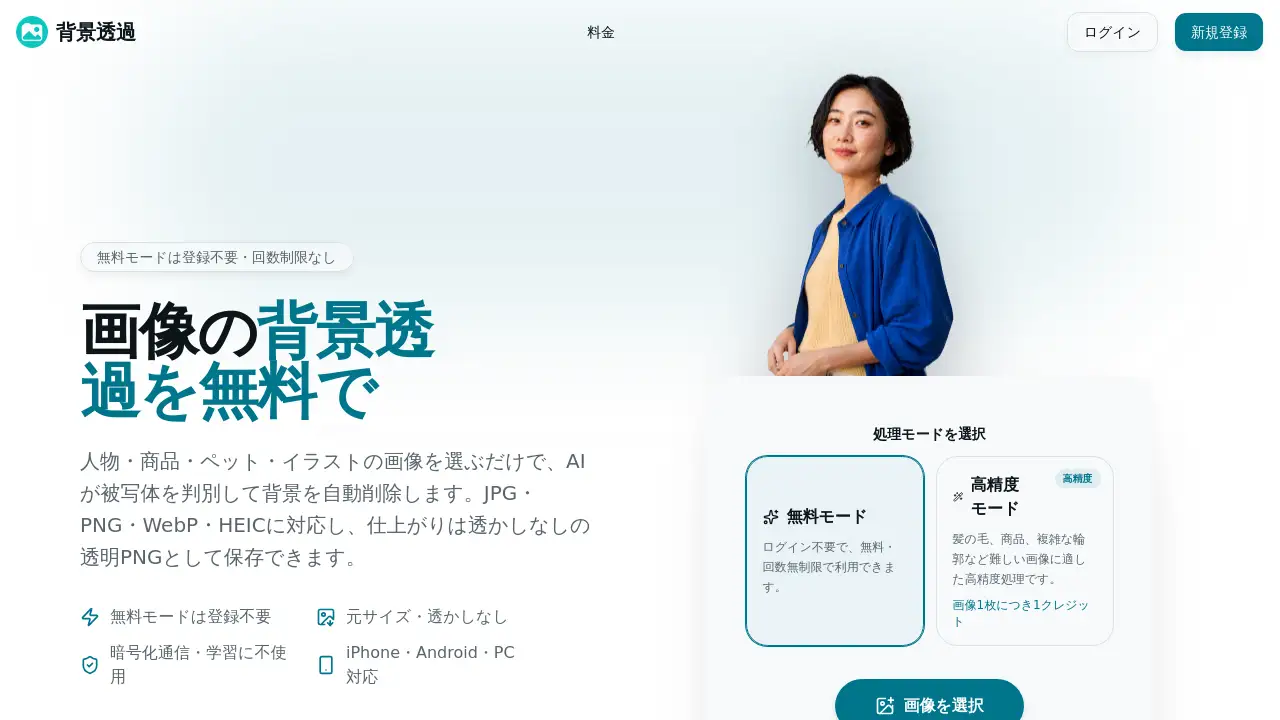
toukapng is a web-based background remover and background removal tool that uses AI to delete image backgrounds automatically. It helps users remove background from JPG, PNG, WebP, or HEIC/HEIF files without installing editing software. The tool is designed for people who need a fast way to remove background from portraits, product photos, pets, and illustrations. Unlike many online tools, the free background remover mode requires no registration and has no usage limit. It also avoids watermarks, so the final transparent PNG can be used in personal or commercial projects. For difficult images, toukapng offers a high-precision mode that uses one credit per image. This makes it a practical background remover for beginners, online sellers, designers, and social media creators who want clean cutouts without a complex workflow.
Key Features of toukapng
AI Background Remover for People, Products, Pets, and Illustrations
The AI background remover detects the main subject and can remove background automatically. It is trained to handle hair, fur, thin outlines, and product edges, though results vary by image.
Delete and Restore Brushes
After the background remover finishes, use the delete brush to remove background leftovers and the restore brush to bring back original pixels. The restore brush does not generate new hidden content.
Transparent, White, or Solid Color Backgrounds
Save the cutout as a transparent PNG, or add a white background for e-commerce listings. Solid color backgrounds are also available for design needs.
Free Mode with No Registration or Usage Limit
The free background remover mode works without an account. It has no usage limit and adds no watermark to the exported transparent PNG.
Batch Processing up to 20 Images
Add up to 20 images at once, with a total limit of 100MB. The background remover processes them in order and lets users download the results as a ZIP file.
Original Size and No Watermark Output
The background remover keeps the original pixel size of each image. It does not add logos or watermarks to transparent PNG or background-filled outputs.
High-Precision Mode for Difficult Edges
For hair, long fur, or thin product outlines, choose the high-precision mode. It costs one credit per image and requires login; new users get 5 credits.
Browser-Based and Mobile-Friendly
toukapng runs in a browser on iPhone, Android, and desktop. Users can upload by file picker, drag and drop, or paste, making it a convenient mobile background remover.
Use Cases for toukapng
Portrait and Profile Images
Create a transparent PNG for resumes, company profiles, social icons, or YouTube thumbnails. iPhone HEIC/HEIF photos can be uploaded directly to the background remover.
Product Photos for E-commerce
Online sellers can remove background from product images for Amazon, Rakuten, Mercari, or own stores. The background remover can output a clean white background or transparent PNG for listings.
Pet and Animal Photos
Keep fur detail while you remove background from dog or cat photos. The transparent PNG can be used for social posts, memory images, or stickers.
Illustrations and Stickers
Remove background from illustrations, hand-drawn art, and logos to create a transparent PNG. This background remover is useful for stickers, print materials, and web design assets.
Social Media and Design Assets
Use the background remover to remove background from subjects for posts, banners, and layouts. Transparent PNG files can be layered over other images or colors.
How to Use toukapng
- Upload an image to toukapng. Supported formats include JPG, PNG, WebP, and HEIC/HEIF. Each image can be up to 10MB, 8000px, and 25 megapixels.
- Let the AI background remover remove background automatically. It detects the subject and deletes the background.
- Check the result. If needed, switch to high-precision mode for difficult edges, or use the delete and restore brushes to adjust details.
- Choose the background style. Keep it transparent, add a white background, or select a solid color.
- Download the file. Use transparent PNG for transparency, or PNG/JPG for colored backgrounds. Batch results can be saved as a ZIP.
Target Audience for toukapng
- Online sellers who need product photo background removal
- Social media creators making profile images and thumbnails
- Designers and illustrators working with transparent PNG assets
- Pet owners creating stickers or social posts
- Professionals who need quick portrait cutouts
- Anyone looking for a free background remover with no registration
Is toukapng Free?
toukapng offers a free background remover mode that requires no registration and has no usage limit. It supports up to 20 images per batch, with a total size of 100MB, and exports transparent PNG files without watermarks. The high-precision mode is available for harder images and uses one credit per image. Users need to log in for this mode, and new accounts receive 5 credits. The reference content also states that commercial use is allowed, but users must ensure they have the necessary rights to the original image, person, logo, or character.
| Plan | Price | Features |
|---|---|---|
| Free | $0 | No registration, unlimited uses, up to 20 images, 100MB total, transparent PNG, no watermark |
| High-Precision | 1 credit per image | Login required, 5 free credits on sign-up, better for hair, fur, and thin edges |
toukapng's Pros and Cons
| Aspect | Pros | Cons |
|---|---|---|
| Pricing | Free background remover mode is no registration and unlimited | High-precision mode uses credits after the initial 5 |
| Features | AI background remover, delete/restore brushes, transparent PNG, batch processing | Results depend on image complexity and color contrast |
| Formats | Supports JPG, PNG, WebP, HEIC/HEIF; keeps original pixel size | Limits: 10MB per image, 8000px, 25MP, 100MB per batch |
| Accessibility | Browser-based and mobile-friendly | High-precision mode requires login |
| Output | No watermark, transparent PNG available | Restore brush cannot create new hidden areas |
Frequently Asked Questions about toukapng
What is toukapng?
toukapng is an online background remover that uses AI to delete image backgrounds. It can create a transparent PNG from common image formats and includes editing brushes for cleanup.
Is toukapng free to use?
Yes. The free background remover mode requires no registration and has no usage limit. It does not add watermarks. High-precision mode uses one credit per image after the initial 5 free credits.
Does toukapng create transparent PNG files?
Yes. The background remover can save cutouts as transparent PNG. It can also remove background from JPG, PNG, WebP, and HEIC files. If users prefer a white or solid color background, the tool can export PNG or JPG instead.
Can toukapng remove background from hair, fur, and thin edges?
The AI background remover is designed to detect hair, pet fur, and thin product outlines. For complex images, use high-precision mode and the delete or restore brush to improve the result.
Is it safe to upload images to toukapng?
The reference information says images are encrypted during transfer and are not used for AI training. They are kept only for the shortest time needed to provide the result and protect the service.
Can I use toukapng on my phone?
Yes. toukapng works in browsers on iPhone, Android, and computers. No app is needed, making it a convenient mobile background remover.
toukapng Tags
background remover, free background remover, AI background remover, transparent PNG, remove background, background removal tool, toukapng, batch background removal, transparent background maker, product photo background remover, pet photo background remover, online background remover