Introduction
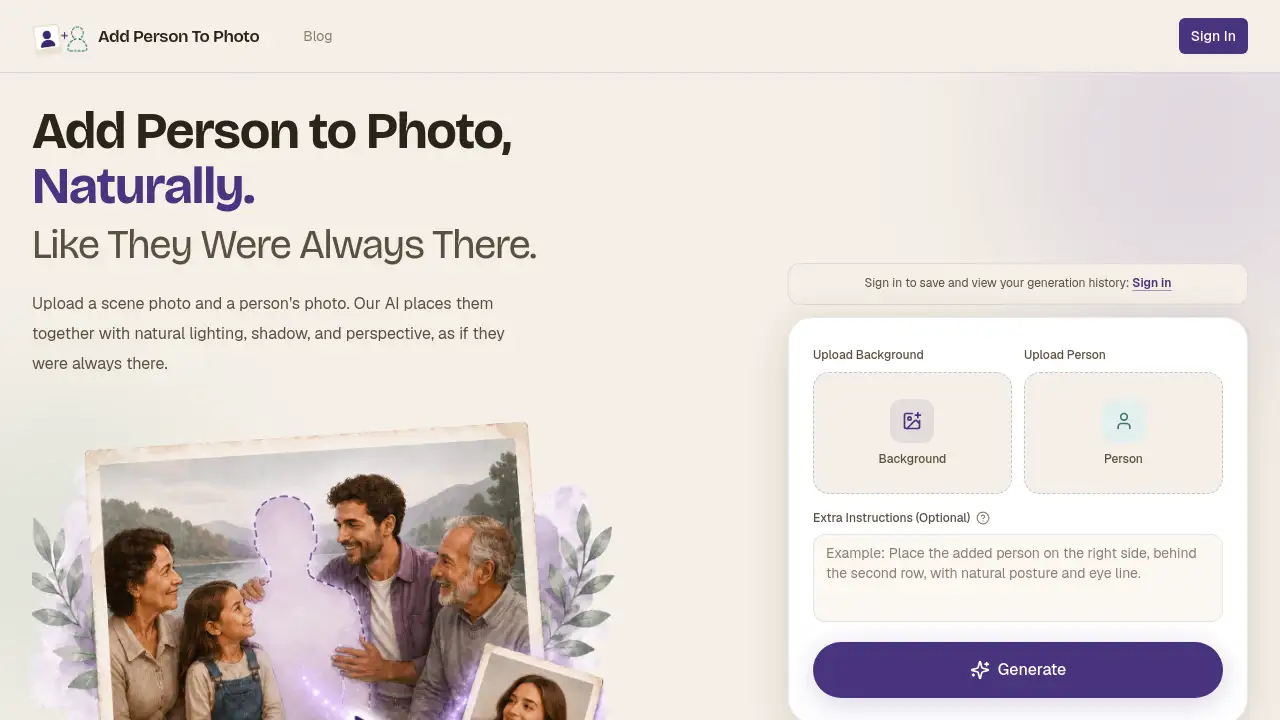
Add Person to Photo is an AI tool that lets users naturally place a person into any scene. Upload a background image and a portrait, and the AI blends lighting, shadow, and perspective for realistic results. It solves the common problem of missing loved ones in group photos or travel shots.
What is Add Person to Photo?
Add Person to Photo is an online AI compositing tool designed to insert a person into an existing photograph with convincing realism. Instead of spending hours in Photoshop, users upload a scene photo and a separate portrait of the person they want to add. The AI automatically analyzes the background's lighting direction, shadow softness, color temperature, and perspective, then composites the new subject so they appear to have been there all along. The tool is suitable for anyone who needs to add a missing person to a photo — whether for family memories, group shots, or creative projects. It matters because it preserves emotional moments that would otherwise be incomplete, and it does so without requiring any technical editing skills.
Key Features of Add Person to Photo
Natural Blending
The AI matches lighting, shadow, skin tone, and perspective automatically. No visible cut-out edges or color mismatches remain after processing.
Privacy-First Design
Uploaded photos auto-delete within seven days. Images are never used for AI training or shared with third parties.
Fast Processing
Most composites are ready in under two minutes. A real-time queue shows progress, and no account is needed to try the tool.
High-Resolution Output
Users can preview the blend and download results as PNG or JPG in the chosen aspect ratio. Output supports up to 4K resolution.
Extra Instructions Field
An optional text box allows users to guide the AI, such as specifying where in the scene the person should be placed or how they should interact.
Credit-Based System
One-time credit packs replace subscriptions. Credits never expire, and paid users get priority in the generation queue.
Use Cases for Add Person to Photo
Reunite with Departed Loved Ones
Place a late grandparent into a wedding photo or a missing parent into a graduation portrait. The AI makes the composite feel natural and respectful.
Complete Family Photos That Missed Someone
When a family member could not attend a reunion or a sibling was abroad, users can add a missing person to a photo so the group shot feels whole.
Fix Group Shots with Absent Colleagues
Add the coworker who was on a call or the teammate who arrived late. No need to reschedule an entire photoshoot.
Drop Yourself into Travel Photos
If a partner took a great landscape shot but is not in it, users can add them into the frame. The AI matches the scene's lighting and perspective.
Include Pets in Family Portraits
Upload a clear photo of a dog or cat, and the AI places them realistically into the scene with proper ground shadows and gaze direction.
Creative and Fun Edits
Insert a friend into a Renaissance painting or place someone next to a favorite character. The tool works for playful and artistic projects.
How to Use Add Person to Photo
- Upload the scene photo — the background image that is missing someone. Supported formats are JPG, PNG, and HEIC, up to 4K resolution.
- Upload the person photo — a clear portrait of the individual who should appear in the scene. The AI reads face, skin tone, and body proportions.
- (Optional) Add extra instructions — type a short note about where the person should stand or how they should look.
- Click generate — the AI processes the composite, matching lighting, shadow, and perspective automatically. Most results are ready in under two minutes.
- Preview and download — see the blend on screen, then save it as PNG or JPG in your preferred aspect ratio.
No account is needed to test the tool. Signing in saves generation history for later access.
Target Audience for Add Person to Photo
- Families wanting to include absent or departed members in portraits
- Event photographers who need quick composites for group shots
- Travelers who want to add themselves or friends into scenic photos
- Social media users creating engaging and emotional image posts
- Small studios handling retouching and composite edits for clients
- Casual users looking for a fun way to insert people into creative scenes
Is Add Person to Photo Free?
The tool offers a free trial allowing users to test the compositing process without payment. After that, one-time credit packs are available:
| Plan | Price | Credits | Features |
|---|---|---|---|
| Basic | $9.90 | 30 | Credits never expire, priority queue |
| Standard | $29.90 | 150 | Most popular, credits never expire, priority queue |
| Pro | $49.90 | 750 | Best value, credits never expire, priority queue |
All plans are one-time payments. Credits never expire for the purchased product.
Add Person to Photo's Pros and Cons
| Aspect | Pros | Cons |
|---|---|---|
| Ease of Use | No editing skills needed; three-step workflow | Occasional alignment issues with complex poses |
| Quality | Realistic lighting and shadow matching | Backgrounds with extreme perspective may require retries |
| Speed | Results in under two minutes | Processing queue depends on server load |
| Privacy | Auto-delete within 7 days; no data sharing | Deletion timer may feel short for some users |
| Pricing | One-time credits, no subscription | Per-credit cost may add up for heavy users |
| Output Options | High-resolution PNG/JPG downloads | No layered file export (e.g., PSD) |
Frequently Asked Questions about Add Person to Photo
How does Add Person to Photo achieve natural-looking results?
The AI is fine-tuned for photo compositing. It analyzes the background's lighting direction, shadow softness, color temperature, and skin tones, then matches all these factors on the inserted subject. Most results pass close inspection.
Is Add Person to Photo safe to use with personal photos?
Yes. Uploaded photos auto-delete within seven days and are never used for AI training or shared with third parties. The service is designed with privacy as a priority.
Can I use Add Person to Photo without creating an account?
Yes. A free trial is available without signing in. Creating an account allows users to save and view their generation history, but it is not required to test the tool.
What file formats and resolutions does Add Person to Photo support?
The tool accepts JPG, PNG, and HEIC files up to 4K resolution for both the scene and the person photo. Output is available as PNG or JPG in the chosen aspect ratio.
How long does it take to generate a composite?
Most composites are ready in under two minutes. The queue shows real-time progress. Paid users get priority processing.
Can I add multiple people to the same photo?
The tool is designed for adding one person per operation. Users can make multiple separate composites and combine them externally if needed.
Add Person to Photo Tags
Add Person to Photo, AI photo compositing, add someone to a photo, add missing person to photo, natural photo blending, AI image editor, photo retouching tool, group photo fix, memory preservation, family portrait tool, online photo editor, realistic AI composite