Introduction
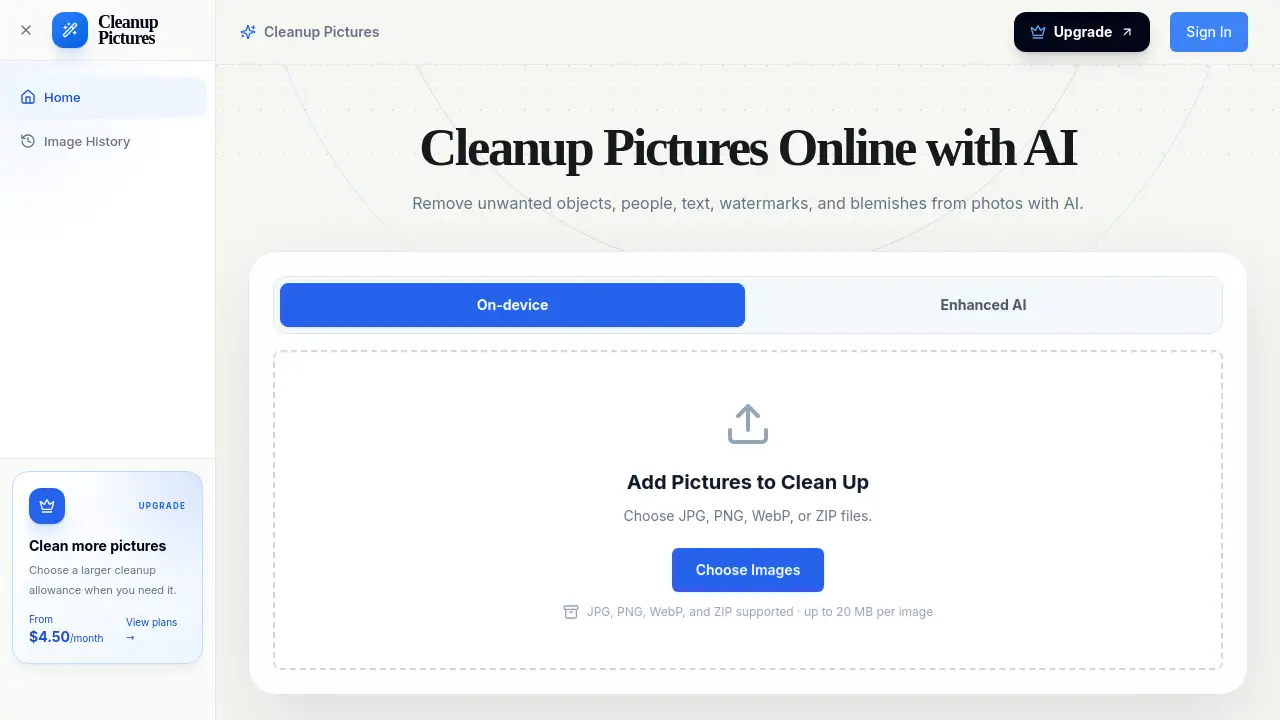
Cleanup Pictures is an online AI photo cleaner for removing unwanted objects, people, text, logos, watermarks, date stamps, and blemishes from photos. It lets users upload an image, brush over distractions, and download a cleaner photo.
What is cleanup pictures?
Cleanup Pictures is a browser-based AI photo cleanup tool. It solves a common photo-editing problem: distracting elements that are hard to remove manually. The tool acts as an AI photo cleaner and AI image cleaner, using background reconstruction after a user marks an area with a brush. It is useful for photographers, online sellers, real estate agents, travelers, social media users, and anyone who wants a cleaner image without complex editing software.
Cleanup Pictures focuses on selective object removal rather than full-image editing. Users brush over the unwanted area, and the AI rebuilds the background using nearby colors, textures, and patterns. Results depend on the picture and the selected area. The tool does not recover original details hidden underneath the object; it creates new pixels that match the surrounding image.
Key Features of cleanup pictures
Simple Brush Object Removal
Brush over an unwanted object, person, text, or mark instead of editing the whole photo. Adjust the brush size and refine the selection when needed.
AI Background Reconstruction
The AI rebuilds the area covered by the brush using visible colors, textures, and patterns around the selected distraction. This supports natural-looking photo cleanup in many scenes.
Before-and-After Photo Comparison
Compare the cleaned image with the original before downloading. Users can check edges, textures, and nearby details, then refine the selection for another pass.
Cleanup History and Credit Protection
Signed-in cloud tasks stay in the cleanup history. If a task is confirmed as failed, its reserved credits are returned to the account.
Adjustable Brush and Refinement
The brush can be resized to stay close to text, logos, small blemishes, or product edges. Refining only the area that looks off is often faster than restarting the entire photo cleanup.
JPG, PNG, and WebP Support
Upload commonly used image formats, including JPG, PNG, and WebP. Users should own the image or have permission to edit it.
Use Cases for cleanup pictures
Remove Unwanted Objects from Photos
Erase wires, signs, bins, furniture, props, and other distractions while keeping the main subject and original framing in place. This is a common use for object removal in travel and street photos.
Remove People and Photobombers
Clean up travel photos, portraits, and event pictures by removing unwanted people from the background. Review faces, hair, shadows, and fine edges before downloading.
Remove Text from an Image
Brush over a caption, label, date stamp, or text overlay. Keep the selection close to the letters and inspect the rebuilt background for natural texture.
Remove Logos and Watermarks
Remove a logo, watermark, proof mark, or stamp from an image when the user owns it or has permission to edit. Keep the brush close to the mark and check the repaired area.
Clean Up Product and Real Estate Photos
Remove dust, props, wires, signs, bins, reflections, or background clutter. Inspect product shapes, building edges, and repeated patterns before exporting.
Remove Blemishes and Small Defects
Erase a dust spot, skin blemish, scratch, stain, or small mark. Review the repaired texture and keep the original for comparison.
How to Use cleanup pictures
- Upload an image. Choose a JPG, PNG, or WebP file that is owned or authorized for editing.
- Brush over the unwanted area. Adjust the brush size and cover the full object, person, text, or mark. Include connected shadows or reflections when they should disappear.
- Select Clean. Let Cleanup Pictures process the marked area and rebuild the background using nearby details.
- Review the result. Compare the cleaned image with the original. Check edges, textures, and repeated patterns.
- Refine and download. If the repaired area needs another pass, make a smaller selection and clean again. Then download the final image.
Target Audience for cleanup pictures
- Photographers and photo editors
- Real estate professionals
- E-commerce and product sellers
- Travelers and social media users
- Designers and marketers
- Studios and high-volume teams
- Anyone needing a simple AI photo cleaner for object removal
Is cleanup pictures Free?
No free plan is listed in the reference pricing information. Cleanup Pictures offers paid credit plans with annual billing and discounts shown. Users should check the official pricing page for current credits, billing options, and purchase details.
| Plan | Price | Features |
|---|---|---|
| Starter | $4.50/month billed annually | 200 credits/month, object removal and picture cleanup workflow, uploads up to 1000 x 1000px, shared processing, priority email support |
| Pro | $9.50/month billed annually | 800 credits/month, everything in Starter, generation API access, priority support |
| Ultra | $19.50/month billed annually | 2,000 credits/month, uploads up to 4000 x 4000px, advanced API access, dedicated support |
| Enterprise | $65.50/month billed annually | 10,000 credits/month, uploads up to 4000 x 4000px, advanced API access, dedicated support |
cleanup pictures's Pros and Cons
| Aspect | Pros | Cons |
|---|---|---|
| Pricing | Annual discounts and scalable plans for different usage levels | No free plan listed; credits are required for cloud processing |
| Features | Brush-based object removal, AI background reconstruction, before-and-after comparison | Does not recover original details hidden underneath the selected area |
| Usability | Simple upload, brush, clean, review, and download workflow | Mobile processing depends on browser, device memory, and image size |
| Output | Browser-processed results are exported as PNG; cloud output can differ | Results vary based on the image and selected area |
| Support | Priority and dedicated support options on higher plans | Upload limits are lower on Starter and Pro |
Frequently Asked Questions about cleanup pictures
What is Cleanup Pictures?
Cleanup Pictures is an online AI photo cleaner and AI image cleaner. It removes a selected object or distraction and reconstructs the marked area using nearby colors, textures, and patterns. It can remove unwanted objects, people, text, logos, watermarks, date stamps, blemishes, and other small distractions.
How do I remove an unwanted object from a photo?
Upload a photo, adjust the brush size, and cover the full object and its connected shadow when needed. Select Clean, compare the result with the original, and refine the selection if the reconstructed area needs another pass.
Can I remove people from a photo?
Yes, users can brush over an unwanted person or photobomber while keeping the main subject in place. Include connected shadows when needed, then inspect faces, hair, clothing, edges, and repeated background details after cleanup.
Can I remove text, logos, or watermarks from an image?
Yes, when the user owns the image or has permission to make the edit. The tool reconstructs the area covered by the brush, so keep the selection close to the text or mark and compare the repair with the surrounding image.
Will AI picture cleanup reduce image quality?
AI cleanup changes detail inside the selected area, and reconstructed textures may look different from the original. Browser-processed results are exported as PNG; cloud output can differ. Users should inspect the result before using it and keep the original image.
Can I use Cleanup Pictures on an iPhone or Android phone?
Mobile processing depends on the browser, device memory, and image size. Use a browser that supports the tool’s image-processing features and keep the tab open. If local processing is unavailable or fails, try a supported desktop browser; cloud processing requires an account and available credits.
cleanup pictures Tags
cleanup pictures, AI photo cleaner, remove unwanted objects from photos, remove people from photo, remove text from image, remove watermarks from photos, AI image cleaner, photo cleanup online, object removal tool, remove blemishes from photos, background reconstruction, before and after photo editor