Introduction
Free Image to Video AI Generator | ImageToVid AI is an online tool that turns still photos into moving AI videos. It helps creators, marketers, and storytellers turn images into video content with smooth motion, cinematic effects, and HD output. The free image to video AI generator works directly in the browser, so users can upload a picture and download a watermark-free video in seconds.
What is Free Image to Video AI Generator | ImageToVid AI?
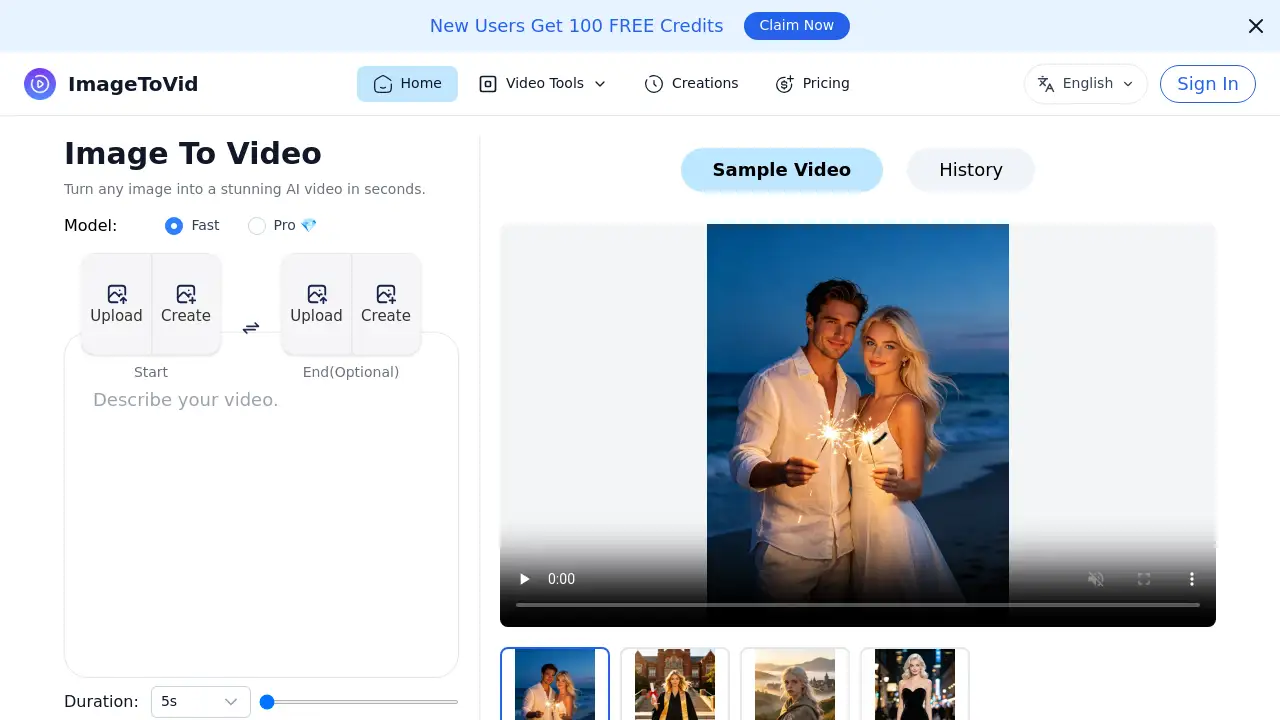
ImageToVid AI is a free image to video AI generator created for anyone who needs quick visual content. The platform uses advanced AI models to create realistic motion from a single photo. Instead of shooting footage or using complex editing software, users simply upload an image and add a prompt. This solves the problem of high-cost video production and saves time for solo creators and small teams. It matters because short-form video is now essential for social media and marketing. The tool also supports optional end images, making it a flexible AI video generator from image.
Key Features of Free Image to Video AI Generator | ImageToVid AI
HD Quality and Watermark-Free Export
Upload a photo and download clean video at up to 1080p. This free image to video AI generator adds no watermark, so users can publish content directly on any channel.
Flexible Image Support
Users can upload portraits, artwork, product images, and old photos. This makes the free image to video AI generator useful for a range of creative projects.
Fast Image to Video Creation Online
Videos are created in seconds inside the browser. This fast workflow helps creators test prompt ideas and produce content without waiting for long processing times. As a free image to video AI generator, it fits into daily content planning.
Advanced AI Models for Realistic Motion
The platform uses advanced AI models behind the scenes. It creates smooth transitions, natural movement, and cinematic effects from static images. Users can turn a single photo into a dynamic scene with this free image to video AI generator. It also works as a reliable AI video generator from image for high-quality output.
Use Cases for Free Image to Video AI Generator | ImageToVid AI
TikTok, Instagram, and Shorts
Turn photos into short vertical videos for TikTok, Instagram Reels, and YouTube Shorts. The free image to video AI generator adds smooth motion and eye-catching effects.
Short Drama and Storytelling
Upload character images, concept art, or storyboard frames and turn one photo into a short drama. This helps writers and directors preview scenes before filming.
Bring Old Photos Back to Life
Create videos from old portraits and family photos. The AI technology adds subtle expressions and realistic motion that make memories feel alive.
Product Marketing Videos
Convert product images into ad-ready videos for e-commerce stores. Smooth camera movements and cinematic visuals help products stand out. This is a practical use case for a free image to video AI generator.
Real Estate Presentations
Make property photos into video presentations for listings and websites. This use case gives real estate agents an easy way to showcase homes.
How to Use Free Image to Video AI Generator | ImageToVid AI
Using the Free Image to Video AI Generator | ImageToVid AI is straightforward:
- Go to imagetovid.ai.
- Upload a starting image or use an End image (optional).
- Select a model, either Fast or Pro.
- Add an optional prompt describing the movement.
- Click Start and wait a few seconds.
- Download the finished video for sharing.
Target Audience for Free Image to Video AI Generator | ImageToVid AI
The free image to video AI generator serves many different user groups.
- Social media managers and content creators
- E-commerce sellers and digital marketers
- Filmmakers and storytellers
- Real estate agents
- Small business owners
- Personal users who want to animate old photos
Is Free Image to Video AI Generator | ImageToVid AI Free?
ImageToVid AI is free to use for creating videos from images. Users can export HD videos without watermarks, and the homepage describes it as a free unlimited image to video AI tool. This free image to video AI generator also offers a Pro model for advanced generation.
| Plan | Price | Features |
|---|---|---|
| Free | $0 | Create videos from images, HD export, no watermark |
| Pro | See official website | Advanced AI model option with Pro label on homepage |
Exact paid pricing is not shown on the homepage, so visit the official website for current plan details.
Free Image to Video AI Generator | ImageToVid AI's Pros and Cons
| Aspect | Pros | Cons |
|---|---|---|
| Pricing | Free to use with HD export | Pro pricing not listed on homepage |
| Ease of use | Simple upload and prompt workflow | Advanced prompt control may take some practice |
| Output quality | Smooth motion and cinematic effects | Video length depends on selected model and prompt |
| Watermark | No watermark on free export | No offline editing features mentioned on homepage |
Frequently Asked Questions about Free Image to Video AI Generator | ImageToVid AI
Is Free Image to Video AI Generator really free?
Yes. The free image to video AI generator lets users turn images into videos without paying. It also provides HD output and no watermark, based on the official product description.
What kinds of images can I upload?
You can upload portraits, artwork, product images, property photos, and other creative visuals. The flexible image support makes this AI video generator from image easy to use for many projects.
How long does it take to generate a video?
The homepage says videos are created in seconds. Generation time depends on the selected model and server load. A free image to video AI generator should fit into fast content workflows.
Can I use the videos for commercial projects?
This free image to video AI generator is made for creators, marketers, and storytellers. Sample use cases include product ads and e-commerce videos. Check the official terms for exact license details.
What is the Pro model in ImageToVid AI?
The Pro model appears on the homepage as an option next to Fast. The free image to video AI generator includes Fast and Pro models for different needs. Exact differences are not listed, so visit the official page for details.
Does ImageToVid AI support an end image?
Yes. The homepage shows an optional End image field. This lets users define the final frame of the video and gives more control over the AI animation.
Free Image to Video AI Generator | ImageToVid AI Tags
Free Image to Video AI Generator, ImageToVid AI, AI video generator from image, image to video AI, image to video online generator, AI photo to video, turn image into video, free AI video tool, image to video converter, AI animation from photo, video generator from image, free image to video AI