Introduction
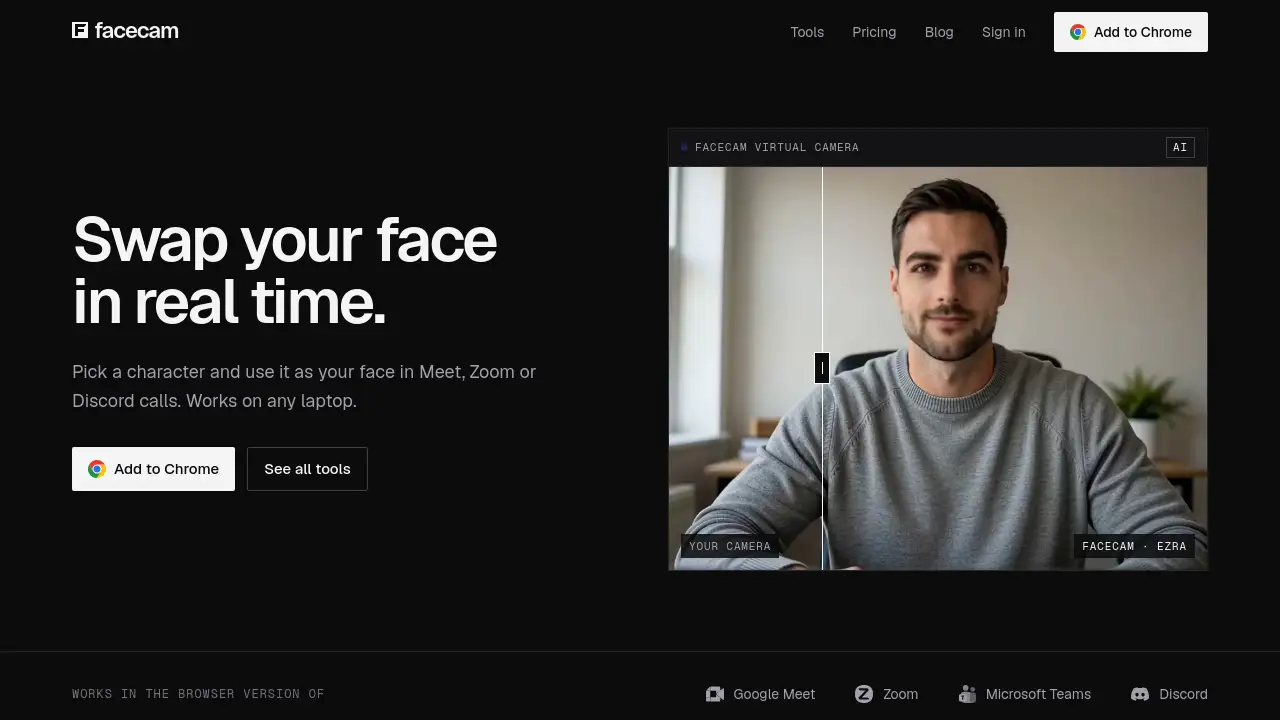
Facecam swaps your face live in Meet, Zoom, and Discord.
What is Facecam?
Facecam is a browser-based AI face swap tool that lets users replace their face in real time during video calls and streams. It also includes a voice changer, PNGTuber maker, AI VTuber creator, and tools for photo, GIF, and video face swap. The main idea is simple: instead of showing a raw webcam feed, users can appear as an AI-generated character or an approved face while talking live. Facecam solves a common problem for people who want privacy, entertainment, or a more polished online presence without buying a gaming PC or learning complex software. It works through a Chrome extension and a Facecam Virtual Camera, so it can be used in browser versions of Google Meet, Zoom, Microsoft Teams, and Discord. Because many tools are free and setup takes about a minute, Facecam is suitable for casual callers, streamers, VTuber fans, and remote workers who want live face swap with minimal friction.
Key Features of Facecam
Live Face Swap in Video Calls
Use live face swap in Google Meet, Zoom, Microsoft Teams, and Discord calls in Chrome. Pick a character and appear as that face in real time through the Facecam Virtual Camera.
Facecam Virtual Camera
Select “Facecam Virtual Camera” as the camera source in a supported browser call. This virtual camera sends the swapped feed without requiring desktop apps or special hardware.
AI-Generated Characters
Choose from ready-made AI characters such as Nova, Atlas, Juno, Kai, Mira, Rook, Sol, and Ezra. Each character is made by AI and is not a real person.
AI Voice Changer and Voice Clone
Change your voice during calls or create a voice clone for a more consistent avatar. These AI voice tools can pair with live face swap for a fuller virtual persona.
PNGTuber and AI VTuber Builder
Build a PNGtuber or AI VTuber for streaming and online hangouts. These tools are useful for creators who want an animated identity without a full 3D rig.
Photo, GIF, and Video Face Swap
Swap faces in photos, GIFs, and videos beyond live calls. This makes Facecam useful for social posts, memes, short videos, and creative experiments.
Free Webcam Effects
Use webcam effects and several other tools for free without an account. The free tier helps new users test the experience before moving to paid credits or a subscription.
Use Cases for Facecam
Remote Meetings and Team Calls
Appear as a chosen character in browser-based Google Meet, Zoom, or Microsoft Teams calls. This can add privacy or fun to regular remote meetings.
Online Gaming and Discord Hangouts
Use live face swap while chatting in Discord in Chrome. Gamers and community members can keep a consistent avatar face during long sessions.
Streaming and Content Creation
Streamers can combine Facecam Virtual Camera, AI voice tools, and an AI VTuber for a more dynamic stream. The tool works on streaming sites like StreamYard when used in Chrome.
Privacy-Focused Video Calls
Hide a real face during calls without turning the camera off. Facecam swaps the video and sends it back, and the company states the video is not saved.
Social Media and Meme Content
Create face swap photos, GIFs, and videos for social platforms. These assets can be made with the same account and tools used for live calls.
How to Use Facecam
- Add the Facecam extension to Chrome and sign in.
- Pick a ready-made AI character, describe a new one, or choose a face you are allowed to use.
- Join a supported call or stream in Chrome, such as Google Meet, Zoom, Microsoft Teams, Discord, or StreamYard.
- Choose “Facecam Virtual Camera” as the camera.
- For OBS, capture the Chrome window instead, because the virtual camera does not appear in desktop apps.
Target Audience for Facecam
- Remote workers who want privacy or fun in video calls
- Streamers and content creators who need live face swap
- VTuber and PNGtuber creators
- Discord and online gaming communities
- Social media users making face swap photos, GIFs, or videos
- People who want AI voice changer or voice clone tools
- Users with standard laptops who do not have a gaming PC
Is Facecam Free?
Facecam is partly free. Many tools, including the voice changer, PNGTuber maker, VTuber maker, and webcam effects, are free with no account. Face swap and AI tools use credits. New accounts get 15 credits to try them, then a Premium or Pro plan is needed.
| Plan | Price | Features |
|---|---|---|
| Free | $0 | Free tools with no account, including voice changer, PNGTuber maker, VTuber maker, and webcam effects; new accounts get 15 credits for face swap and AI tools |
| Premium | $20/month | About 10 hours of live face swap per month; every tool, including live, photo, GIF, and video face swap; AI voices, voice clone, and AI VTuber; works in Meet, Zoom, and Discord in Chrome |
| Pro | $50/month | Everything in Premium; about 25 hours of live face swap per month; 2.5× monthly use; room for long streams and video swaps |
Users can cancel or switch plans at any time. Plans and credits last until the end of the paid month.
Facecam's Pros and Cons
| Aspect | Pros | Cons |
|---|---|---|
| Pricing | Free tools available; Premium at $20/month and Pro at $50/month for heavier use | Face swap and AI tools require credits or a paid plan after the trial |
| Features | Live face swap, AI voice changer, voice clone, PNGTuber, AI VTuber, photo/GIF/video face swap, webcam effects | Some advanced tools depend on subscription limits |
| Compatibility | Works in browser versions of Google Meet, Zoom, Microsoft Teams, Discord, and sites like StreamYard | Does not show up in desktop apps; OBS users must capture the Chrome window |
| Setup | Works on any laptop or desktop with Chrome and a webcam; live in about a minute | Requires the Chrome extension and sign-in for face swap |
| Privacy | Video is swapped and sent back, and not saved according to Facecam | A short log is kept for usage duration and chosen face to enforce rules |
Frequently Asked Questions about Facecam
Do I need a gaming PC to use Facecam?
No. Facecam works on any laptop or desktop with Chrome and a webcam. That makes live face swap and virtual camera features accessible without expensive hardware.
Which apps does Facecam work with?
Facecam works with calls and streams joined in Chrome, including Google Meet, Zoom, Microsoft Teams on the web, Discord in Chrome, and streaming sites like StreamYard. Choose “Facecam Virtual Camera” as the camera. It does not appear in desktop apps.
Is my video recorded by Facecam?
No. Facecam states that the video is swapped and sent straight back, and it is never saved. A short log is kept for how long the tool was used and which face was selected to enforce rules.
Is Facecam free?
Partly. Many tools, such as the voice changer, PNGTuber maker, VTuber maker, and webcam effects, are free with no account. Face swap and AI tools use credits. New accounts get 15 credits, then users need a Premium or Pro plan.
How do I cancel Facecam?
Go to Billing, then Manage billing. Users can cancel at any time, and the plan and credits last to the end of the paid month. If the account was paid on the old Facecam, sign in with the same email to manage or cancel.
Does Facecam work with OBS?
Facecam Virtual Camera does not show up in desktop apps. For OBS, capture the Chrome window instead. This lets users still use live face swap in a stream setup.
Facecam Tags
Facecam, Facecam AI face swap, live face swap, virtual camera, Facecam Virtual Camera, AI voice changer, voice clone, PNGtuber maker, AI VTuber, face swap photos, GIF face swap, video face swap, webcam effects, Chrome extension.