Introduction
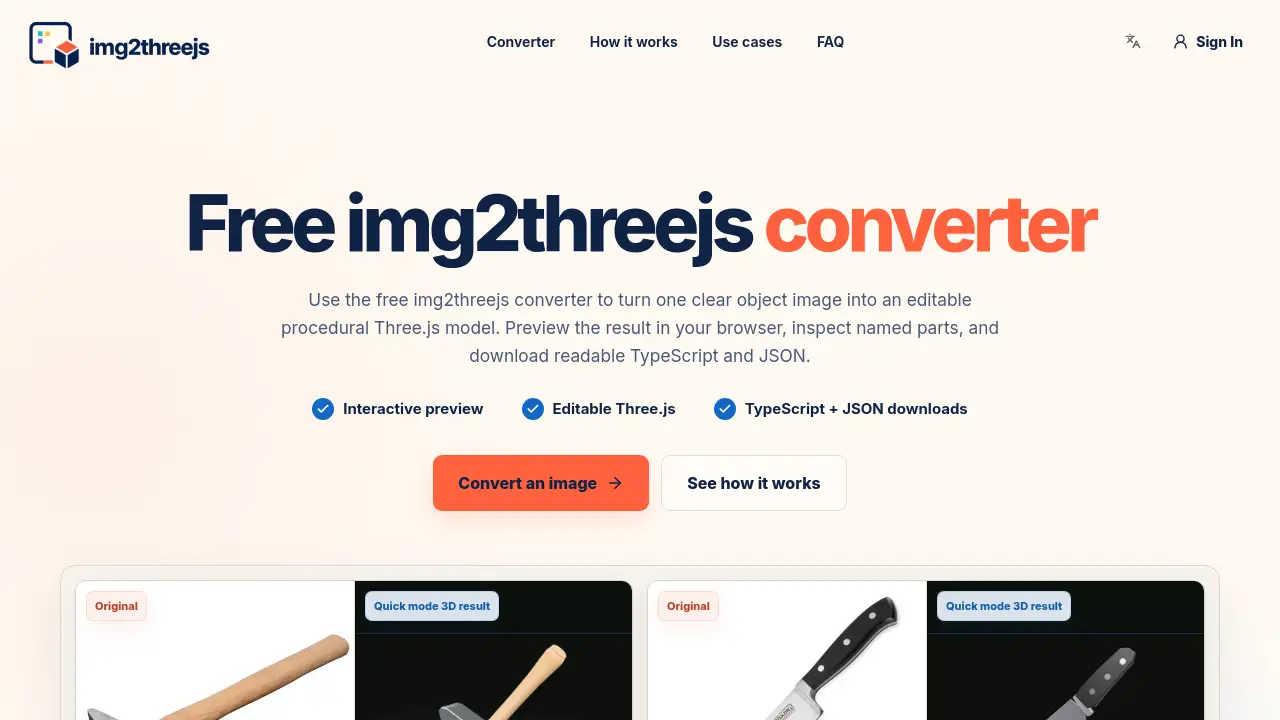
Img2threejs converter online is a free image to Three.js converter that turns one clear object image into an editable Three.js scene. It lets users preview the result in the browser, inspect named parts, and download readable TypeScript and JSON. The main goal is to help developers create web 3D models without painstaking manual modeling.
What is Img2threejs converter online?
Img2threejs converter online is a browser-based tool designed for developers who need an editable Three.js starting point for 3D web projects. Instead of producing one opaque mesh, the Img2threejs converter online builds a procedural Three.js model with named components, materials, transforms, and a JSON build specification. This approach means every visible part remains traceable in code.
The product solves a practical problem: turning a simple product photo into a working Three.js scene is normally slow. The Img2threejs converter online automates the first draft. It analyzes the object silhouette, visible components, material cues, repeated parts, and orientation. Then it creates a validated specification and assembles the result in the browser. Users can orbit the model, inspect the generated structure, and download either TypeScript or JSON.
This tool matters because it keeps the 3D result editable. Developers can rename parts, adjust dimensions, replace materials, attach events, or connect animation to named components. For anyone learning Three.js or building interactive web 3D models, the Img2threejs converter online provides a clean, code-first alternative to proprietary 3D software.
Key Features of Img2threejs converter online
Interactive preview
The built-in preview allows users to orbit the generated model, switch material views, and inspect the JSON specification. The Img2threejs converter online renders the procedural result directly in the browser, so no extra viewer is needed.
Editable Three.js output
The main output is an editable Three.js factory that returns a reusable THREE.Group. This is one of the strongest reasons to use the Img2threejs converter online for web development, because the generated structure remains readable and changeable.
TypeScript and JSON downloads
After generation, users can download readable TypeScript and JSON. The Img2threejs converter online keeps the build specification separate from the code, allowing a developer to review the construction plan and modify it later.
Named parts and hierarchy
The converter creates named parts, materials, transforms, and parent-child relationships. Instead of flattening the object into a single imported asset, the Img2threejs converter online gives each component a name that can be referenced in future code.
Free quick generation
A quick mode is available for free, with one anonymous generation per day. This makes the Img2threejs converter online easy to test before deciding whether to use credits for more advanced agent-based jobs.
Use Cases for Img2threejs converter online
Interactive product previews
The Img2threejs converter online works well for product pages and configurators. A developer can use a clean product photo to create a browser-native draft, then highlight one feature or swap a material on a named component.
Game prop prototypes
Game developers can use the Img2threejs converter online to block out a recognizable prop before investing in high-detail assets. The procedural draft shows how pieces are assembled and which parts might move.
Creative coding and Three.js practice
Creative coders can use the Img2threejs converter online to start from a familiar reference and keep the result as readable TypeScript and editable Three.js. The structured JSON also provides a constrained description that AI coding assistants can edit.
How to Use Img2threejs converter online
Using the Img2threejs converter online is simple.
- Upload a PNG or JPG image with a clearly visible object and a simple background.
- Select Quick Generate in the converter interface.
- Wait for the converter to analyze the image and render a procedural Three.js model in the browser.
- Preview the result using the interactive preview. Switch views and inspect the named parts in the JSON specification.
- Download the TypeScript factory or JSON build specification for your project.
Target Audience for Img2threejs converter online
- Web developers who create interactive 3D web experiences
- Three.js learners who want readable code examples
- Product teams looking for quick, editable Three.js models
- Game developers needing early prop prototypes
- Creative coders who prefer code-first workflows
Is Img2threejs converter online Free?
The Img2threejs converter online offers a free tier. Quick mode includes one free anonymous generation per day. Agent mode is not free because it uses more AI model capacity and cloud compute for multi-step analysis, generation, rendering, and review. Agent jobs are priced in credits based on estimated complexity, and the price is shown before confirmation.
| Plan | Price | Features |
|---|---|---|
| Quick mode | Free | 1 anonymous generation per day, basic image to editable Three.js conversion |
| Agent mode | Credits | Higher complexity, multi-step analysis, extra reference views, review |
Img2threejs converter online's Pros and Cons
| Aspect | Pros | Cons |
|---|---|---|
| Output quality | Editable Three.js and named parts | Approximation, not photo-grade 3D scan |
| Workflow | TypeScript and JSON downloads support code review | No GLB, OBJ, FBX, or STL export |
| Cost | Free quick mode available | Agent mode requires credits |
| Input requirements | Works from a single image | Hidden surfaces are inferred, not measured |
Frequently Asked Questions about Img2threejs converter online
What is Img2threejs converter online?
Img2threejs converter online is a free image to Three.js converter that rebuilds a visible object as an editable Three.js scene. It returns named components, materials, transforms, JSON, and readable TypeScript instead of an opaque mesh.
How does the converter work?
Upload one PNG or JPG with a clearly visible object, then select Quick Generate. The Img2threejs converter online analyzes the reference, validates the proposed geometry, and renders the result in the browser. Users can orbit the model, inspect its structure, and download either TypeScript or JSON.
Which images work best?
Sharp, well-lit images with one complete hard-surface object and a simple background work best. Product photos, tools, small appliances, and isolated props give the Img2threejs converter online clearer evidence than cluttered scenes or transparent materials.
Does it create a real 3D model?
Yes. The output is a real multi-part Three.js scene with procedural geometry. It is an editable Three.js approximation, not a photo-grade scanned mesh, because a single photograph cannot reveal exact scale or hidden surfaces.
Can I edit the generated code?
Yes. The downloaded Three.js factory returns a THREE.Group with named parts. Developers can rename components, change dimensions and materials, attach interactions, and add animation.
What file formats can I export?
The Img2threejs converter online exports editable Three.js TypeScript and a structured JSON build specification. It does not currently export GLB, OBJ, FBX, or STL files.
Img2threejs converter online Tags
Img2threejs converter online, image to Three.js converter, free image to Three.js converter, editable Three.js, procedural Three.js model, TypeScript and JSON, web 3D models, named parts, interactive preview, browser 3D converter, Three.js factory, img2threejs.