Introduction
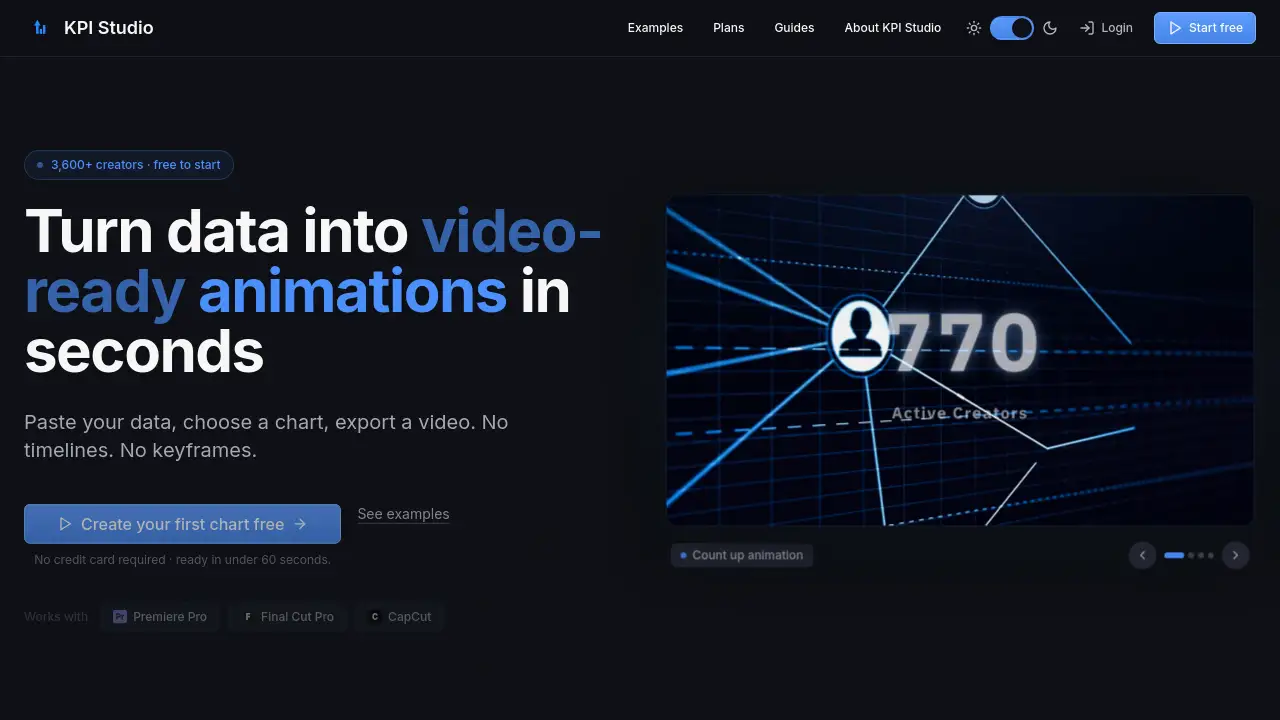
KPI Studio is a fast, simple tool that turns data into animated charts for video editing.
What is KPI Studio?
KPI Studio is a web-based tool designed to create animated charts and data visualizations for video content. It solves a common problem for video editors and content creators: the tedious process of animating key performance indicators (KPIs) and data charts in complex software like Adobe After Effects. This tool is suitable for YouTubers, social media marketers, e-learning creators, and any professional who needs to quickly visualize data in their videos. It matters because it saves significant time, allowing creators to produce professional-looking animated graphics without needing motion design skills, timelines, or keyframes. Animated KPI generation becomes a task that takes under a minute instead of hours.
Key Features of KPI Studio
Fast, No-Keyframe Animation
Users simply paste their data, choose a chart style, and export a fully animated chart without manually setting any animation timelines or keyframes.
Video-Ready Export Formats
The tool exports in multiple formats, including MP4, MOV with alpha channel for transparency, GIF, and PNG, making assets ready to drop directly into Premiere Pro, Final Cut Pro, CapCut, or any other video editor.
Multiple Chart and KPI Types
It supports a variety of animated chart types such as growing bar charts, drawing line charts, count-up numbers, pie charts, odometers, gauges, pictograms, and map animations.
Flexible Aspect Ratios
Creators can export their data animations in common video aspect ratios like 16:9 (widescreen), 9:16 (stories), 1:1 (square), and 4:3 (standard) to fit any platform.
Real-Time Customization and Preview
The platform offers a real-time preview, allowing users to instantly see how their data visualization will look and make quick customizations to colors and styles before exporting.
Use Cases for KPI Studio
Social Media Content Creation
Creators can quickly generate engaging animated KPIs for YouTube videos, Instagram Reels, or TikTok to showcase statistics, growth metrics, or survey results.
Business and Marketing Presentations
Professionals can enhance their PowerPoint or Google Slides presentations with compelling video-ready animations that illustrate revenue trends, market share, or performance benchmarks.
E-Learning and Explainer Videos
Educators and trainers can use animated charts to visualize concepts, historical data, or scientific results, making educational content more dynamic and easier to understand.
Client Reporting and Reviews
Agencies and freelancers can efficiently produce polished data visualization clips for client reports or review videos, saving time compared to manual animation or outsourcing.
How to Use KPI Studio
Using KPI Studio is a straightforward, three-step process designed for speed:
- Paste Your Data: Copy and paste numerical data directly from a spreadsheet or type it into the tool.
- Customize Your Chart: Select from the available animated chart types and customize elements like colors, labels, and aspect ratio with a real-time preview.
- Export for Video: Choose your desired format (e.g., MP4 with transparency) and download the file. The animated KPI is now ready to be imported into your video editing timeline in Premiere Pro, Final Cut Pro, or CapCut.
Target Audience for KPI Studio
- Video Content Creators (YouTubers, TikTokers)
- Social Media Marketers and Managers
- E-Learning Course Developers
- Freelancers and Agencies producing client videos
- Business Professionals creating internal or external presentations
- Anyone who needs to add animated data to video without learning complex animation software
Is KPI Studio Free?
KPI Studio offers a free tier to start, with paid plans for more advanced needs. The pricing is transparent and structured as follows:
| Plan | Price | Key Features |
|---|---|---|
| Free | $0/month | Unlimited PNG exports, 3 free animated exports (MP4/GIF/MOV), all chart types, real-time preview. |
| Creator Pack | $11.99 (one-time) | Everything in Free, plus 10 video exports, no watermark, 1080p export resolution. Credits do not expire. |
| Pro (Most Popular) | $19.99/month | Everything in Free, plus unlimited video exports, no watermark, 4K export resolution, and a 7-day free trial. |
KPI Studio's Pros and Cons
| Aspect | Pros | Cons |
|---|---|---|
| Ease of Use | Extremely simple, three-step process with no learning curve for basic charts. | Customization options are more limited compared to a full design suite like After Effects. |
| Speed & Workflow | Creates video-ready animations in under 60 seconds, dramatically faster than manual methods. | Relies on an internet connection as it is a web-based tool. |
| Cost | Free tier is generous for testing. One-time Creator Pack is great for occasional users. | The Pro subscription might be a recurring cost for very infrequent users. |
| Integration | Exports are perfectly formatted for major video editors like Premiere Pro and Final Cut Pro. | Exported animations are standalone clips; advanced integration or data linking within the editor is not possible. |
Frequently Asked Questions about KPI Studio
What video editing software does KPI Studio work with?
KPI Studio exports standard video files (MP4, MOV) and files with transparency (alpha channel). These are universally compatible and can be imported into any professional or consumer video editor, including Adobe Premiere Pro, Apple Final Cut Pro, CapCut, DaVinci Resolve, and more.
Can I use KPI Studio for free?
Yes, KPI Studio has a free plan that requires no credit card. It allows unlimited PNG exports and provides 3 free animated video exports (MP4, GIF, MOV) so you can fully test the tool on a real project.
What kinds of charts can I animate?
The tool supports numerous animated chart types, including bar charts, line charts, pie charts, count-up numbers, odometers, gauges, pictograms, fill charts, and map animations. Each is designed as a standalone, video-ready animation.
What if my data changes after I create the chart?
This is a key strength of KPI Studio. If your numbers update, you simply return to your project, paste the new data, and re-export. There is no need to redo any animation keyframes or rebuild the chart from scratch.
Does the exported video have a watermark?
Exports from the Free plan include a KPI Studio watermark. All paid plans (Creator Pack and Pro) allow for exports with no watermark, providing a clean, professional asset for your videos.
What are the export resolution options?
The Free and Creator Pack plans allow exports at up to 1080p (Full HD) resolution. The Pro plan unlocks 4K export resolution for the highest quality data visualizations.
KPI Studio Tags
KPI Studio, animated charts, data visualization, video editing, Premiere Pro, Final Cut Pro, CapCut, animated KPIs, create chart animation, video-ready graphics, social media visuals, content creation tool, no keyframe animation, fast chart maker, data to video