Introduction
Lesson Maker Pro is a web-based lesson planning tool for teachers who want to plan their whole teaching week in one place. Lesson Maker Pro combines lesson creation, classroom materials, and ready-to-teach slides in a single workflow. With AI help available on demand, this AI lesson planner helps teachers prepare for classes more efficiently. This review covers Lesson Maker Pro features, use cases, and practical benefits.
What is Lesson Maker Pro?
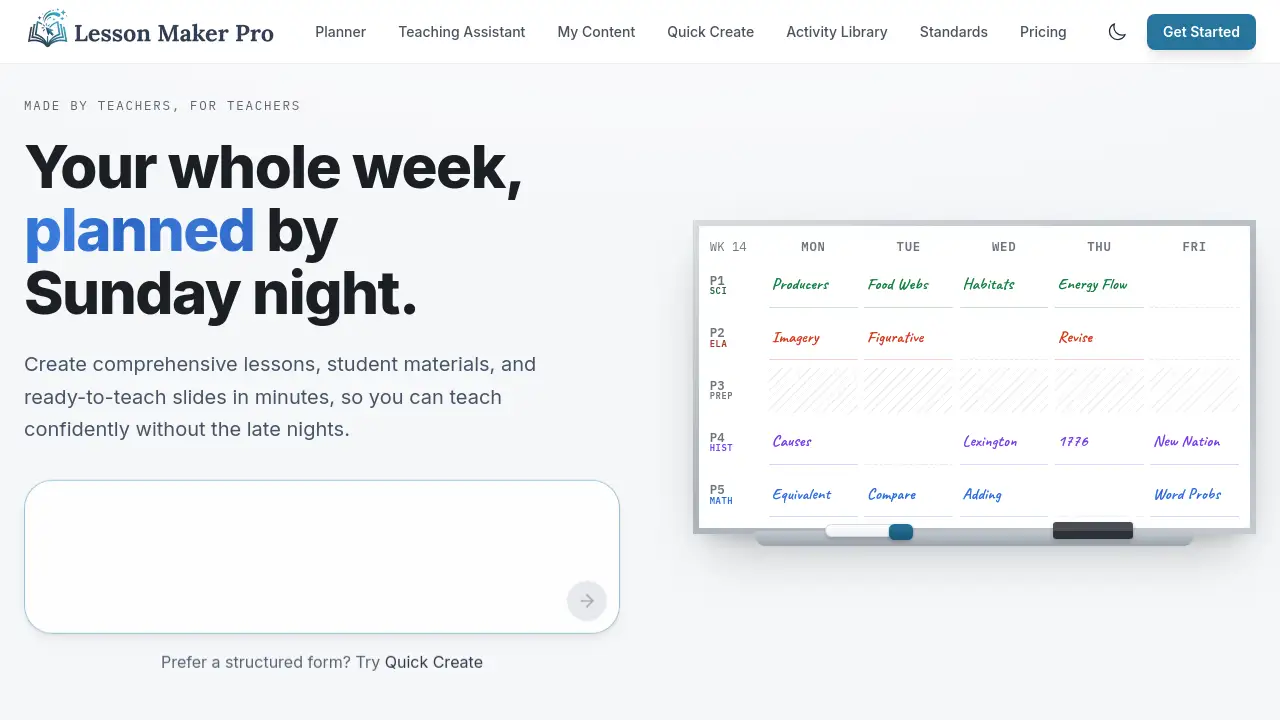
Lesson Maker Pro is an AI lesson planner designed to reduce the chaos of weekly teaching preparation. Instead of storing lesson notes, handouts, and slides in separate files, teachers can build each lesson in Lesson Maker Pro and keep all related resources together. The tool includes a visual schedule, and teachers can drag completed lessons into their real schedule. Lesson Maker Pro is a lesson planning tool for classroom teachers, science teachers, curriculum coordinators, substitute teachers, and educators who want a central workspace. It matters because planning time is limited. When lessons, materials, and ready-to-teach slides are already connected, Lesson Maker Pro can help teachers spend less time on organization and more time helping students. The product appears designed for educators who want both structure and flexibility.
Key Features of Lesson Maker Pro
Plan Your Whole Teaching Week
This lesson planning tool gives teachers a clear view of an entire teaching week in one place. Lesson Maker Pro shows what is ready and what still needs preparation.
Build Lessons in One Place
Teachers can create lesson plans directly in Lesson Maker Pro. This AI lesson planner keeps lesson details organized, including goals, activities, and assessment tasks.
Create Materials and Resources
The lesson planning tool also supports classroom materials. Teachers can add handouts, data sheets, and exit tickets to a lesson so everything is available when needed.
Generate Ready-to-Teach Slides
Lesson Maker Pro helps teachers generate ready-to-teach slides for classroom instruction. This feature keeps the teacher and students focused on the lesson sequence.
Drag Lessons Into Your Real Schedule
After a lesson is built, teachers can drag it into a real schedule in Lesson Maker Pro. The drag-and-drop design makes this AI lesson planner easy to use for weekly planning.
Get AI Help When You Want It
AI help is available on demand inside Lesson Maker Pro. Teachers can use this AI lesson planner to generate ideas, refine instructions, or adjust lesson content when they choose.
Use Cases for Lesson Maker Pro
Weekly Classroom Planning
Teachers can use Lesson Maker Pro to plan an entire teaching week in one place. This lesson planning tool keeps lessons, materials, and ready-to-teach slides together for each day.
Standards-Aligned Lesson Preparation
Lesson Maker Pro works well for building standards-aligned lessons, such as natural selection simulations. Teachers can add hands-on materials, data sheets, and ready-to-teach slides to support science standards.
Sub Plans and Emergency Lessons
A lesson planning tool becomes very useful when a substitute teacher must lead a class. With Lesson Maker Pro, a full lesson can be ready in the schedule, including all materials and ready-to-teach slides.
Reusing and Updating Lessons
Teachers can update an existing lesson and drag it into a new week within Lesson Maker Pro. This lesson planning tool saves time and allows for continuous improvement of ready-to-teach slides and activities.
How to Use Lesson Maker Pro
Using Lesson Maker Pro is straightforward:
- Open Lesson Maker Pro and create a weekly schedule.
- Use this lesson planning tool to build a lesson with objectives, activities, and materials.
- Use the AI lesson planner to generate or refine ready-to-teach slides.
- Drag the completed lesson into the real schedule for the correct time.
- Review the week and make changes when needed.
Target Audience for Lesson Maker Pro
Lesson Maker Pro is designed for:
- Classroom teachers
- Science teachers
- Curriculum coordinators
- Instructional coaches
- Substitute teachers
- Student teachers
- School teams looking for a shared lesson planning tool
- Teachers who want an AI lesson planner for weekly preparation
- Educators who need ready-to-teach slides for daily instruction
Is Lesson Maker Pro Free?
Pricing information for Lesson Maker Pro is not listed in the available product content. The product homepage does not clearly mention a free plan, trial, or subscription fee. Because of this, teachers who want to know whether this lesson planning tool is free should check the official website or contact the product team for current pricing details.
Lesson Maker Pro's Pros and Cons
| Aspect | Pros | Cons |
|---|---|---|
| Pricing | No pricing information available | Transparency is limited |
| Features | Combines lessons, materials, and slides in one place | Full workflow may take time to learn |
| Scheduling | Drag-and-drop schedule is simple and visual | Calendar sync with other school tools is not confirmed |
| AI Help | Optional AI support does not force automation | AI output still needs teacher review |
Frequently Asked Questions about Lesson Maker Pro
Is Lesson Maker Pro useful for science teachers?
Lesson Maker Pro appears useful for science teachers. The sample content includes a natural selection simulation, materials lists, and NGSS standards such as MS-LS4-4 and MS-LS4-6.
Can Lesson Maker Pro generate slides?
Yes, Lesson Maker Pro can help create ready-to-teach slides. This saves time because teachers do not need to prepare a separate slide set after writing the lesson plan.
Is Lesson Maker Pro an AI lesson planner?
Lesson Maker Pro includes AI help that is available when the teacher wants it. Because of this, it works as an AI lesson planner without making automation mandatory.
Does Lesson Maker Pro store materials with each lesson?
The product design suggests yes. Teachers can build lessons and add materials such as data sheets, cards, and exit tickets to the same lesson workspace.
Do teachers have to use AI in Lesson Maker Pro?
No. The product description says AI help is available when you want it. This means the AI lesson planner is optional and can be used only when needed.
Is there a free version of Lesson Maker Pro?
The available reference material does not state if Lesson Maker Pro has a free version. Users should check whether this AI lesson planner has a free plan or trial on the official website.
Lesson Maker Pro Tags
Lesson Maker Pro, lesson planning tool, AI lesson planner, ready-to-teach slides, teaching week planner, create lesson plans, classroom materials, drag-and-drop schedule, teacher productivity, science lesson planning, weekly lesson planner, AI for teachers