Introduction
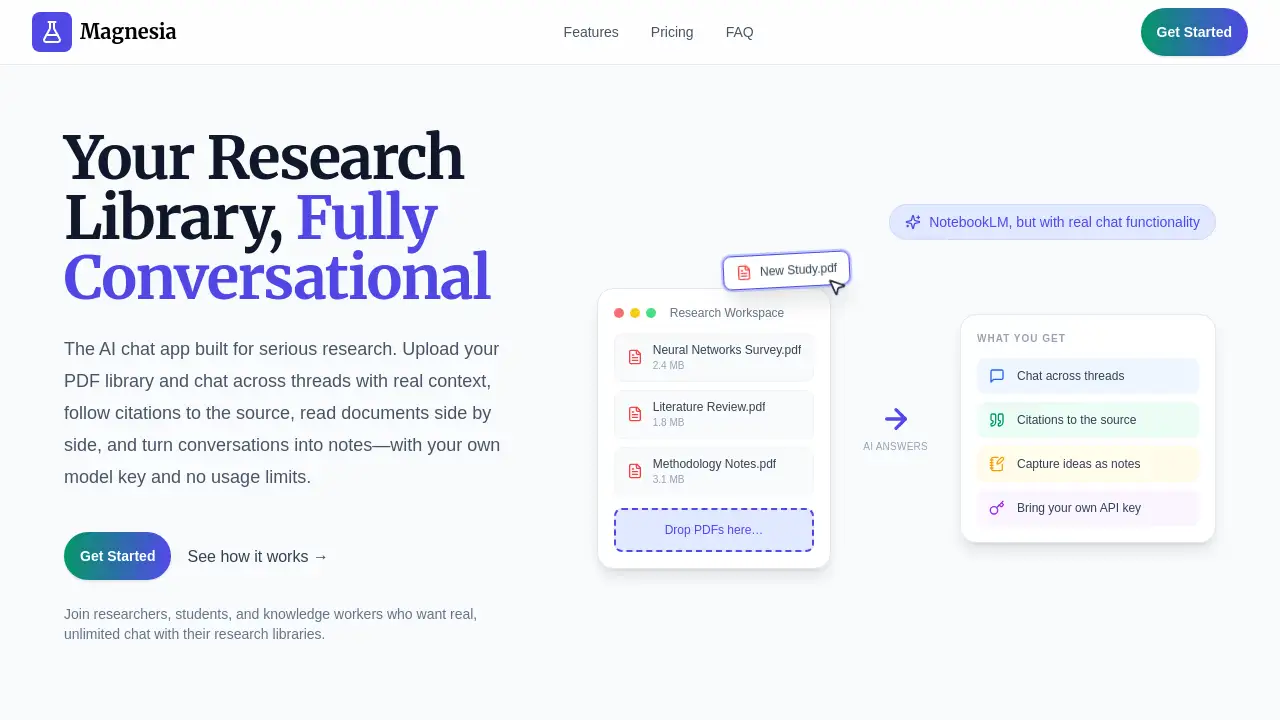
Magnesia is a Conversational Research Library that transforms how researchers interact with their documents. It offers real chat functionality across multiple threads, allowing users to upload PDFs and have continuous conversations with citations. It serves as a solid NotebookLM alternative for serious research work, providing unlimited usage via a one-time purchase.
What is Magnesia - Conversational Research Library?
Magnesia is an AI-powered research workspace built for serious researchers, students, and knowledge workers. It solves the problem of fragmented document analysis by letting you upload your entire PDF library and chat across multiple threads while maintaining full context. Unlike common tools that limit conversations to a single thread or impose usage quotas, Magnesia offers real, multi-threaded conversations with citations that link directly to source documents.
The platform is designed around the research loop: read, ask, capture. You can view source PDFs and parsed text side by side with your chat, follow citations to the exact chunk, and turn thread summaries into formatted notes. By bringing your own API key (BYOK), you avoid per-message limits and only pay for the AI calls you make. This makes Magnesia a reliable alternative to NotebookLM and Claude Projects, especially for those who need unlimited chat across large document collections.
Key Features of Magnesia - Conversational Research Library
True Chat Functionality Across Multiple Threads
Unlike NotebookLM, which restricts you to one thread per notebook, Magnesia lets you maintain continuous, context-aware conversations in separate threads. You can switch between topics without losing progress.
Citations to the Source
Every answer includes clickable citations. Click any citation to see the exact PDF chunk and jump into the document viewer. This ensures your research is traceable and verifiable.
Built-in Document Viewer
Read the source PDF and its parsed text side by side with your chat. No need to switch windows or tabs.
Capture Ideas as Notes
Summarize a thread into a rich Markdown note. The built-in editor supports lists, code blocks, tables, LaTeX, and more. Notes are stored as plain Markdown and can be @mentioned in future chats.
Bring Your Own API Key (BYOK)
Use your own API key from providers like OpenAI, Anthropic, Google, or DeepSeek. Magnesia gives you access to the full OpenRouter model catalog. No usage limits, transparent costs.
Smart Context Control
Choose exactly which documents and notes each chat turn can use. This lets you focus the AI on specific sources without noise.
Model Selection Per Turn
Pick different LLMs for different questions—GPT-4 for complex analysis, Claude for writing, and others for lighter tasks—all within the same thread.
Multimodal Inputs
Attach images (JPEG, PNG, GIF, WebP) via drag-and-drop or paste. Vision-capable models can analyze charts, tables, and formulas directly.
Advanced RAG Pipeline
Hybrid search (vector + keyword) with reranking ensures the most relevant answers rise to the top, even across large document libraries.
Multiple Workspaces
Organize documents by project, course, or topic. Switch contexts seamlessly without mixing up your research.
Use Cases for Magnesia - Conversational Research Library
Literature Review for a Thesis
Upload dozens of research papers. Create separate threads for each theme. Ask questions, follow citations, and capture key findings as notes—all within one workspace.
Exam Preparation
Upload textbooks, lecture notes, and past papers. Use smart context control to limit the AI to specific chapters. Practice questions and get explanations with source citations.
Business Report Analysis
Gather PDF reports from multiple sources. Chat across threads to compare findings, then summarize each thread into a note. The side-by-side viewer makes it easy to verify data.
Collaborative Research Projects
Workspaces let team members share a document library. Each person can work in their own threads while accessing the same sources. Notes can be exported for sharing.
How to Use Magnesia - Conversational Research Library
- Upload your documents. Drag and drop PDFs—multiple files at once. Magnesia processes them in parallel. No file size limits.
- Create a conversation thread. Type your research question into a new thread. The AI will search your library and return an answer with citations.
- Follow citations to the source. Click any citation to jump into the built-in document viewer. See the exact chunk and context.
- Capture insights as notes. When a thread yields important findings, summarize it into a note. Use the Markdown editor to format and organize.
- Switch between workspaces. Use multiple workspaces to keep different projects separate. @mention notes from other threads to cross-reference.
All you need is a Magnesia license and your own API key from a supported provider.
Target Audience for Magnesia - Conversational Research Library
- Researchers and academics working with large PDF libraries
- Graduate students writing theses or dissertations
- Knowledge workers who analyze reports and documents daily
- Writers and journalists researching complex topics
- Professionals preparing for exams or certifications
- Teams collaborating on document-heavy projects
Is Magnesia - Conversational Research Library Free?
Magnesia uses a one-time purchase model. It offers a Lifetime Access plan:
| Plan | Price | Features |
|---|---|---|
| Lifetime Access | $39 (one-time) | BYOK, advanced document understanding, model selection per turn, multiple workspaces, built-in document viewer, note-taking, multimodal inputs, all future updates |
You need to provide your own API key; you only pay the AI provider for actual usage. There is no monthly subscription. A 30-day money-back guarantee is included. Compared to NotebookLM (free but limited) or Claude Pro ($20/month with usage quotas), Magnesia’s one-time $39 cost (plus your API bills) can be more economical for heavy users.
Magnesia - Conversational Research Library's Pros and Cons
| Aspect | Pros | Cons |
|---|---|---|
| Pricing | One-time payment, no subscription | Requires separate API key and associated costs |
| Features | True multi-thread chat, citations to source, unlimited usage | Some advanced settings (RAG parameters) may require initial learning |
| Ease of Use | Intuitive drag-and-drop upload, side-by-side viewer | Setting up API keys may be unfamiliar to non-technical users |
| Customization | Choose any model per turn, full OpenRouter catalog | Not all models may support vision or multimodal inputs |
| Data Control | BYOK ensures data privacy and transparency | Users must manage their own API billing and quotas |
Frequently Asked Questions about Magnesia - Conversational Research Library
How does Magnesia differ from NotebookLM?
NotebookLM offers only a single thread per notebook and lacks real chat continuity. Magnesia supports multiple threads with full context, lets you choose models per turn, and provides unlimited usage via BYOK. Citations are clickable and lead directly to the source PDF chunk.
Can I use my own API key?
Yes. Magnesia is BYOK (Bring Your Own Key). You can use API keys from OpenAI, Anthropic, Google, DeepSeek, and any provider available on OpenRouter. This gives you control over costs and data privacy.
What file types are supported?
Currently, Magnesia supports PDF files upload. You can upload multiple PDFs at once, and there are no file size limits. The platform also accepts images (JPEG, PNG, GIF, WebP) for vision-capable models.
Is there a free trial?
Magnesia does not mention a free trial. However, it offers a 30-day money-back guarantee on the one-time purchase, allowing you to test the product risk-free.
How do citations work?
Every answer generated by the AI includes numbered citations. Clicking a citation opens the built-in document viewer at the exact chunk where the information was found. This ensures you can verify and trace every piece of research.
Can I organize my documents into different projects?
Yes. Magnesia supports multiple workspaces. You can create separate workspaces for different courses, projects, or topics. Each workspace has its own document library, thread history, and notes.
Magnesia - Conversational Research Library Tags
Conversational Research Library, NotebookLM alternative, AI research chat, chat with PDFs, research workspace, unlimited chat, BYOK, document analysis, multi-threaded conversations, AI research assistant, PDF chat tool, study assistant