Introduction
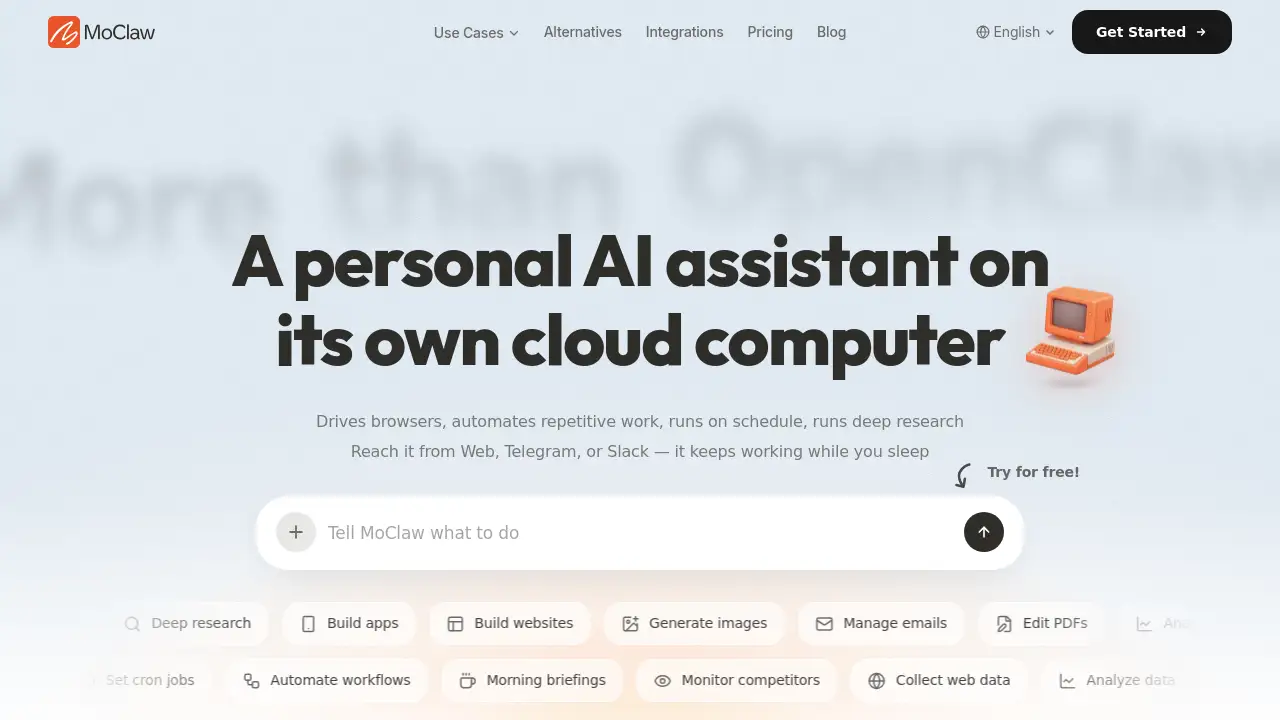
MoClaw is a cloud AI computer for autonomous AI agents. It drives browsers, automates repetitive work, runs on schedule, and performs deep research. Designed for people who want an always-on AI assistant but do not want to manage open-source setups, MoClaw delivers a hosted AI computer that can be reached from Web, Telegram, or Slack. Users can watch the AI agent work in real time while it completes tasks across apps and websites. This article reviews MoClaw’s features and practical use cases.
What is MoClaw | Cloud AI Computer for Autonomous AI Agents?
MoClaw is a managed cloud AI computer for autonomous AI agents. It gives each account access to a dedicated environment with storage, tools, browser control, and an AI model. Instead of running an open-source agent framework on a local machine, users get a ready-to-go cloud computer that is already connected to common productivity workflows.
The product is built around tasks and tools, not simple chat replies. It can control browsers, edit documents, process PDFs, analyze data, generate images, monitor competitors, and run scheduled workflows. It also keeps working in the cloud, so tasks continue even when a device sleeps or closes.
This approach matters because many autonomous AI agent tools are difficult to install and maintain. MoClaw removes that complexity and focuses on practical outcomes: browser automation, scheduled research, and routine work that would otherwise require manual effort.
Key Features of MoClaw | Cloud AI Computer for Autonomous AI Agents
Chat From Web, Telegram, and Slack
MoClaw can be accessed through a web app, Telegram, or Slack. This makes it easy to send a task from any workspace and receive results where users are already active.
Manage an Always-On Cloud Computer
Each user or team gets an AI computer hosted in the cloud. It stays available 24/7, supports persistent storage, and provides a visual desktop so users can see what the AI agent is doing in real time.
Control a Browser From Natural Language
The built-in browser control lets autonomous AI agents navigate websites, read pages, submit forms, and collect web data. This is useful for sites that do not offer an official API.
Schedule Repetitive Work With Cron
Users can create cron jobs and scheduled tasks. For example, MoClaw can scan competitor pricing pages every morning and send a summary through Telegram or Slack.
Run Deep Research Tasks
MoClaw can combine multiple sources into a clear brief. It supports long-running research tasks such as exploring market trends, reading documentation, and delivering a structured report.
Use OpenClaw-Compatible Skills
MoClaw supports custom skills that are compatible with OpenClaw-style workflows. Users can ask MoClaw to build a new skill or connect a custom script or CLI for a specific need.
Connect to Existing SaaS Tools
The platform includes connectors for popular services such as Google Workspace, GitHub, Linear, Slack, and similar tools. This helps users bring automation into their current software stack.
Keep Files and Memory in One Place
Files, tools, and preferences stay in a persistent workspace. MoClaw can use stored files and past context to make future work faster and more accurate.
Use Cases for MoClaw | Cloud AI Computer for Autonomous AI Agents
Competitor Monitoring
MoClaw can watch competitor websites, pricing pages, release notes, and blogs. It then sends a simple summary when something changes, which helps teams track market movements without manual checking.
Morning Briefings and Scheduled Reports
Users can set up a daily briefing that scans selected sources at a specific time. The result is delivered directly to Telegram, Slack, or the web app.
Marketing and Content Research
Marketers can use MoClaw to collect web data, analyze customer language, prepare content briefs, and compare product information across multiple websites.
Document and Spreadsheet Automation
MoClaw can manage emails, edit PDFs, analyze data, prepare slides, and organize files. These tasks are helpful for operators, consultants, and managers who handle documents daily.
Sales and Lead-Mining Workflows
Sales teams can ask MoClaw to gather prospect information, enrich lead data, and prepare follow-up summaries. This reduces repetitive research and keeps deal data in one place.
Light Development Tasks
Developers and builders can use MoClaw to generate small code snippets, build simple apps or websites, and automate API testing. It is not meant to replace a full development environment, but it can handle common agent-building tasks.
How to Use MoClaw | Cloud AI Computer for Autonomous AI Agents
- Go to the MoClaw website and create an account.
- Choose how to connect: web browser, Telegram, or Slack.
- Describe the task in natural language. For example, “Scan these competitor pages and summarize pricing changes.”
- Let MoClaw select the needed tools, browser actions, files, and skills.
- Review the output, or ask MoClaw to run the same task on a schedule.
The setup process is simple because MoClaw does not require any local installation.
Target Audience for MoClaw | Cloud AI Computer for Autonomous AI Agents
- Solo founders and bootstrappers
- SaaS, Shopify, and Etsy operators
- Managers, recruiters, and consultants
- College and graduate students
- Marketing and content teams
- Sales teams and account executives
- Developers and AI agent builders
- Professionals who want a personal AI assistant
Is MoClaw | Cloud AI Computer for Autonomous AI Agents Free?
MoClaw is free to get started. Premium features are available when the user needs more capacity or workflow tools. The published plan starts at $20 per month.
| Plan | Price | Features |
|---|---|---|
| Free | $0 | Basic access to get started |
| Pro | $20/month | Dedicated cloud computer, 50+ skills, browser control, persistent storage, scheduled tasks, visual desktop, and 1,000 monthly credits |
Users who need more usage can add credits or bring their own API key for supported AI models.
MoClaw | Cloud AI Computer for Autonomous AI Agents's Pros and Cons
| Aspect | Pros | Cons |
|---|---|---|
| Setup | No local installation, fast onboarding, cloud-hosted | Less control than self-hosted open-source tools |
| Pricing | Predictable monthly price, free tier available | Heavy usage may require extra credits |
| Automation | Always-on scheduling and real-time execution | Complex workflows may still need clear instructions |
| Connectivity | Works from Web, Telegram, and Slack | Connectors may not cover every app a team uses |
Frequently Asked Questions about MoClaw | Cloud AI Computer for Autonomous AI Agents
Is MoClaw the same as OpenClaw?
MoClaw is a managed cloud alternative to OpenClaw-style agent tools. It keeps a similar idea, but removes the need to set up and run the software on a personal computer.
Does MoClaw require coding skills?
No. Users can describe tasks in natural language. For advanced users, MoClaw supports custom skills and OpenClaw-compatible scripts, but coding is not required for basic use.
Can MoClaw schedule tasks to run automatically?
Yes. MoClaw supports scheduled tasks and cron jobs. Users can set recurring commands and receive updates at specific times through Telegram, Slack, or the web interface.
What kind of tasks can MoClaw handle?
MoClaw can perform browser research, web data collection, document editing, PDF processing, image generation, competitor monitoring, email management, and many other repetitive tasks.
Is data safe on MoClaw?
According to the product page, each MoClaw environment is dedicated and private. User data is not shared or mixed with other users.
How is MoClaw different from a normal chatbot?
A normal chatbot gives replies. MoClaw is built around tasks, tools, and automation. It can use a browser, run scheduled workflows, manage files, and continue working in the cloud until the task is complete.
MoClaw | Cloud AI Computer for Autonomous AI Agents Tags
MoClaw, Cloud AI Computer, Autonomous AI Agents, AI assistant, OpenClaw alternative, browser automation, scheduled AI tasks, deep research assistant, cloud automation, Telegram AI, Slack AI assistant, AI workflow automation