Introduction
A Monocards review should help you decide whether a Mac app can remove the design burden from sharing updates. Monocards is a native Mac app for turning metrics, releases, code, and screenshots into sharp, on-brand visuals. Users can start from purpose-built card types instead of a blank canvas. The app renders every design locally, so files never need to leave the Mac. This Monocards review looks at the core features, workflows, target audience, pricing, and limitations. The goal is to give a practical Monocards review for builders who want consistent images without doing design work.
What is Monocards?
Monocards is a local visual designer for people who share their own work. It solves a common problem: shipping a project still requires release notes, charts, screenshots, metrics, and milestone posts. Most teams do not want to open a heavy design tool every time they share a number. The Monocards app provides ready-made card types, so a user can type a few lines and get a polished graphic.
This matters because consistency makes content recognizable. Once a template is saved, the same colors, fonts, and layout appear across many card formats. Monocards is not a generic image generator. It is a focused Mac app for turning small updates into brand-aligned visuals.
Key Features of Monocards
Start With 18 Purpose-Built Card Types
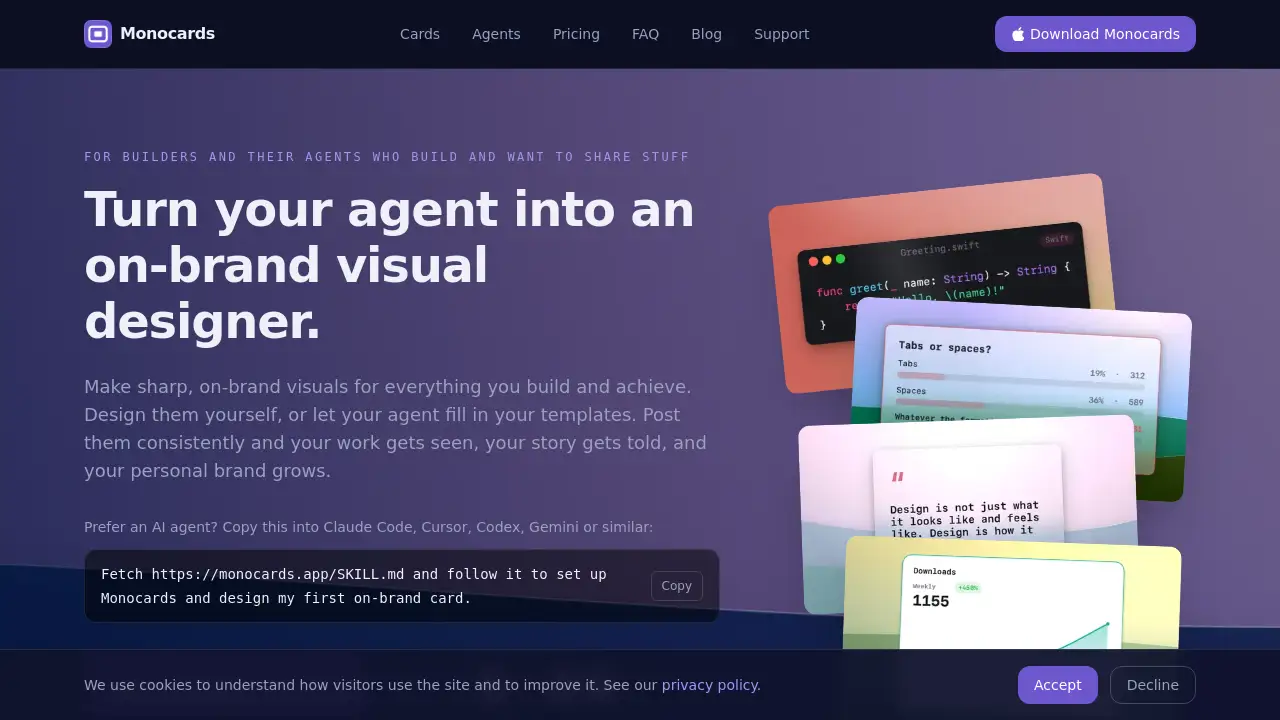
The first thing users meet inside Monocards is a library of 18 card types. These card types cover device frames, bar and line charts, code images, release notes, quotes, comparisons, pricing plans, progress bars, checklists, calendars, countdowns, tier lists, 2x2 grids, bingo boards, polls, name badges, funnels, timelines, stat cards, and gradient backdrops. Each type expects specific content, so the design work is already done before a user types a word.
Use One Brand Template Across Every Card
Monocards allows users to lock in brand assets once. After styling a card with the right colors, fonts, and logo, save that design as a template. Every other card type can then use the same template, making charts, screenshots, and release notes look like they belong together. This is the core of on-brand templates: content changes, but the visual identity stays the same.
Render Locally on the Mac Without an AI Image Model
Monocards does not generate images with AI. Instead, the app draws every card through local rendering on the user’s Mac. There is no image model, no API key, no cloud upload, and no token cost. That means Monocards can keep working offline, and sensitive data like unreleased metrics or product screenshots never leaves the machine.
Let an Agent Fill In Your Templates Through Local MCP
A local MCP server is built into Monocards. Developers can connect Claude Desktop, Claude Code, Cursor, Codex, Gemini, or similar tools and ask for an on-brand card in natural language. The agent supplies the content, while the Monocards template controls the final look. This avoids the common problem of agent-made images that do not match a personal brand.
Export Cards for Any Social Platform
Users of the Monocards Mac app can export PNG, JPEG, vector PDF, MP4, and GIF files. They can choose one image or produce all common social sizes at once, then drag the card straight into a post. This makes the app useful for X, LinkedIn, newsletters, and changelog pages.
Keep Data Private With No Account and No Cloud
Monocards does not ask for an account or signup. Templates, screenshots, and rendered cards stay in the local Mac environment. For teams that handle private signup numbers or pre-release product information, this local-first approach is a big advantage over web-based design tools.
Use Cases for Monocards
Share Product Launches and Build in Public Updates
Solo makers use Monocards to turn a launch into a visual update. A developer can frame a screenshot, show a signup chart, post a progress bar, or share a countdown to launch day. The cards bring attention to milestones and keep a personal brand visible.
Explain Weekly Metrics and Monthly Reports
Monocards is useful when numbers need to be understood at a glance. A founder can chart weekly signups, a data analyst can import CSV data, and an operations lead can publish a status list. Because the template stays the same, each report looks familiar and polished.
Publish Release Notes and Code Highlights
With Monocards, engineers can read the commits since a version and make a release-notes card without opening a design tool. Code-to-image support adds syntax highlighting, and a device frame makes app screenshots look sharper.
Build Marketing Graphics and Social Media Content
Social media managers use Monocards to make testimonial cards, comparison tables, pricing layouts, and platform mockups. The ready-made card types remove repetitive design work, so one update can be turned into many posts quickly.
Let AI Agents Help With Visuals
Monocards can be paired with coding agents for fast output. A common request is: make a launch checklist, chart this CSV, turn this update into an X post mockup, or prepare a countdown for tomorrow’s post. The local MCP server makes this possible without sending content to an online image service.
How to Use Monocards
Using Monocards is straightforward. A typical workflow has four parts:
- Download the Monocards Mac app from the official website and install it on a device running macOS 15 or later.
- Pick a card type, such as a chart, checklist, screenshot frame, release note, or testimonial.
- Add content and select a saved template. If no template exists, style one card and save it as the brand layout.
- Export a PNG, JPEG, or PDF, or drag the finished graphic into a post.
For AI agents, Monocards offers a shortcut: copy the command on the homepage into Claude Code, Cursor, Codex, Gemini, or another tool. The agent fetches the SKILL.md file and follows it to configure the local MCP server. From there, Monocards can generate cards based on user instructions without leaving the terminal.
Target Audience for Monocards
- Indie hackers and solo developers who document daily progress
- Product teams that publish release notes and feature announcements
- Technical founders who build in public and want consistent brand visuals
- Developer relations and community professionals who post product updates regularly
- Analysts who turn internal metrics into clear charts and status reports
- Anyone who uses coding agents and wants them to create on-brand cards
Is Monocards Free?
No, Monocards is not free. It uses a one-time pricing model instead of a subscription.
| Plan | Price | Features |
|---|---|---|
| One-time license | Shown at official checkout | All 18 card types, reusable templates, local MCP server, PNG/JPEG/PDF/MP4/GIF export, one year of updates, 14-day money-back guarantee |
The official page says each purchase unlocks the whole app. Users do not need an account, and the app works offline. A discounted update extension may be optional after the first year, but the purchased version continues to work. Since Monocards requires a license to run, there is no separate free tier or free trial.
Monocards’s Pros and Cons
| Aspect | Pros | Cons |
|---|---|---|
| Pricing | One-time purchase; no subscription | No free trial before paying |
| Platform | Native Mac app; works offline | Requires macOS 15 or newer; no Windows or web version |
| Design flow | Purpose-built cards and templates speed up posting | Less suitable for freeform design compared to Canva or Figma |
| Agent integration | Local MCP; no API key or token cost | Setup may feel technical for non-developers |
| Privacy | No cloud, no account, on-device rendering | No cloud sync or remote collaboration |
Frequently Asked Questions about Monocards
Does Monocards use AI to generate card visuals?
No. Monocards draws every card locally from a template. Fonts, colors, and layout remain fixed. An AI agent only fills in the content through the local MCP server, and no image model, API key, or token cost is involved.
Is Monocards available for Windows or as a web app?
No. Monocards is a Mac app that requires macOS 15 or later. The official page says it is built for Apple Silicon, so the software relies on a local install rather than a browser.
Can I use my own colors, fonts, and logo?
Yes. Style a card with your colors and fonts, then save that look as a template. All future cards and agent-generated cards use that saved template, which keeps the visual identity consistent.
What output formats does Monocards support?
Monocards exports PNG, JPEG, PDF, MP4, and GIF files. Users can choose one image size or produce every common social size at once.
Does Monocards need an account or cloud service?
No. There is no signup, no account, and no cloud in between. Drafts, templates, and screenshots render on the Mac and never upload to a server.
Is there a free trial?
No. A license key is required to run the app. Customers can rely on the 14-day money-back guarantee to test Monocards in their own workflow.
Monocards Tags
Monocards, Monocards review, Mac app for cards, on-brand templates, social media card maker, build in public tool, MCP local server, release note cards, data visualization Mac app, one-time purchase Mac app, visual designer for agents, AI agent card generator