Introduction
AI-powered Sora 2 Prompt Generator for professional video creation.
What is Sora 2 Prompt Generator?
The Sora 2 Prompt Generator is a specialized AI tool designed to create professional video prompts optimized for use with Sora 2, OpenAI's advanced video generation model. This tool addresses a common challenge for video creators: crafting detailed, effective prompts that translate creative ideas into high-quality AI-generated videos. By understanding user concepts and refining them with cinematic techniques, the Sora 2 Prompt Generator acts as a creative co-pilot. It is particularly suitable for content creators, marketers, and filmmakers who want to streamline their workflow and enhance the output quality of their Sora 2 video creation projects. Its ability to bridge the gap between a simple idea and a technically sound prompt makes it a valuable asset in the AI video generation toolkit.
Key Features of Sora 2 Prompt Generator
Multiple AI Models
Users can select from different AI models, including GPT-4o Mini for speed, GPT-5 Mini for enhanced creativity, and Gemini 2.5 Flash, which excels at understanding context and reference images for prompt generation.
Reference Images
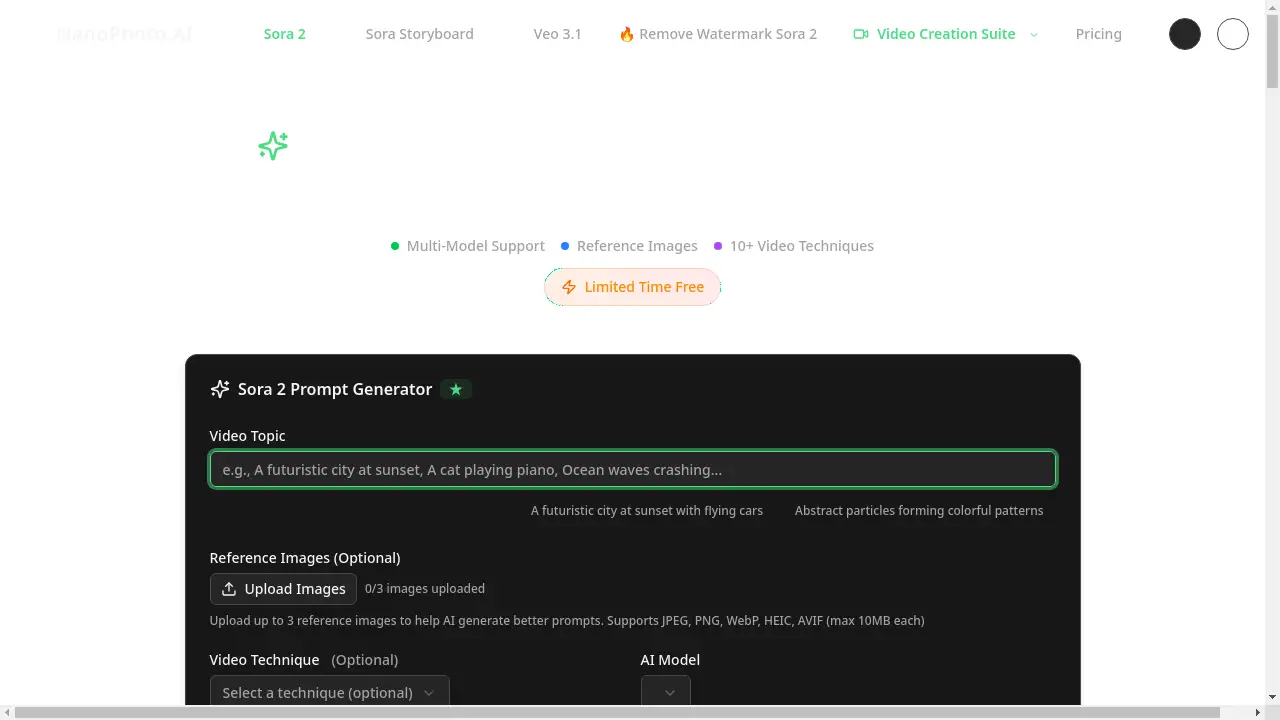
The tool allows the upload of up to three reference images, enabling the AI to generate more accurate and visually aligned video prompts for Sora 2 video creation.
Video Techniques
It incorporates over ten professional video techniques, such as montage, long take, and time-lapse, guiding the AI to produce prompts with specific cinematic styles.
Real-time Streaming
Users can watch as the AI generates their video prompts in real-time, providing the opportunity to stop and edit the output at any point during the process.
Customizable Video Duration
Creators can specify the desired length of their video in seconds, helping the AI tailor the prompt's complexity and scene structure accordingly.
Use Cases for Sora 2 Prompt Generator
Content Creation
Content creators can quickly generate a stream of video ideas and refine their concepts to consistently produce engaging content for their audience.
Marketing Campaigns
Marketers can create compelling ad video scripts and promotional content designed to boost viewer engagement and conversion rates.
Film Pre-production
Filmmakers and video artists can explore creative possibilities and refine shot concepts before moving into full-scale production.
Social Media Videos
Ideal for generating prompts for short-form video content on platforms like TikTok, Instagram Reels, and YouTube Shorts.
How to Use Sora 2 Prompt Generator
Using the Sora 2 Prompt Generator involves a simple four-step process to transform an idea into a professional video prompt.
- Describe Your Idea: Enter the main theme or concept for your video in the provided text box, with a limit of 500 characters.
- Add References (Optional): To enhance accuracy, you can upload up to three reference images and select a video technique and duration.
- Choose AI Model: Select the most suitable AI model from the available options based on your need for speed, creativity, or image understanding.
- Generate & Use: Click the generate button to watch the AI create your prompt in real-time. The final prompt can be edited, copied, and then used directly in Sora 2.
Target Audience for Sora 2 Prompt Generator
- Content Creators (YouTubers, social media influencers)
- Digital Marketers and Advertising Professionals
- Independent Filmmakers and Video Artists
- Hobbyists exploring AI video generation
Is Sora 2 Prompt Generator Free?
The Sora 2 Prompt Generator is currently available for free for a limited time. During this period, users can access the tool's core features—including multiple AI models, reference image upload, and video techniques—without any credit cost. Simply logging in is sufficient to start generating professional video prompts. This offers an excellent, risk-free opportunity to evaluate the tool's capabilities for Sora 2 video creation.
Frequently Asked Questions about Sora 2 Prompt Generator
Which AI model should I choose for prompt generation?
GPT-4o Mini is recommended for fast iterations and brainstorming. GPT-5 Mini provides more creative and detailed results, while Gemini 2.5 Flash is the best choice when using reference images due to its superior contextual understanding.
Can I upload my own images as references?
Yes, you can upload up to three reference images to help the AI generate more accurate prompts. Supported file formats include JPEG, PNG, WebP, HEIC, and AVIF, with a maximum file size of 10MB each.
What are video techniques and why are they important?
Video techniques are professional cinematography methods like montage, long take, and time-lapse. Selecting a technique guides the AI to structure the prompt with a specific stylistic approach, resulting in more tailored outputs for Sora 2.
Can I edit the prompts after they are generated?
Absolutely. The generated video prompts are fully editable, allowing you to make any final adjustments or refinements before copying and using them in your Sora 2 video creation workflow.
Is there a free plan available?
Yes, for a limited time, the Sora 2 Prompt Generator is completely free to use. No credits are required; users just need to log in to start generating prompts.
How do I use the generated prompt with Sora 2?
Once you are satisfied with the generated prompt, you can simply copy the text and paste it directly into the Sora 2 video generator interface to create your video.
Sora 2 Prompt Generator Tags
Sora 2 Prompt Generator, AI video prompt, Sora 2 video creation, video prompt generator, AI video generator, prompt creation, reference images, video techniques, AI models, GPT-4o Mini, GPT-5 Mini, Gemini 2.5 Flash, cinematic prompts