Introduction
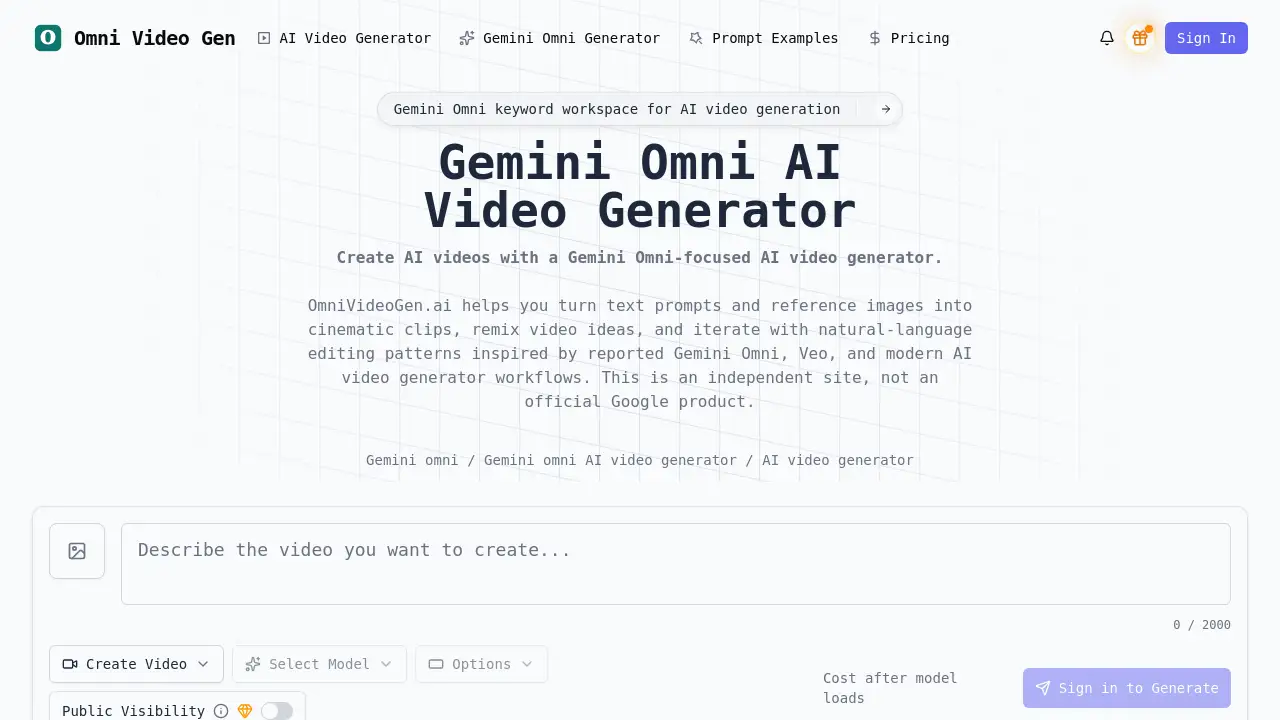
Omni Video Gen is an independent AI video generator workspace designed for creating videos from text, images, and through remixing.
What is Omni Video Gen?
Omni Video Gen is an online platform that provides an AI video generator workspace inspired by reported workflows of Gemini Omni. It allows users to create video content from a simple text description, animate a still image, or remix an existing visual concept into a new clip. The product positions itself as a practical, independent tool for creators seeking a Gemini Omni-style creative flow without requiring direct access to Google's official tools. It solves the problem of needing complex video editing software or production skills to generate short, stylized video clips. This makes it suitable for content creators, marketers, educators, and artists who want to quickly prototype or produce video content for social media, product demos, educational materials, or creative projects.
Key Features of Omni Video Gen
Text-to-Video Generation
This core feature enables users to turn written prompts into AI-generated videos, allowing for the creation of scenes from scratch by describing subjects, camera motion, and style.
Image-to-Video Animation
Users can upload a reference image, which the AI video generator then animates into a short video clip, bringing portraits, landscapes, and product shots to life with motion.
Video Remix Workflow
Inspired by reported Gemini Omni directions, this feature allows for reimagining existing visual ideas with new styles, lighting, or creative treatments directly from a prompt.
Chat-Based Editing
The platform facilitates editing through natural language instructions, enabling users to refine video concepts without needing to navigate complex manual editing timelines.
AI Video Templates
A library of reusable prompt structures helps users start faster for common use cases like social media clips, product demos, or cinematic scenes.
Omni-Modal Creation
The workspace supports working across text, image, and video concepts in one integrated flow, catering to a multi-modal approach to AI video generation.
Use Cases for Omni Video Gen
Social Media Content Creation
Creators can draft short, engaging vertical clips for platforms like Instagram Reels or TikTok ads using the AI video generator's prompt-based workflow.
Product Demonstration Videos
Marketers can turn product features and benefits into polished, concept-driven videos suitable for launches or website explainers.
Anime-Style Video Production
Artists and animators can explore creating stylized characters and serene, motion-filled scenery in an anime aesthetic.
Cinematic Scene Prototyping
Filmmakers and storytellers can build dramatic scenes with specific camera movements, lighting, and atmospheric details for pre-visualization.
Educational Explainer Clips
Educators can prototype visual metaphors, lesson intros, or complex concept explanations from simple text descriptions.
Creative Experimentation
Hobbyists and digital artists can test prompts, visual styles, and the limits of AI video generation for personal projects.
How to Use Omni Video Gen
Using Omni Video Gen involves a straightforward four-step process focused on the Gemini Omni AI video generator workflow.
- Choose a Creation Mode: Start by selecting whether you want to create a video from text (text-to-video), animate an image (image-to-video), or remix an existing idea.
- Configure Video Settings: Adjust basic parameters like the video's aspect ratio and set its visibility to public or private, using the default AI model provided.
- Craft Your Prompt: Write a detailed description of your desired video. For best results, include the subject, the type of motion, camera movement, visual style, lighting, and overall mood.
- Generate and Iterate: Review the AI-generated video clip. You can then copy the prompt for regeneration, refine your instructions, or start a new remix to perfect the output.
Target Audience for Omni Video Gen
- Social media content creators and influencers
- Digital marketers and advertising professionals
- Educators and instructional designers
- Independent filmmakers and video artists
- Product managers and startup founders
- Hobbyists interested in AI and digital creativity
Is Omni Video Gen Free?
The reference information indicates a "Public Visibility" plan that includes "150 Credits," but specific pricing details for other tiers are not provided on the homepage. Users should visit the official Omni Video Gen website at https://omnivideogen.ai to check the latest pricing, subscription plans, and credit packages for accurate and up-to-date information.
Omni Video Gen's Pros and Cons
| Aspect | Pros | Cons |
|---|---|---|
| Workflow | Streamlined, prompt-based interface inspired by modern AI tools like Gemini Omni. | May lack the advanced manual control of professional desktop editing software. |
| Accessibility | Lowers the barrier to video creation, requiring no prior editing expertise. | Output quality and consistency are dependent on the user's ability to write effective prompts. |
| Use Cases | Excellent for rapid prototyping, social content, and creative experimentation. | May not be suitable for producing long-form, narrative-driven video projects. |
| Independence | Operates as an independent platform, offering a specific creative workflow. | Not an official Google or Gemini product, which may affect feature parity with official tools. |
Frequently Asked Questions about Omni Video Gen
What is an AI video generator?
An AI video generator is a tool that uses artificial intelligence to create video clips from user inputs like text prompts or images. Omni Video Gen is one such platform that specializes in this technology.
Do I need video editing experience to use Omni Video Gen?
No, you do not need prior video editing experience. The platform is designed around natural language prompts and simple settings, making the Gemini Omni AI video generator workflow accessible to beginners.
Can I use Omni Video Gen for commercial projects?
Users should review the platform's Terms of Service for specific licensing details regarding commercial use of generated videos. It is advisable to check the official website for the latest policy information.
How does the image-to-video feature work?
You upload a still image as a reference. Then, you describe the desired motion, expression, or camera movement in a prompt. The AI video generator will then animate the image based on your instructions.
What is meant by "video remix" in Omni Video Gen?
The video remix feature allows you to take an existing visual concept or generated clip and rework it with a new creative direction, such as changing the style, lighting, or scene, using a new text prompt.
Is Omni Video Gen affiliated with Google or Gemini?
No. Omni Video Gen is an independent platform that provides a workspace for Gemini Omni-style video creation workflows. It is not an official Google, Gemini, or DeepMind product.
Omni Video Gen Tags
AI video generator, Gemini Omni, text to video, image to video, video remix, create AI videos online, AI video creation, video from text, animate image, social media video maker, product demo video, cinematic AI, chat-based video editing, AI video templates, omni-modal AI