Introduction
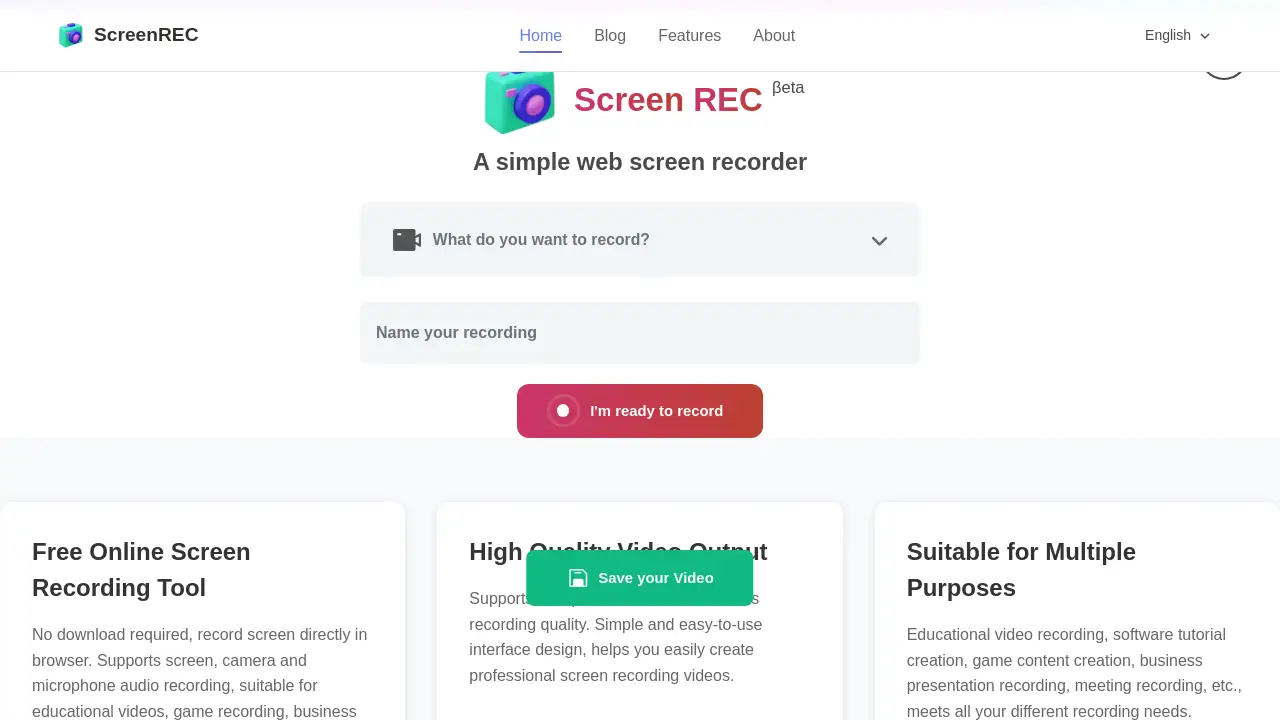
online-record-vedio.xyz is a free online screen recording tool that requires no software download.
What is online-record-vedio.xyz?
online-record-vedio.xyz is a web-based screen recorder that operates directly within a browser. This tool solves the common problem of needing to quickly capture screen activity without the hassle of installing complex software. It is designed for a wide range of users, from educators and students to professionals and content creators, who need to record their screen for various purposes. The ability to record screen content along with audio from a microphone or system makes it a versatile solution for creating clear and informative videos. Its importance lies in its accessibility and simplicity, removing technical barriers for anyone who needs to create a video tutorial, presentation, or demonstration.
Key Features of online-record-vedio.xyz
Screen Recording
This feature allows users to record their entire screen or select specific application windows, providing flexibility for different recording needs.
Audio Recording
Users can capture sound from their computer's system audio and their microphone simultaneously, ensuring clear narration and in-app sounds.
Camera Recording
The tool can record camera footage alongside the screen content, enabling users to add a personal video overlay to their recordings.
High Quality Output
It supports multiple video formats to ensure the best possible recording quality for the final output file.
Free to Use
The service is completely free and does not require any registration, allowing users to start recording immediately.
Online Editing
After recording, users can preview their video and download it directly online, streamlining the workflow without needing separate editing software.
Use Cases for online-record-vedio.xyz
Educational Video Recording
Teachers and trainers can create instructional videos and tutorials to explain concepts or software usage clearly.
Software Tutorial Creation
Developers and tech enthusiasts can record step-by-step guides to demonstrate how to use an application or code.
Game Content Creation
Gamers can easily capture their gameplay footage for sharing on social platforms or creating walkthrough videos.
Business Presentation Recording
Professionals can record presentations, meeting summaries, or product demos to share with colleagues or clients.
How to Use online-record-vedio.xyz
- Navigate to the online-record-vedio.xyz website in your browser.
- Click the "I'm ready to record" button to initiate the screen recorder.
- Choose what to capture: your entire screen, a specific window, or a browser tab.
- Select your audio sources (microphone and/or system audio) and camera if desired.
- Click start, record your content, and then stop. Preview and download your video directly from the site.
Target Audience for online-record-vedio.xyz
- Educators and Online Tutors
- Students
- Software Developers and IT Professionals
- Gamers and Streamers
- Business Professionals and Marketers
- Content Creators and YouTubers
Is online-record-vedio.xyz Free?
Based on the product description, online-record-vedio.xyz is a completely free tool. No pricing tiers or subscription plans are mentioned, and it states "no registration required."
| Plan | Price | Features |
|---|---|---|
| Free | $0 | Full access to screen, audio, and camera recording. No download or registration required. |
online-record-vedio.xyz's Pros and Cons
| Aspect | Pros | Cons |
|---|---|---|
| Accessibility | No download or installation required; works directly in a web browser. | Requires a stable internet connection to access and use. |
| Cost | Completely free with no hidden fees or registration barriers. | May lack advanced features found in premium desktop software. |
| Ease of Use | Simple, intuitive interface ideal for beginners and quick recordings. | Features like editing are basic; complex edits may need separate software. |
| Versatility | Suitable for various use cases like tutorials, gaming, and presentations. | Recording quality and performance may be limited by browser capabilities. |
Frequently Asked Questions about online-record-vedio.xyz
Is online-record-vedio.xyz really free?
Yes, online-record-vedio.xyz is a completely free online screen recording tool. There are no charges for using its core features to record your screen, audio, and camera.
Do I need to install any software to use this screen recorder?
No installation is needed. This is a web-based tool that runs directly in your browser, so you can start recording immediately without downloading any software.
What can I record with this online tool?
You can record your entire screen, a specific application window, or a browser tab. You can also record audio from your microphone and system, and include video from your webcam.
What video formats does it support for output?
The tool supports multiple video formats to ensure high-quality output, though the specific formats (like MP4 or WebM) are best confirmed directly on the website at the time of recording.
Is it suitable for recording gameplay?
Yes, the screen recording feature makes it suitable for capturing gameplay footage. However, for high-frame-rate or resource-intensive games, performance may depend on your system and browser.
Can I edit my recordings on the site?
The tool offers basic online editing functionality, allowing you to preview your recording and download it. For more advanced editing, you would likely need dedicated video editing software.
online-record-vedio.xyz Tags
free screen recorder, online screen recording, record screen with audio, web-based recorder, no download screen capture, video tutorial tool, game recording software, business presentation recorder, free online video recorder, screen and camera recording, easy screen recorder, browser recorder