Introduction
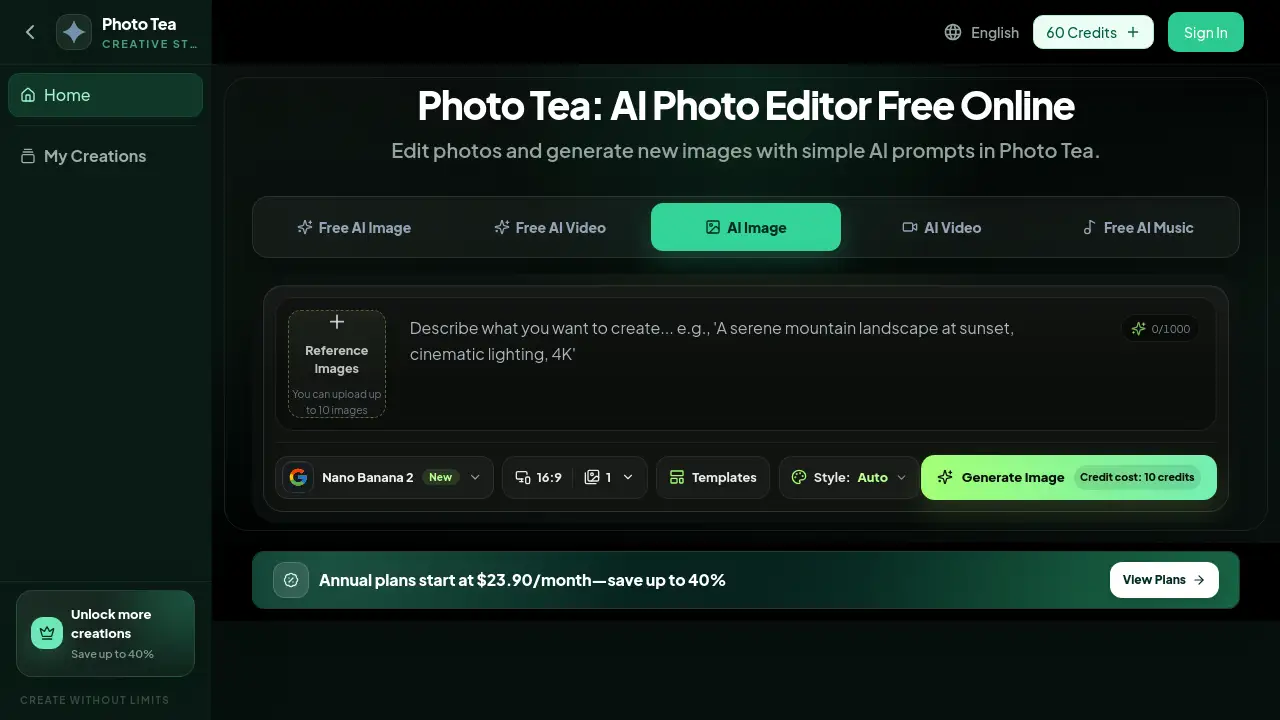
Photo Tea is a free AI photo editor and image generator for prompt-based edits. It helps remove objects, change backgrounds, enhance images, upscale photos, and create new visuals in a browser.
What is Photo tea?
Photo Tea is an online AI photo editor that starts with an image you already have. Instead of rebuilding a photo from scratch, users upload a source image and describe the change they want. The platform then creates a revised version while trying to preserve important details such as faces, products, text, colors, lighting, and camera angles.
This makes Photo Tea useful for people who need faster image edits but do not want to manage complex masking, layers, or manual retouching workflows. It works as a free AI photo editor for simple jobs, and it also supports paid plans for more AI image generation and watermark-free downloads. Common uses include ecommerce product photos, portraits, travel photos, food images, real estate listings, and social media visuals.
The main idea is simple: write a focused prompt, explain what should change, and say what must stay the same. Photo Tea then acts as an AI object remover, AI background changer, AI photo enhancer, AI image upscaler, and image-to-image generator in one online workspace.
Key Features of Photo tea
AI Object Remover
Remove unwanted people, signs, cables, litter, or background clutter with a text prompt. Photo Tea rebuilds the erased area while keeping the main subject, framing, and surrounding details consistent.
AI Background Changer
Replace a distracting background with a white studio, outdoor setting, ecommerce surface, or campaign scene. The tool aims to preserve people, products, edges, text, shadows, and camera perspective while changing the setting.
AI Photo Enhancer
Enhance blurry, dim, or low-detail photos with sharper details and balanced lighting. This can help improve product images, profile photos, and presentation visuals while preserving natural faces, materials, and textures.
AI Image Upscaler
Upscale a small image into a larger, cleaner version for an online shop, portfolio, social post, or marketing asset. Users can review text, facial features, product edges, and surface detail before downloading.
Prompt-Based Recoloring and Style Transfer
Recolor clothing, packaging, furniture, or walls and apply a new visual style with a simple prompt. The editor aims to keep the subject, material, perspective, and composition consistent while changing color, lighting, or mood.
Image-to-Image Generator
Upload a reference photo and generate a new product scene, portrait treatment, social graphic, or creative direction. Describe what should change and which recognizable details the AI photo editor must preserve.
Use Cases for Photo tea
Ecommerce Product Photos
Turn a basic product photo into a cleaner ecommerce image by replacing the surface and lighting while preserving packaging, color, proportions, label area, and camera angle.
Portraits and Headshots
Move a portrait into a cleaner setting with AI background replacement while keeping the person’s identity, expression, hair, pose, clothing, and natural skin texture recognizable.
Travel and Lifestyle Photos
Remove unwanted people, litter, signs, or background clutter from a travel or lifestyle photo, then reconstruct the exposed ground and scenery without changing the main subject.
Social Media Food Photos
Turn an ordinary cafe snapshot into a polished social media food photo by removing table distractions, warming the light, and improving color while preserving the dish, bowl, texture, and camera angle.
Real Estate Listings
Prepare a living room photo for a property listing by removing small distractions and correcting exposure and white balance while preserving architecture, furniture, materials, and perspective.
Campaign and Brand Concepts
Generate image-to-image variations for ads, landing pages, presentations, real estate scenes, or early campaign planning while keeping the product, subject, layout, and brand details consistent.
How to Use Photo tea
- Upload a photo. Add a JPG, PNG, or WebP source image to the online AI photo editor. Start with a clear product photo, portrait, room, travel image, or social media visual.
- Describe the edit. Tell Photo Tea what to change, where the change should happen, and what must remain unchanged. For example, remove a person from the background while preserving the subject, framing, lighting, and camera angle.
- Review the result. Inspect faces, text, edges, colors, and textures in the edited photo.
- Refine if needed. Adjust the prompt if the result needs a different direction or more detail.
- Download the version. Save the edited image for a product listing, profile, post, presentation, or campaign.
Target Audience for Photo tea
- Ecommerce sellers who need cleaner product images
- Photographers and portrait editors who want faster background or object edits
- Social media creators who need polished visuals for posts and ads
- Real estate agents preparing property listing photos
- Small business owners creating marketing assets
- Everyday users who want a free AI photo editor online
Is Photo tea Free?
Photo Tea is free to start. Eligible new accounts can claim starter credits without entering a credit card. Each generated version uses credits, and the editor shows the current cost before the job is submitted. Paid plans are available for more AI image generation, photo editing, and watermark-free downloads. Current plan details should be checked on the official pricing page.
| Plan | Price | Features |
|---|---|---|
| Free | $0 | Starter credits for eligible new accounts, access to editing tools, credit cost shown before submission |
| Paid | Varies | More credits for AI image generation, photo editing, and watermark-free downloads |
Photo tea's Pros and Cons
| Aspect | Pros | Cons |
|---|---|---|
| Access | Runs in a modern web browser; no software install required | Needs an internet connection |
| Editing Style | Prompt-based AI photo editing can be faster than manual masking | Results depend on prompt quality and image detail |
| Features | Includes object removal, background changes, enhancement, upscaling, recoloring, and image-to-image generation | Credit-based generation may limit heavy use on free access |
| Detail Control | Users can specify what to change and what to preserve | Some complex edits may still need review or retries |
| Pricing | Free starter credits and paid options | Exact paid pricing is not listed in the reference content |
Frequently Asked Questions about Photo tea
What does Photo Tea do?
Photo Tea is an AI photo editor and image generator. Users upload a source photo and describe a change, such as removing a background, erasing an object, enhancing quality, replacing a setting, recoloring an item, or creating an image-to-image variation.
Is Photo Tea a free AI photo editor online?
Photo Tea is free to start. Eligible new accounts can claim starter credits without entering a credit card. Each generated version uses credits, and the editor shows the cost before submission.
Can Photo Tea remove an unwanted person or object?
Yes. Photo Tea can work as an AI object remover to erase distractions and reconstruct the surrounding area. Results vary with the object’s size, overlap, and the amount of visible background available for reference.
Can Photo Tea change a background without changing the subject?
Yes. Users can use Photo Tea as an AI background changer and tell the editor to preserve the subject’s identity, shape, pose, text, proportions, and camera angle. Important details should always be reviewed before publishing.
Does Photo Tea enhance or upscale images?
Photo Tea can help improve image quality and create higher-quality photo variations from a source image. For important commercial work, review the generated result at full size before publishing.
How should users write an AI photo editing prompt?
Name the subject or area, describe the exact change, and specify what must remain unchanged. Concrete details about color, setting, light, material, framing, identity, and mood are more useful than a broad request such as “make it better.”
Photo tea Tags
AI photo editor, free AI photo editor, Photo Tea, edit photos online, AI object remover, AI background changer, AI photo enhancer, AI image upscaler, image-to-image generator, prompt-based photo editing, remove objects from photos, change background online