Introduction
Pixo is an AI video generator designed to carry video projects from the first script to the final screen. Instead of juggling separate apps, users talk with a video agent inside a chat workspace. The agent writes scripts, prepares storyboards, produces visuals, and assembles clips on a timeline. The product page describes its own purpose clearly: AI agents that research, script, and edit videos while users direct the outcome. That “direct, don’t edit” approach makes Pixo stand out as an accessible AI video creation platform for creators and teams.
What is Pixo?
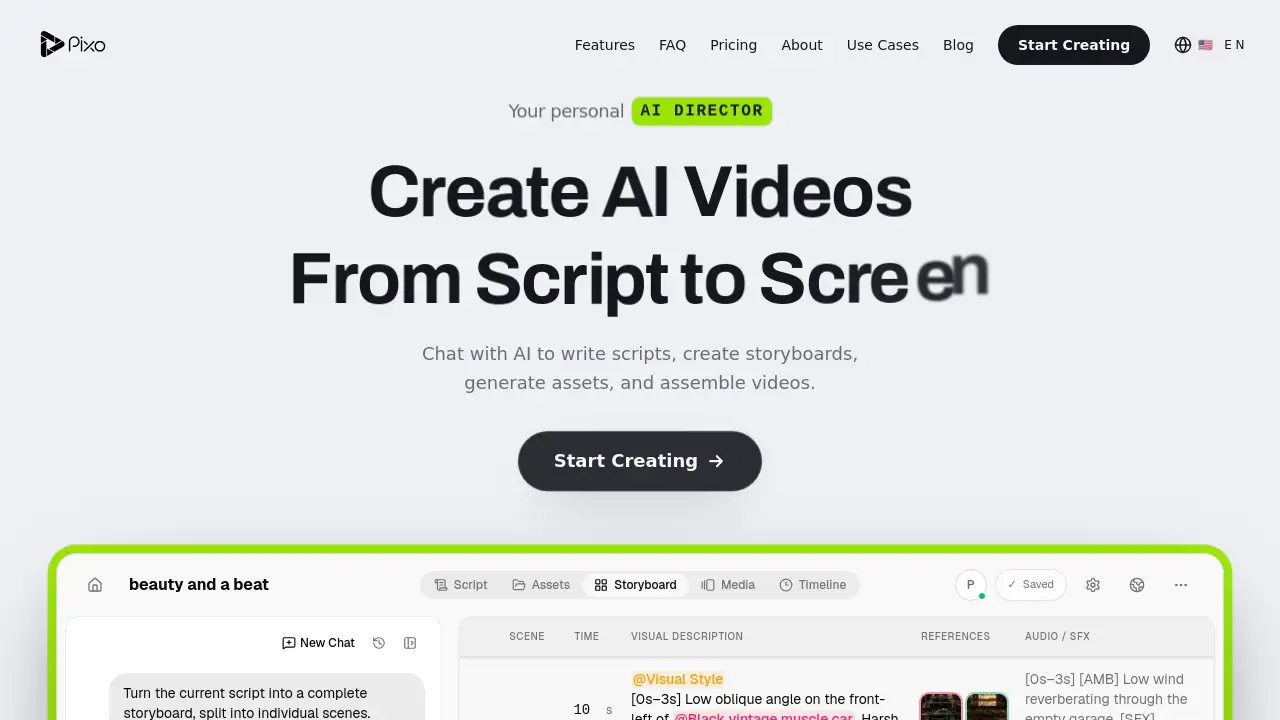
At its core, Pixo is an AI video generator for people who need a structured, script-to-screen production system. The homepage calls it “Your personal Video Agent.” Pixo solves a common problem: making a video usually requires separate skills such as researching a topic, writing a script, creating visuals, editing scenes, and adding sound. In Pixo, a conversation replaces much of that manual workload. Users type directions, and the AI works through a storyboard with scenes, time, visual descriptions, references, audio, and previews.
The platform matters because it combines several video tasks into one assistant. It is also an AI video creation platform because it connects idea, asset production, and assembly. For people who do not want to learn complex editing software, Pixo’s chat system makes the process simpler. For professionals, the same AI video generator enables faster drafts. Whether the goal is a music video, a brand story, or an educational clip, Pixo creates a production plan that can be improved through conversation.
Key Features of Pixo
Script Writing by Chat
The core workflow starts with a conversation. Users can describe the topic, style, tone, or scene list, and Pixo turns that direction into written scripts for AI video production.
Storyboard Creation
Pixo can split a script into a complete storyboard. The platform displays ready scenes with references and audio on the timeline, which helps creators visualize their video before production begins.
AI Asset Generation
The video agent creates assets such as visual styles and scene references. This feature makes the AI video generator useful for people who need a full visual package, not just a text idea.
Automated Video Assembly
Pixo can assemble video elements into a timeline after the scenes are reviewed. Each scene can carry visual descriptions, references, and audio cues, making AI video editing feel less technical.
Media Timeline Workspace
The editing workspace shows Scene, Time, Visual Description, References, Audio/SFX, and Preview. This transparent layout helps users see what the AI video generator is planning in each part of the production.
Research Assistance
Since the Pixo video agents can research, script, and edit, the AI video creation platform also helps users gather content direction before the script is written. This is useful for creators who start with only a rough topic.
Use Cases for Pixo
Music Video Pre-Production
The homepage demo shows a storyboard for a music video described as “beauty and a beat.” Artists and content teams can use Pixo to visualize song concepts and build a structured draft before shooting or generating final scenes.
Brand Content and Ads
Businesses need product videos and social advertisements. Pixo can help create scripts, storyboards, and video drafts quickly, so marketing teams can review the messaging before final production.
YouTube and Podcast Clips
Long-form creators can use Pixo as a research and script assistant. The script-to-video format reduces repetitive pre-production work and helps creators turn talking points into visual scenes.
Educational Videos
Teachers and explainer creators can use this AI video generator to outline lessons and convert complex concepts into clear visual shots. The storyboard format makes it easier to organize educational content.
How to Use Pixo
Using Pixo as an AI video generator is straightforward.
- Go to the Pixo website and choose Start Creating.
- Start a chat and describe the video idea, audience, style, or desired length.
- Ask the AI video agent to research, write a script, and create a storyboard.
- Review the scenes in the timeline and request changes, new assets, or alternate audio cues.
- Keep directing the assistant until the video plan is ready to deliver.
The platform is designed to feel like a conversation rather than a complicated editing session.
Target Audience for Pixo
- Content creators who want a faster video workflow.
- Marketing and social media teams producing regular assets.
- Small business owners without a full-time video editor.
- YouTubers and podcasters exploring AI video creation tools.
- Music artists and video teams planning music visuals.
- Educators and course creators explaining concepts visually.
Is Pixo Free?
The product homepage does not mention a free plan or a free trial in its visible content. Pixo has a dedicated pricing page, so the best way to confirm cost is to visit the official Pixo pricing page. Since the website includes a sign-in option called “Start Creating,” users will likely begin with an account, but specific details should be checked directly from the source.
| Plan | Price | Features |
|---|---|---|
| Free | Not stated on homepage | No verified details available |
| Pro | Not stated on homepage | See official Pricing page |
Pixo's Pros and Cons
| Aspect | Pros | Cons |
|---|---|---|
| Production Workflow | Handles script, storyboard, assets, and timeline in one connected process. | Videos should still be reviewed and directed by a human. |
| Chat Interface | Natural language prompts make the video agent easy to control. | The full storyboard view may take some time to understand. |
| Time Savings | This AI video generator removes many repetitive setup tasks. | Clear user feedback is needed to avoid extra edits. |
| Creative Planning | Visual descriptions and audio references are organized side by side. | Collaboration features are not fully explained on the homepage. |
Frequently Asked Questions about Pixo
How does Pixo make video creation easier?
Pixo brings research, scriptwriting, storyboarding, asset generation, and timeline assembly into one chat-driven workflow. Users direct the outcome with prompts, so the process feels more like giving instructions than spending hours on manual editing tasks.
What kind of videos can I create with Pixo?
The platform is flexible enough for different formats, including music videos, brand content, social media clips, and educational videos. The homepage example uses a cinematic storyboard for a music video, which suggests that Pixo is suitable for narrative-style AI video projects.
Do I need video editing experience to use Pixo?
Not necessarily. Because Pixo is an AI video generator with clear visual descriptions, a chat workspace, and a timeline, beginners can rely on the assistant to prepare most of the production steps. Reviewing the scenes and making small changes are still important.
Does Pixo work from text alone?
Pixo is more than a simple text-to-video tool. It can take a text prompt, produce a script, generate a scene-by-scene storyboard, and assemble those ideas into a media timeline. The video agent acts as an AI video creation platform for the whole production path.
Is there a free trial for Pixo?
The homepage content does not confirm whether Pixo offers a free trial or a starter plan. The official pricing page is the best place to check current pricing options.
Pixo Tags
AI video generator, AI video creation platform, video agent, script to video AI, AI storyboard maker, AI video editing tool, text to video, automated video production, Pixo video agent, AI video workflow, create videos with AI, AI content creation software