Introduction
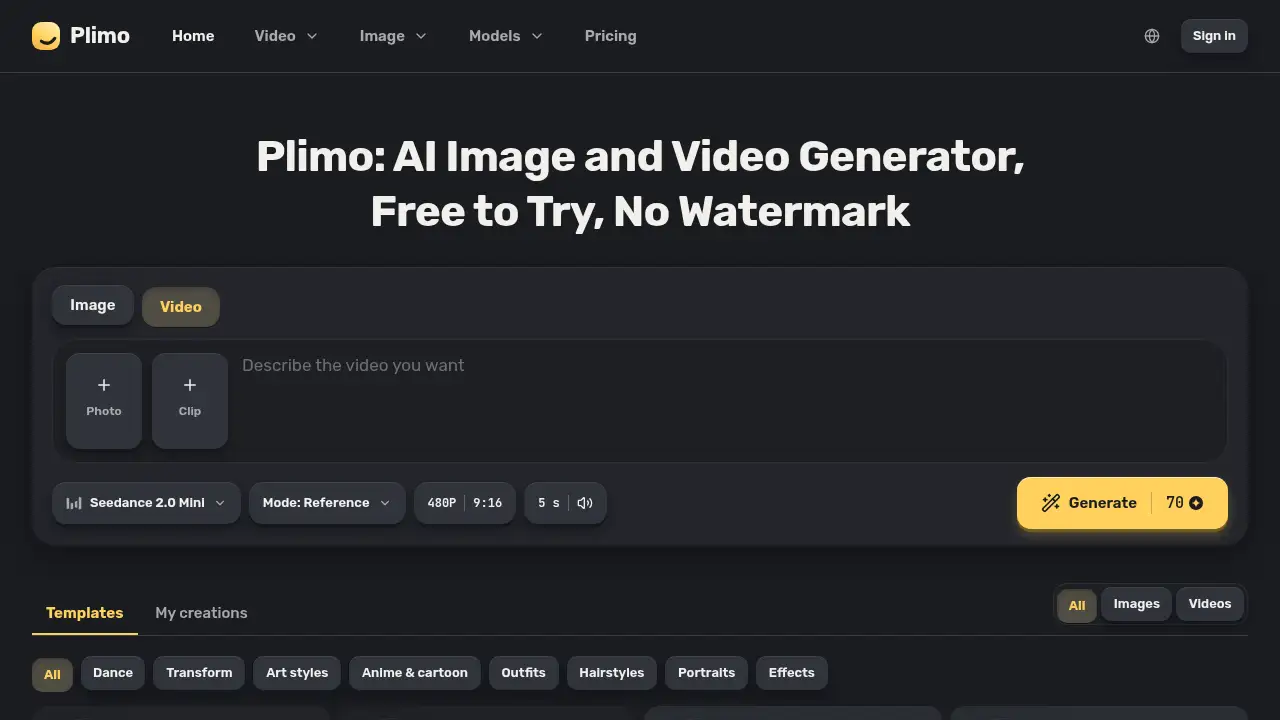
Plimo is an all-in-one AI image and video generator that puts the newest models and trending templates into a single account. It solves the problem of juggling multiple subscriptions and apps for creative work. With Plimo, users can generate images, create short videos, and try new looks without switching platforms. This review covers what Plimo offers, how it works, and who it suits.
What is Plimo?
Plimo is an AI image and video generator that brings together 15 image models and 17 video models from companies like OpenAI, Google, ByteDance, Kuaishou, Alibaba, and xAI. Instead of paying for separate tools and learning different interfaces, users get one account, one set of credits, and one place to create. The product solves a common problem for creators: great visuals often require multiple apps, subscriptions, and workflows. Plimo simplifies this by offering an AI image generator, AI video generator, and many template-based tools in one platform. It is suitable for social media creators, small business owners, marketers, hobbyists, and anyone who wants to make pictures or clips without professional software. Plimo matters because it lowers the barrier to high-quality visual content while keeping model choice flexible.
Key Features of Plimo
All-in-One AI Image and Video Models
Access 15 image models and 17 video models from a single Plimo account. Users can switch between GPT Image 2.5, Nano Banana 2.1, Veo 3.1 Fast, Kling 4.0, and others without opening separate subscriptions.
Trending Templates
Start from templates that come with prompts and settings already prepared. Add a photo and generate a look that is currently popular on social media, saving time on prompt writing.
Side-by-Side Model Comparison
Run the same prompt or photo through two different models and compare the results. This helps users learn what each AI model does best and choose the right output for the job.
Up to 4K Resolution and 30-Second Videos
Create pictures up to 4K with Nano Banana 2.1 and GPT Image 2.5. Generate videos up to 4K with Veo 3.1 Fast, and produce clips up to 30 seconds with Kling 4.0 and Seedance 2.5.
Image-to-Video Workflow
Turn a generated image into the first frame of a video. Upload a picture to the Image to Video tool, describe the movement, and let the AI video generator bring it to life with sound.
Watermark-Free Downloads
Download every image and video without a watermark, even on a free account. Results are ready to post, share, or use in personal projects.
Fast Access to New Models
Try newly released image and video models soon after they launch. Plimo adds new options regularly, so users do not need to create another account to test the latest technology.
Use Cases for Plimo
Social Media Short Videos
Create vertical clips for TikTok, Reels, or Shorts with the Text to Video tool. Add sound and motion to a simple idea, then download the clip without a watermark.
Product Photos for Small Shops
Turn a phone photo of a candle or mug into a studio-style product shot. Use the AI image generator to place the item on a marble stand or in soft light, creating listing images quickly.
Old Family Photos That Move
Upload an old family photo to Image to Video and write a simple instruction like “they smile and wave.” The picture becomes a short, moving memory with a few seconds of animation.
Headshots and Profile Pictures
Convert one selfie into a clean work headshot with the AI Headshot Generator. Or create a fresh AI selfie for a social profile without booking a photographer or studio.
Trying a New Hairstyle or Outfit
Test a haircut or color with the AI Hairstyle Changer before visiting a salon. Try an outfit with the AI Clothes Changer before ordering it online, reducing the risk of a bad choice.
Invitations, Posters, and Signs
Describe the design and exact wording, then choose GPT Image 2.5 for readable text. Use Plimo to create birthday invitations, shop signs, and event posters with clear lettering.
How to Use Plimo
- Pick a tool. Choose the AI Image Generator, Text to Video, Image to Video, AI Hairstyle Changer, or another tool inside Plimo.
- Upload a photo or write a prompt. Start from a selfie, product shot, or old family photo. Templates already include a prompt, so a photo may be all that is needed.
- Choose a model. Select GPT Image 2.5 for text-heavy images, Nano Banana 2.1 for combining photos, Kling 4.0 for longer clips, or Veo 3.1 Fast for 4K video.
- Generate and download. Review the result, change one detail if needed, and generate again. Download the final image or video without a watermark.
Target Audience for Plimo
- Social media creators who need short videos and eye-catching images
- Small business owners who want product photos and promotional graphics
- Marketers and content teams looking for multiple AI models in one account
- Hobbyists exploring AI art, anime, and creative photo edits
- People who want to try hairstyles, outfits, or headshots before committing
- Anyone who prefers a simple, browser-based AI image and video generator
Is Plimo Free?
Plimo offers a free start with 100 credits for new accounts. These credits do not expire and are enough for about 50 pictures with Plimo Image 1.0 or one short video. No credit card is required to sign in and generate. Paid membership plans are listed on the official pricing page.
| Plan | Price | Features |
|---|---|---|
| Free | $0 | 100 one-time credits, no watermark, personal use, access to core tools |
| Member | See pricing page | Commercial use, priority queue, longer result storage, and plan-specific limits |
Free users can generate images and short videos, but results are for personal, non-commercial use. Memberships unlock commercial usage and additional benefits. For current prices and limits, check the Plimo pricing page.
Plimo's Pros and Cons
| Aspect | Pros | Cons |
|---|---|---|
| Pricing | Free credits with no credit card; no watermark on downloads | Free results are for personal use only; paid plan prices are not listed in the reference |
| Features | 15 image models, 17 video models, templates, model comparison, 4K output, 30-second clips | Requires sign-in; no adult content supported |
| Ease of Use | Browser-based, no software to learn, templates need no prompt writing | Some users may still need time to learn which model fits each task |
| Output | Watermark-free images and videos; image-to-video workflow | Free account results are stored for only 7 days |
Frequently Asked Questions about Plimo
What is Plimo?
Plimo is an all-in-one AI image and video generator that combines many image and video models in one account. It includes tools for text to video, image to video, headshots, hairstyles, anime, and more.
Do I need to pay to use Plimo?
No. New accounts receive 100 free credits that do not expire. This is enough to test the platform with about 50 pictures or one short video. Paid memberships are available for commercial use and additional features.
Do I need to write prompts?
Not always. Many templates come with prompts already written, so users can add a photo and generate. Writing a custom prompt is optional when more control is needed.
Which AI model should I choose?
Choose by the job. GPT Image 2.5 works well for text in images, Nano Banana 2.1 for mixing several photos, Kling 4.0 for longer clips, and Veo 3.1 Fast for polished 4K video. Comparing two models is also possible.
Can I turn a photo into a video?
Yes. Upload a photo to the Image to Video tool, describe what should move, and Plimo will use the photo as the first frame. Most video models also add sound.
Are downloads watermark-free?
Yes. Plimo does not stamp watermarks on pictures or videos, whether the account is free or paid. Downloads are ready to post as they are.
Plimo Tags
Plimo, AI image and video generator, all-in-one AI image generator, AI video generator, text to video, image to video, AI image models, AI video models, AI headshot generator, AI hairstyle changer, watermark-free AI images, Plimo review