Introduction
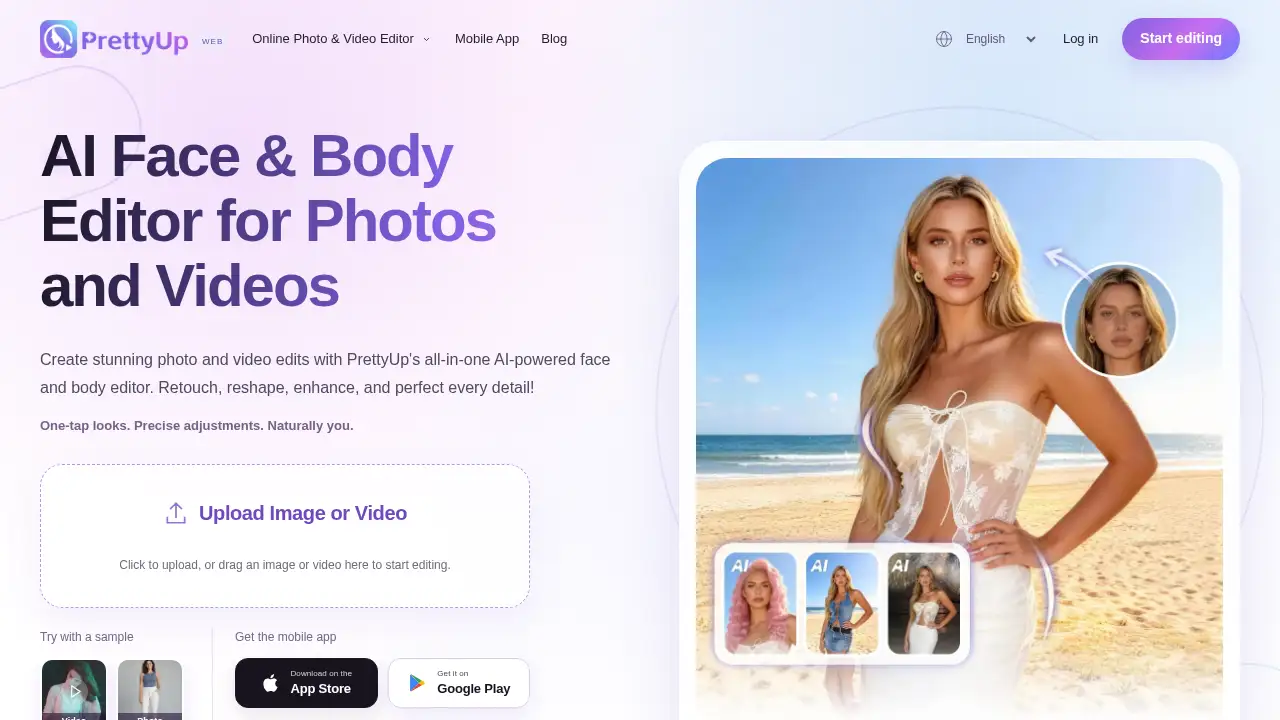
PrettyUp is a browser-based face and body photo editor.
What is PrettyUp?
PrettyUp is an online face and body editing tool for retouching photos and videos. It brings face adjustments, body reshaping, skin retouching, makeup try-on, and AI portrait effects into one workflow. The platform is designed for people who want to improve selfies, portraits, full-length photos, and short clips without installing desktop software. PrettyUp is free to start online, and users can sign in for daily free AI credits. It matters because many beauty edits involve several separate steps; PrettyUp aims to keep face editing, body editing, makeup, and video touch-ups in one place. The tool is suitable for beginners, social media users, and creators who want presets with manual control.
Key Features of PrettyUp
Face Editor for Balanced Portraits
Adjust face shape, eye size, nose width, or lip size in the PrettyUp face editor. Users can start with presets, then set the strength of each change for a more controlled look.
Body Reshaping and Slim Photo Editing
Refine waist, hips, shoulders, height, and leg length with PrettyUp body editor tools. The slim photo editor helps users adjust proportions, while presets provide a quick starting point.
Skin Retouching with Separate Controls
Soften blemishes and uneven tone in close-up portraits with the PrettyUp photo editor. Separate smoothing, skin tone, and blemish controls make it easier to keep retouching subtle or more polished.
Makeup Photo Editor for Custom Looks
Try natural, sweet, or bold makeup presets in the makeup photo editor. Users can personalize lipstick, blush, eye makeup, and contour, then adjust individual effect strength.
Video Body Editor for Clips
Bring face, body, and makeup adjustments into the PrettyUp video body editor. Users can preview changes in motion and fine-tune the effect strength before exporting.
AI Clothes Changer and Expression Tools
Choose from 1,000 outfit templates or upload a clothing reference in the AI clothes changer. The AI expression generator and flash portrait presets add more ways to explore AI portrait effects.
Use Cases for PrettyUp
Everyday Selfies and Portraits
Use the PrettyUp photo editor to refine facial features and skin. Keep strength low for a natural-looking touch-up.
Full-Length Photo Adjustments
Use the body editor for waist, hips, shoulders, height, and leg length. Presets and manual controls help match the adjustment to the pose.
Makeup and Style Trials
Test lipstick, blush, eye makeup, and contour in the makeup photo editor. Users can also try outfits with the AI clothes changer.
Short Video Touch-Ups
Use the video editor to make small face, body, or makeup changes in clips. Preview the result in motion before exporting.
Content Creation Prep
Creators can prepare selfies, portraits, and social videos in one browser-based workflow. PrettyUp offers HD downloads without watermarks, with final resolution depending on the original file and export options.
How to Use PrettyUp
- Open PrettyUp in a browser and sign in if AI credits are needed.
- Upload a photo or video to the relevant PrettyUp editor.
- Select a face, body, skin, makeup, or AI tool, and start with a preset if preferred.
- Adjust individual controls and effect strength, then preview video changes in motion.
- Export the result before refreshing or closing the page, because the current web editor does not automatically save projects.
Target Audience for PrettyUp
- People who want quick selfie and portrait retouching
- Users refining full-length photos for social media
- Makeup and style experimenters
- Short-video creators who need simple beauty edits
- Beginners who prefer a browser-based photo editor
- Mobile users who want App Store or Google Play access
Is PrettyUp Free?
PrettyUp is free to start online. Users can open the editor in a browser without installing software, and signing in provides daily free AI credits. Exact paid plan prices are not listed in the reference content, though user reviews mention paid and lifetime subscription options. Check the official site or app store listing for current pricing.
| Plan | Price | Features |
|---|---|---|
| Free to start | $0 | Browser access, free start, daily free AI credits after sign-in |
| Paid options | Not specified in reference | Reviews mention paid and lifetime subscription choices; exact details should be checked officially |
PrettyUp's Pros and Cons
| Aspect | Pros | Cons |
|---|---|---|
| Pricing | Free to start online | Exact paid prices are not listed in the reference |
| Features | Face, body, skin, makeup, video, and AI portrait tools in one place | Some AI features may depend on daily credits |
| Workflow | Photo and video editing share a similar process | The web editor does not automatically save projects |
| Export | HD downloads without watermarks are offered | Final resolution depends on the original file and export options |
Frequently Asked Questions about PrettyUp
What can users edit with PrettyUp?
PrettyUp combines face, body, skin, makeup, and video tools. Users can also try the AI clothes changer, AI expression generator, and flash portrait effects.
Is PrettyUp free to use online?
PrettyUp is free to start online. Users can open the editor in a browser without installing software, and signing in provides daily free AI credits.
Can PrettyUp edit videos as well as photos?
Yes. PrettyUp offers a photo editor for still images and a video body editor for clips, so face, body, and makeup changes can be previewed in motion.
How safe are uploaded photos on PrettyUp?
The reference states uploaded media is used only for editing and processing and is automatically deleted within 24 hours. Users should still avoid uploading sensitive files they do not want processed.
Can users adjust effects after choosing a preset?
Yes. For face, body, skin, and makeup edits, PrettyUp lets users start with a preset and fine-tune available controls or lower the effect strength.
Do PrettyUp downloads include watermarks?
PrettyUp offers HD downloads without a watermark, though final resolution depends on the original file and the export options available for the tool and plan.
PrettyUp Tags
PrettyUp, PrettyUp photo editor, online face and body editing, face editor, body editor, makeup photo editor, video body editor, slim photo editor, AI clothes changer, AI portrait effects, photo retouching tool, beauty editor online