Introduction
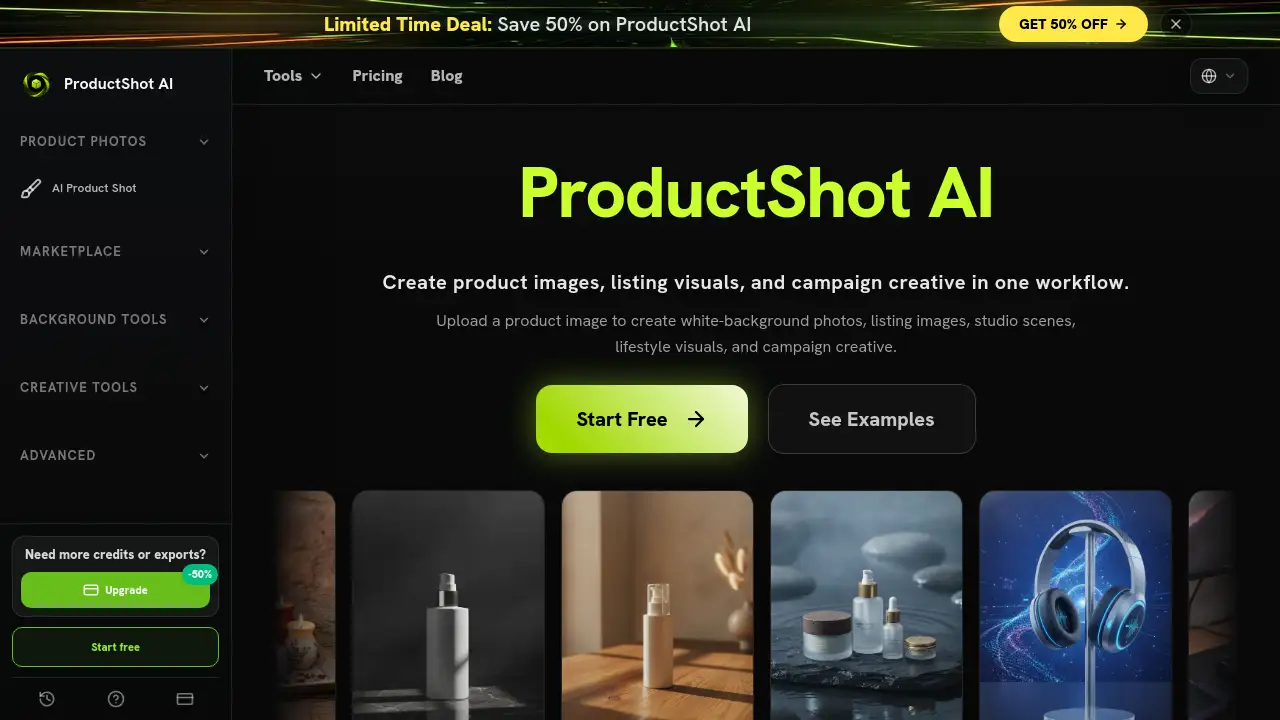
ProductShot AI offers a fresh approach to generating ecommerce product images, allowing sellers to create studio-quality photos and campaign visuals directly from a single product upload.
What is product shot ai?
ProductShot AI is a specialized creative workspace designed for ecommerce sellers who need high-quality product visuals without the time and expense of traditional photography. This AI product photography generator solves a common problem: creating consistent, professional-looking images for marketplaces, storefronts, and advertising campaigns from just one source photo. It matters because it helps businesses maintain visual consistency across channels while dramatically reducing production time. The tool is suitable for online retailers, brand managers, and marketing teams who regularly produce ecommerce product images for listings, ads, and social media content. By keeping product details like shape, color, packaging, and logos consistent across different scenes, ProductShot AI ensures that every generated photo feels like the same item, whether it appears on Amazon, a brand website, or a social ad.
Key Features of product shot ai
Product Lock Technology
This feature preserves key product details such as shape, color, materials, packaging, and logo placement while changing backgrounds or scenes. It maintains visual consistency across all generated ecommerce product images.
Background Editing and Scene Building
Users can replace plain backgrounds with white, light-neutral, or custom scenes. The tool helps reduce visual clutter and creates clean catalog-style product shots for marketplaces and storefronts.
Studio and Lifestyle Scene Generation
One product upload can be transformed into professional studio lighting setups or lifestyle product photography. This creates images suitable for storefronts, launch pages, ads, and social creative without arranging separate photoshoots.
Reference Image Guidance
Upload reference images to guide props, surfaces, composition, lighting, and brand mood while keeping product details recognizable. This helps match a specific visual direction without losing product accuracy.
Output Comparison and History
Compare generated results using a before-and-after view. Users can save, share, and reuse previous outputs for seasonal campaigns, listing tests, and social creative, building a reusable library of product image variations.
Workflow Presets
Choose from preset options for scene, lighting, angle, ratio, and channel settings. This simplifies the process of generating AI product photography for different platforms and uses.
Use Cases for product shot ai
Marketplace Listing Images
Generate clean white-background photos or light-neutral listing images for Amazon, eBay, or Etsy. The tool ensures product details remain consistent while creating clean ecommerce product images for catalog pages.
Campaign and Ad Creative
Produce campaign visuals for launch pages, social media ads, and email marketing. Users can create multiple ad variants in one workflow, testing different backgrounds and compositions quickly.
Lifestyle Product Photography
Create lifestyle scenes that place products in realistic settings. Reference images can guide the mood and props, making the final product shots feel natural and engaging for social content or brand storytelling.
How to Use product shot ai
- Upload a Product Image: Start with a clear photo of the product. This helps ProductShot AI capture the shape, label, color, and materials accurately.
- Choose Your Settings: Select options for Product Lock, scene type, lighting, angle, image ratio, and channel preset. These settings guide the AI product photography generator to produce desired results.
- Generate and Compare: Run the generation process. Use the before-and-after view to compare different outputs and select the best product shots.
- Download, Share, or Create Variations: Export the final images, share a result page, or use saved history to create more variations for different campaigns or platforms.
Target Audience for product shot ai
- Individual Ecommerce Sellers and Small Business Owners
- Marketing Teams and Brand Managers
- Ecommerce Creative Managers and Content Ops Teams
- Brand Designers and Growth Designers
- Agency Founders and Performance Marketing Leads
Is product shot ai Free?
ProductShot AI offers free credits to get started. After the trial, users can choose from subscription plans or one-time credit packs.
| Plan | Price (Monthly) | Credits | Key Features |
|---|---|---|---|
| Starter | $9.9/mo (annual $118.8) | 800/month | Core AI generation, HD export, prompt enhancement, commercial license |
| Premium | $19.9/mo (annual $238.8) | 2,000/month | Everything in Starter, team presets, priority support, brand style kits |
| Advanced | $49.9/mo (annual $598.8) | 6,000/month | Everything in Premium, priority queue, dedicated support, enterprise controls |
Credit packs are also available for one-time purchases without a subscription.
product shot ai's Pros and Cons
| Aspect | Pros | Cons |
|---|---|---|
| Efficiency | Generate multiple product shots from a single upload | Initial setup requires a clear source image |
| Consistency | Product Lock maintains key details across different scenes | Complex materials might need manual adjustments |
| Cost | Reduces need for expensive traditional photoshoots | Monthly credit system may limit heavy users |
| Features | Wide range of tools for backgrounds, scenes, and references | Advanced features require higher-tier plans |
| Ease of Use | Simple four-step workflow with presets | New users may need time to learn optimal settings |
Frequently Asked Questions about product shot ai
How does ProductShot AI keep product details consistent?
ProductShot AI uses Product Lock technology to maintain the shape, color, materials, packaging, and logo placement of the original product. This ensures that every generated ecommerce product image feels like the same item, even when changing backgrounds or scenes.
Can I use reference images to guide the output?
Yes, users can upload reference images to guide props, surfaces, composition, lighting, and brand mood. This helps achieve a specific visual direction while keeping the core product details recognizable and accurate.
What kind of images can I create with product shot ai?
The tool can generate white-background photos, marketplace listing images, studio product shots, lifestyle scenes, and campaign visuals. It is designed to produce a wide variety of ecommerce product images from a single product upload.
How does the credit system work?
Each plan provides a set number of monthly credits valid for 30 days. Credits are consumed each time the AI generates an image. Unused credits do not roll over, but users can purchase additional credit packs or upgrade their plan for more volume.
Is there a free trial available?
Yes, ProductShot AI starts with free credits so users can try the workflow before committing to a paid plan. This allows potential customers to test the AI product photography generator and see if it fits their needs.
Can I use the generated images for commercial purposes?
Yes, all subscription plans include a commercial usage license, meaning users can use the generated ecommerce product images for their business, including marketplaces, ads, and social media.
product shot ai Tags
AI product photography generator, ecommerce product images, product shot AI, product photography tool, background editing AI, lifestyle product photography, AI creative workspace, listing image generator, marketplace image tool, AI product photo generator, ecommerce visual tools, campaign creative AI