Introduction
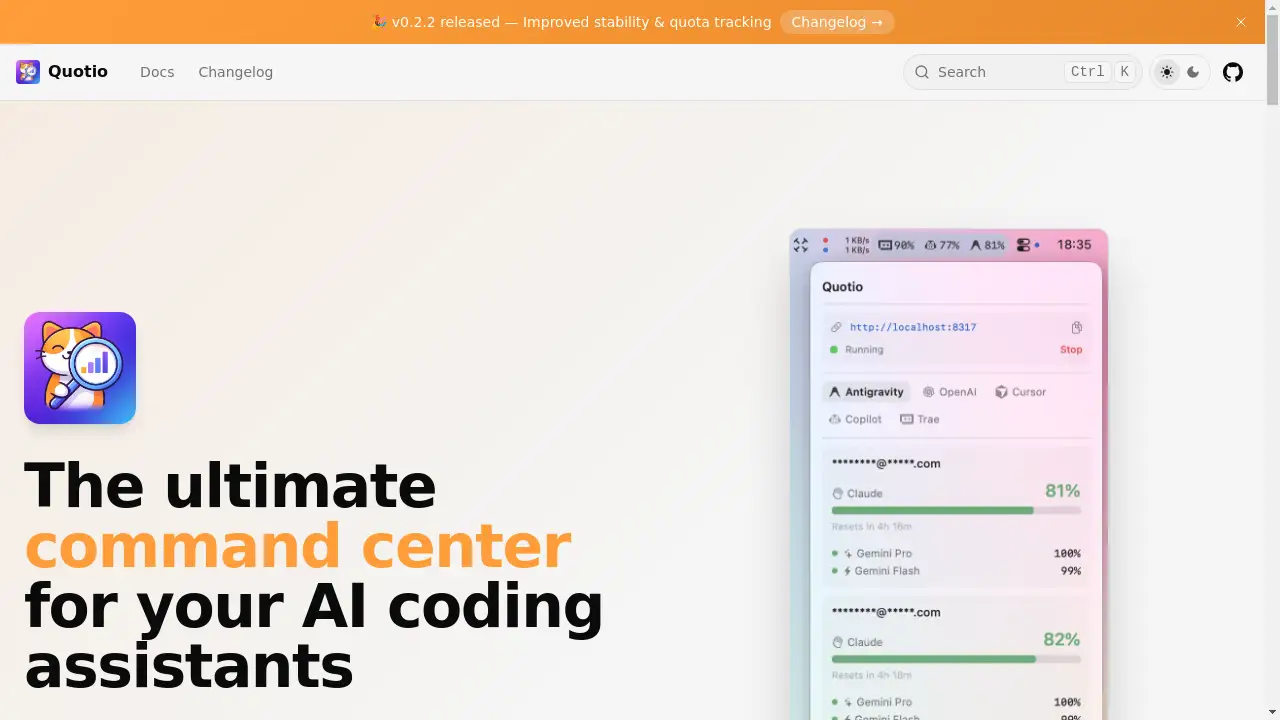
Quotio is the ultimate command center for managing multiple AI coding assistants and their usage quotas.
What is Quotio?
Quotio is a native macOS menu bar application designed as a centralized management hub for developers and engineers who use multiple AI-powered coding tools. The primary problem it solves is the fragmentation and complexity of managing different AI service accounts, API keys, usage quotas, and CLI configurations across various platforms like Google Gemini, Anthropic Claude, and OpenAI. This tool is ideal for software developers, data scientists, and tech teams who rely on several AI coding assistants simultaneously and need to avoid hitting quota limits or manually switching between services. By consolidating control into one elegant interface, Quotio streamlines the workflow, saving time and reducing administrative overhead, which is crucial for maintaining productivity in modern AI-enhanced development environments.
Key Features of Quotio
Multi-Provider Support
The app allows users to connect over nine major AI providers, including Gemini, Claude, OpenAI, and GitHub Copilot, via OAuth or API keys, all from a single dashboard.
Standalone Quota Mode
Users can quickly view their account status and remaining quotas for each service without needing to run a proxy server, perfect for a fast check.
One-Click Agent Configuration
Quotio automatically detects and configures popular CLI agents like Claude Code, Codex CLI, and Gemini CLI with just one click, simplifying setup.
Real-time Dashboard
A comprehensive dashboard provides live monitoring of request traffic, token usage, and success rates across all connected AI services.
Smart Quota Management
The app features visual tracking of quotas and supports automatic failover strategies, such as Round Robin or Fill First, to optimize usage.
Menu Bar Integration
Quick access to server status and a quota overview is available directly from the macOS menu bar, ensuring key information is always a glance away.
Auto-Update Mechanism
Built on the Sparkle framework, Quotio delivers seamless automatic updates to ensure users always have the latest features and improvements.
Bilingual Interface
With support for both English and Vietnamese, the app caters to a global user base of developers.
Use Cases for Quotio
Managing Team AI Resources
Development leads can use Quotio to oversee and allocate AI quota usage across a team, ensuring resources are used efficiently and no one is blocked.
Streamlining Personal Development Workflow
Individual developers who use multiple AI coding assistants for different tasks can manage all their accounts and CLI tools from one place, avoiding context switching.
Monitoring Service Usage and Costs
Freelancers or small teams can track their consumption across various AI APIs in real-time to stay within budget and prevent unexpected overage charges.
Rapid Prototyping and Experimentation
Researchers or engineers testing code generation across different AI models can quickly switch providers and configure agents without manual setup delays.
How to Use Quotio
Using Quotio is a straightforward process designed to get you set up quickly.
- Check Requirements: Ensure your Mac is running macOS 15.0 (Sequoia) or later.
- Download and Install: Visit the Quotio GitHub Releases page, download the latest
.dmgfile, and drag the application to your Mac's Applications folder. - Handle macOS Security (if needed): As an unsigned app, macOS may block it on first launch. If this happens, open Terminal and run the command:
xattr -cr /Applications/Quotio.app. - Launch and Configure: Open Quotio from your Applications. Use the intuitive interface to connect your AI provider accounts via OAuth or API keys.
- Set Up Agents and Monitor: Configure your preferred CLI coding agents with one-click setup and begin monitoring your quotas and usage from the dashboard or menu bar.
Target Audience for Quotio
- Software Developers and Engineers who integrate AI code generation into their daily work.
- Development Team Leads and Engineering Managers responsible for team tooling and resource allocation.
- Data Scientists and ML Engineers who utilize AI for scripting and analytical coding tasks.
- Tech-Focused Students and Researchers experimenting with different AI coding models.
- Freelance Developers and Indie Hackers managing multiple projects and AI service subscriptions.
Is Quotio Free?
Yes, Quotio is completely free. It is an open-source application released under the MIT License. There are no subscription fees, in-app purchases, or premium tiers. Users get full access to all features, including multi-provider support, quota management, CLI agent configuration, and real-time monitoring, without any cost. This makes it an exceptionally valuable and generous tool for any developer looking to optimize their AI coding assistant workflow.
Frequently Asked Questions about Quotio
What operating systems does Quotio support?
Quotio is exclusively built for macOS. It requires macOS 15.0 (Sequoia) or a later version to run, as it leverages the latest native frameworks.
Can I use Quotio with Cursor or Zed?
Cursor and Zed are supported for quota tracking and monitoring only. You can view your usage for these IDEs within Quotio, but they cannot be configured as AI providers for the proxy server.
How does the smart quota management work?
The smart quota management system allows you to set strategies like "Round Robin" to distribute requests evenly across providers or "Fill First" to use one provider's quota completely before moving to the next, helping automate and optimize your usage.
Is my data secure when using Quotio?
Quotio operates locally on your Mac. It facilitates OAuth connections to AI providers and stores configuration data (like API keys for your local proxy) on your machine. As an open-source tool, its code can be reviewed for transparency.
Do I need to run a proxy server to use Quotio?
No, you do not. The Standalone Quota Mode allows you to use Quotio purely for monitoring your connected accounts and viewing quotas without running any proxy server.
How do I update the app to the latest version?
Quotio has a built-in auto-update feature powered by the Sparkle framework. The app will notify you when a new version is available and can update itself seamlessly in the background.
Quotio Tags
Quotio, AI coding assistants, quota management, macOS developer tool, AI provider management, CLI agent configuration, menu bar app, SwiftUI, open source, GitHub Copilot manager, Claude Code, Codex CLI, Gemini CLI, developer productivity