Introduction
See 3D AI quickly transforms images into editable 3D models for free.
What is See 3D AI Model Generator?
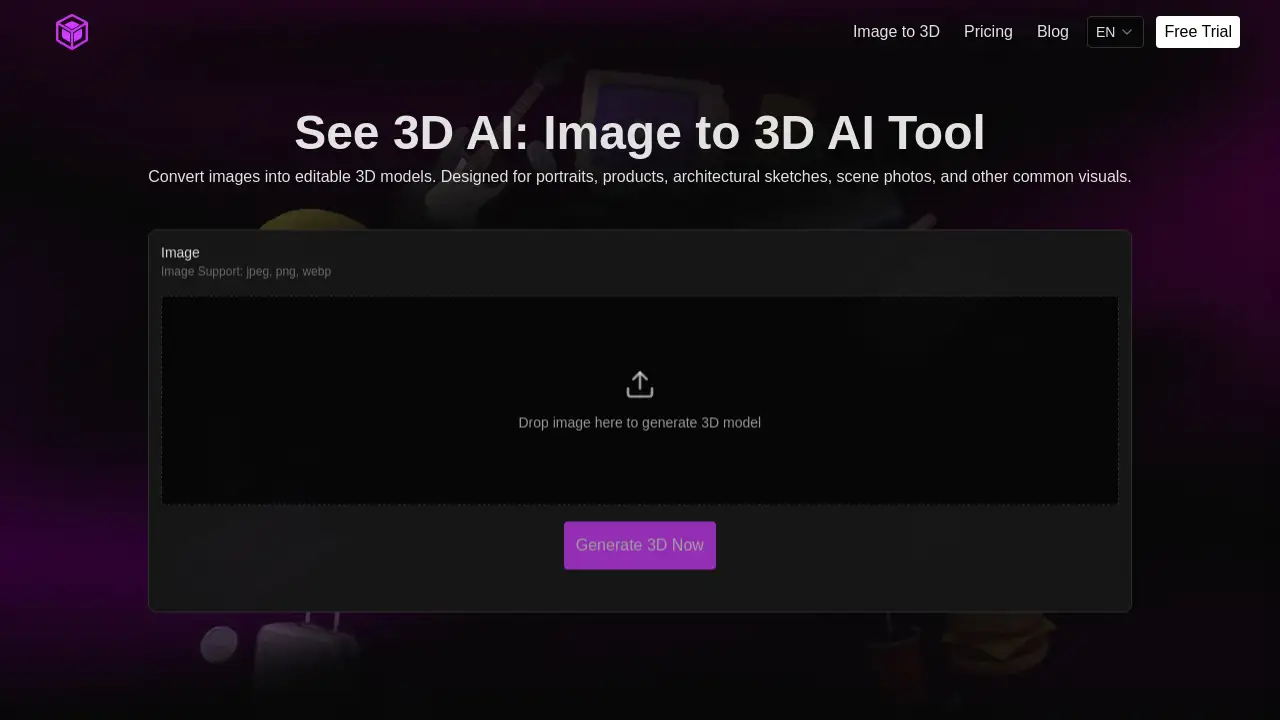
The See 3D AI Model Generator is an online image-to-3D tool that converts a single photograph or sketch into a textured, three-dimensional digital model. It tackles the common challenge of creating 3D assets, a process traditionally requiring significant time, specialized software skills, and manual effort. By leveraging AI for image analysis and spatial reconstruction, this tool automates the generation of a model's base structure, contours, and depth. It is suitable for a wide range of users, from beginners and hobbyists to designers, e-commerce managers, and architects who need to quickly create 3D models from existing 2D visuals like portraits, product photos, or architectural sketches. This accessibility makes 3D creation more efficient and opens up new possibilities for content creation, prototyping, and visualization.
Key Features of See 3D AI Model Generator
Automated 3D Model Creation
The core feature is its ability to automatically analyze an uploaded image and generate a complete 3D model, eliminating the need to build a framework from scratch.
Support for Common Image Formats
Users can upload images in popular formats like JPEG, PNG, and WebP, making it easy to start the conversion process from almost any photo or digital sketch.
Industry-Standard Output
The generated 3D models adhere to common standards, ensuring they are ready for further editing, optimization, or direct use in rendering, animation, and other 3D software.
Intuitive and Clear Workflow
The platform offers a straightforward, logical process from image upload to model download, designed to be accessible even for users with no prior 3D modeling experience.
Fast Processing Times
As advertised, the tool can deliver initial 3D model results in a matter of seconds, significantly speeding up the asset creation pipeline.
Use Cases for See 3D AI Model Generator
E-commerce Product Visualization
Online retailers can quickly generate 3D models from product photos, enabling interactive 360-degree views on their websites to enhance customer engagement.
Game Development and Digital Art
Indie developers and digital artists can create base models for characters, props, or environmental assets directly from concept art or reference images.
Architectural and Interior Design Preview
Designers can convert sketches or photos of furniture (like sofas) or room layouts into basic 3D models for client presentations and spatial planning.
Prototyping and Concept Drafting
Inventors, marketers, and creators can turn a simple sketch of an object or character into a tangible 3D draft to evaluate form and function before committing to detailed modeling.
How to Use See 3D AI Model Generator
Using the See 3D AI tool involves a simple, step-by-step process:
- Visit the Website: Navigate to the See 3D AI platform at
see3d.art. - Upload Your Image: Click the upload area and select a JPEG, PNG, or WebP image from your device. The image should be clear and well-lit for best results.
- Initiate Generation: Start the AI processing. The system will analyze the image's structure and depth information.
- Preview and Wait: A preview of the generated 3D model will typically appear within seconds. The model will be textured based on the original image.
- Download Your Model: Once processing is complete, download the 3D model file. The output is a standard 3D mesh file that can be imported into other software for further use.
Target Audience for See 3D AI Model Generator
- 3D Modeling Beginners and Hobbyists: Individuals interested in 3D creation but lacking advanced software skills.
- Digital Artists and Illustrators: Creators looking to bring their 2D artwork into three-dimensional spaces for animation or VR.
- E-commerce Business Owners and Marketers: Professionals needing to create interactive 3D product visuals without a dedicated 3D artist.
- Game Developers (Indie/Small Teams): Developers who need to rapidly prototype assets or create simple in-game objects.
- Architects and Interior Designers: Professionals who want to quickly convert sketches or product photos into 3D forms for client visualization.
Is See 3D AI Model Generator Free?
See 3D AI offers a free tier to create 3D models, as stated in its description. For users requiring more extensive use, it provides premium plans. Based on the reference information, the following paid options are available:
| Plan | Price | Key Features |
|---|---|---|
| Yearly | $15.99 / Year (billed annually) | 13,000 credits/month, unlimited AI tools, no watermarks, 365-day history, fast queue, private usage, priority support, commercial license. |
| Add Credits (One-Time) | $19.99 (one-time payment) | 10,000 AI credits (valid for 1 month), includes all premium features like watermark-free outputs, commercial license, and priority support. |
All payments are processed securely via Stripe.
See 3D AI Model Generator's Pros and Cons
| Aspect | Pros | Cons |
|---|---|---|
| Accessibility | Extremely easy to use with a clear, beginner-friendly interface. No 3D modeling expertise required. | The level of detail and accuracy in complex models may not match manually crafted professional 3D assets. |
| Speed & Efficiency | Drastically reduces the time to create a basic 3D model from hours or days to seconds. | As an AI tool, results depend heavily on input image quality; poor or ambiguous images may yield less optimal models. |
| Pricing | Offers a valuable free tier and affordable premium plans, especially the yearly subscription. | Credits in the one-time add-on plan expire after one month, which may not suit infrequent users. |
| Output Utility | Generates industry-standard, editable 3D models suitable for further work in other software. | The tool is focused on image-to-3D; it does not generate models from text prompts, which some competing AI tools offer. |
Frequently Asked Questions about See 3D AI Model Generator
What image formats does See 3D AI support?
The tool supports common image formats including JPEG, PNG, and WebP. Ensure your image is clear and well-lit for the best 3D model generation results.
Do I own the 3D models I create?
According to the premium plan details, outputs come with a commercial license, meaning you can use the models you generate for commercial projects. It's always advisable to check the latest Terms of Service on the website for specific rights.
How accurate are the generated 3D models?
The accuracy is highly dependent on the input image. Photos with clear subjects, good lighting, and distinct contours tend to produce the best and most usable 3D models. The tool is excellent for creating base meshes and drafts.
Can I edit the 3D model after generating it?
Yes. A key advantage highlighted is that the output models are industry-standard files. This means you can download them and import them into any standard 3D editing software (like Blender, Maya, or Unity) to refine, texture, or optimize them further.
What is the difference between the free and paid plans?
The free plan allows users to create 3D models. The paid plans (Yearly and Add Credits) offer higher volumes of credits per month, remove watermarks, provide faster processing, grant access to unlimited AI tools, include a commercial license, and offer priority support.
How long does it take to generate a 3D model?
The platform promotes fast generation times, often delivering a preview of the 3D model within seconds of uploading an image. The exact time can vary based on image complexity and server load.
See 3D AI Model Generator Tags
AI 3D model generator, image to 3D converter, free 3D model maker, create 3D from photo, AI 3D creation, online 3D modeling tool, texture 3D model generator, product photo to 3D, architectural sketch to 3D, beginner 3D software, See 3D AI, see3d.art