Introduction
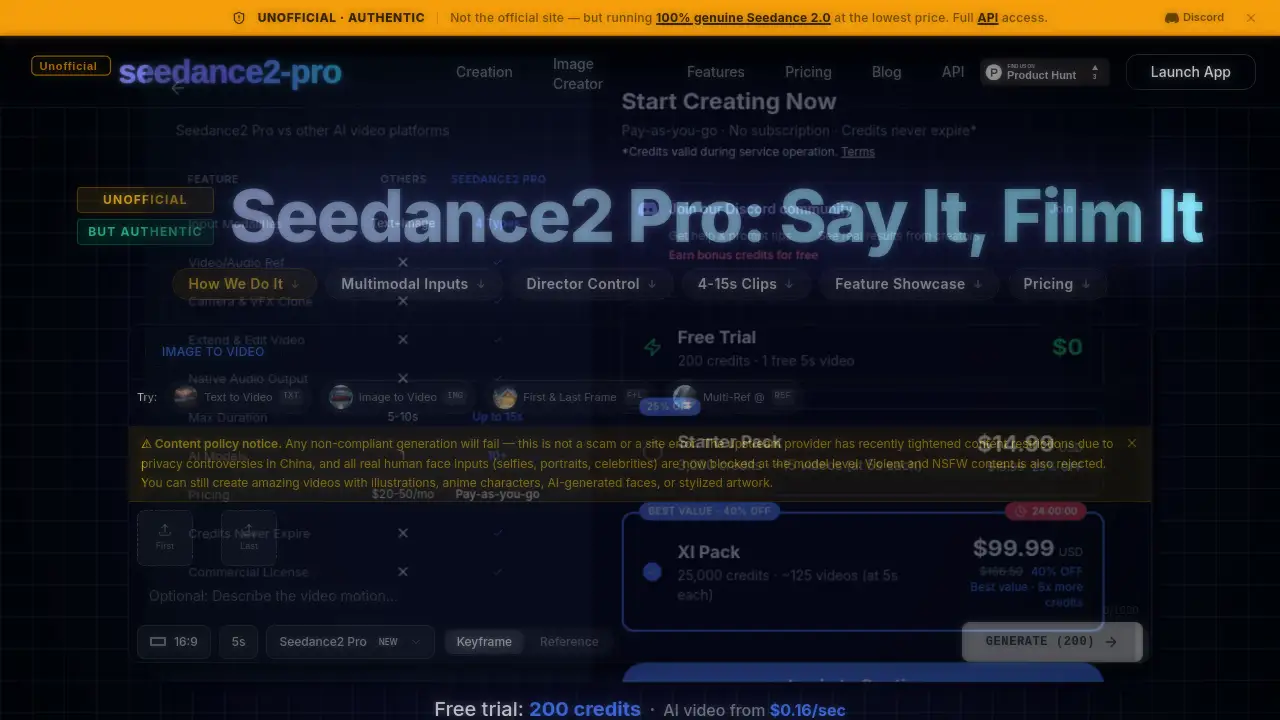
Seedance 2.0 is an unofficial platform providing access to a powerful AI video generator that creates cinematic videos from text, images, and audio.
What is Seedance 2.0?
Seedance 2.0 is a cutting-edge AI video generator designed to transform multimodal inputs like text prompts, images, video clips, and audio into high-quality, cinematic video clips. It addresses the challenge for creators, marketers, and storytellers who need to produce professional-looking video content quickly without extensive technical skills or expensive equipment. By leveraging advanced AI, this tool allows users to maintain character consistency, replicate complex camera motions, and sync action to audio beats, making sophisticated video production more accessible. The platform is particularly suitable for creating short-form content, advertisements, storyboards, and creative projects where multimodal inputs and director-like control are essential.
Key Features of Seedance 2.0
Multimodal Input Flexibility
Users can combine up to 9 images, 3 videos, and 3 audio tracks with text prompts to guide the AI, offering unparalleled creative control over style, motion, and rhythm.
Character and Consistency Control
The model excels at maintaining character consistency, keeping faces, outfits, and product details stable across different shots and scenes for coherent storytelling.
Precise Camera and Motion Mimicry
By uploading a reference video, the AI can analyze and recreate complex camera movements, blocking, and intricate choreography, allowing for precise camera and action mimicry.
Audio-Driven Video Generation
The tool supports audio sync and lip-sync capabilities across multiple languages, using reference audio to drive the rhythm, mood, and timing of the generated video for more realistic performances.
Seamless Video Extension and Editing
Users can extend existing clips or edit specific elements like swapping characters without regenerating the entire video, facilitating efficient clip extension and iterative refinement.
Creative Template Application
The AI can replicate the visual structure, transitions, and VFX of a reference video or image, enabling users to apply professional ad-style templates and effects to their own assets easily.
Use Cases for Seedance 2.0
Social Media Content Creation
Ideal for generating eye-catching, short-form video clips for platforms like TikTok, Instagram Reels, and YouTube Shorts using simple text or image prompts.
Advertising and Commercial Pre-visualization
Marketers can quickly prototype ad concepts, test different visual styles, and create polished product showcases by leveraging multimodal inputs and template replication.
Storyboarding and Narrative Development
Filmmakers and writers can use it to visualize script scenes, fill in missing story beats, and maintain character consistency across a sequence of shots for pre-production planning.
Educational and Explainer Videos
Educators and content creators can produce engaging explainer videos by converting text-based information or illustrative images into dynamic, easy-to-understand video content.
How to Use Seedance 2.0
- Upload Your References: Start by uploading the images, video clips, or audio files you want to use as guidance for your AI video generation.
- Tag and Describe: Use the
@symbol to assign roles to your uploaded files (e.g.,@image1for the first frame) and write a detailed text prompt describing the desired action, camera movement, and style. - Configure and Generate: Select your desired clip length (between 4 to 15 seconds) and click generate. The Seedance 2.0 AI will process your inputs and create the video.
- Refine and Extend: Review the output. You can then use the edit function to make adjustments or the extend feature to seamlessly add more seconds to the clip.
Target Audience for Seedance 2.0
- Social media influencers and content creators
- Digital marketers and advertising professionals
- Independent filmmakers and video editors
- Game developers and animators for concept visualization
- Educators and corporate trainers
- Hobbyists interested in exploring AI video generation
Is Seedance 2.0 Free?
The platform operates on a credit-based system. It offers a free trial with 200 credits to new users. For continued use, various paid credit packs are available. One promoted offer provides 25,000 credits for a one-time payment, which translates to generating over 10 minutes of video.
| Plan | Price | Key Features |
|---|---|---|
| Free Trial | $0 | 200 credits to test basic AI video generation. |
| Credit Packs | Variable (e.g., $99.99) | Bulk purchase of credits for extended use, enabling longer videos and more generations. |
For the latest and most detailed pricing, visiting the official Seedance 2.0 pricing page is recommended.
Seedance 2.0's Pros and Cons
| Aspect | Pros | Cons |
|---|---|---|
| Access & Cost | Provides affordable access to a premium AI model without needing a direct subscription. | Is an unofficial service, which may raise concerns about long-term stability versus official channels. |
| Features & Control | Offers powerful multimodal inputs and fine-grained control over consistency, camera work, and audio. | Has strict content restrictions (no real human faces, no NSFW/violent content) enforced at the model level. |
| Ease of Use | Features a straightforward workflow with reference tagging (@) for directing the AI. | Requires understanding how to effectively combine and tag different media types for optimal results. |
| Output Quality | Generates high-quality, cinematic 2K videos with strong character consistency and smooth motion. | Clip length is currently limited to a maximum of 15 seconds per generation. |
Frequently Asked Questions about Seedance 2.0
Is this the official Seedance 2.0 website?
No, this is an unofficial third-party platform. It provides access to the AI video generator by utilizing a pool of premium accounts, offering the same output quality without requiring users to manage their own subscriptions directly.
What are the content restrictions?
Due to upstream provider policies, the model blocks all real human face inputs (like selfies or celebrity photos), as well as violent and NSFW content. Users can still create videos using illustrations, anime characters, AI-generated faces, or stylized artwork.
How does the credit system work?
Each video generation consumes a certain number of credits based on the length of the clip. Users purchase packs of credits, which are then deducted per generation. The free trial provides an initial amount to test the service.
Can I create videos longer than 15 seconds?
The core generation is limited to clips between 4 and 15 seconds. However, you can use the clip extension feature to seamlessly add more time to an existing generated video, effectively creating longer sequences.
What makes Seedance 2.0 different from other AI video tools?
Key differentiators include its advanced handling of multimodal inputs, superior character consistency across shots, the ability to precisely mimic camera moves from a reference video, and strong audio sync capabilities for realistic performances.
Do I need technical skills to use it?
No advanced technical skills are required. The process involves uploading media, tagging it with @ symbols in a prompt, and describing your vision in natural language. The platform is designed to be accessible to non-technical creators.
Seedance 2.0 Tags
AI video generator, Seedance 2.0, free AI video, text to video, image to video, cinematic AI video, multimodal AI, character consistency, video extension, audio sync, lip sync AI, AI video editor, create video from text, AI filmmaking, video content creation