Introduction
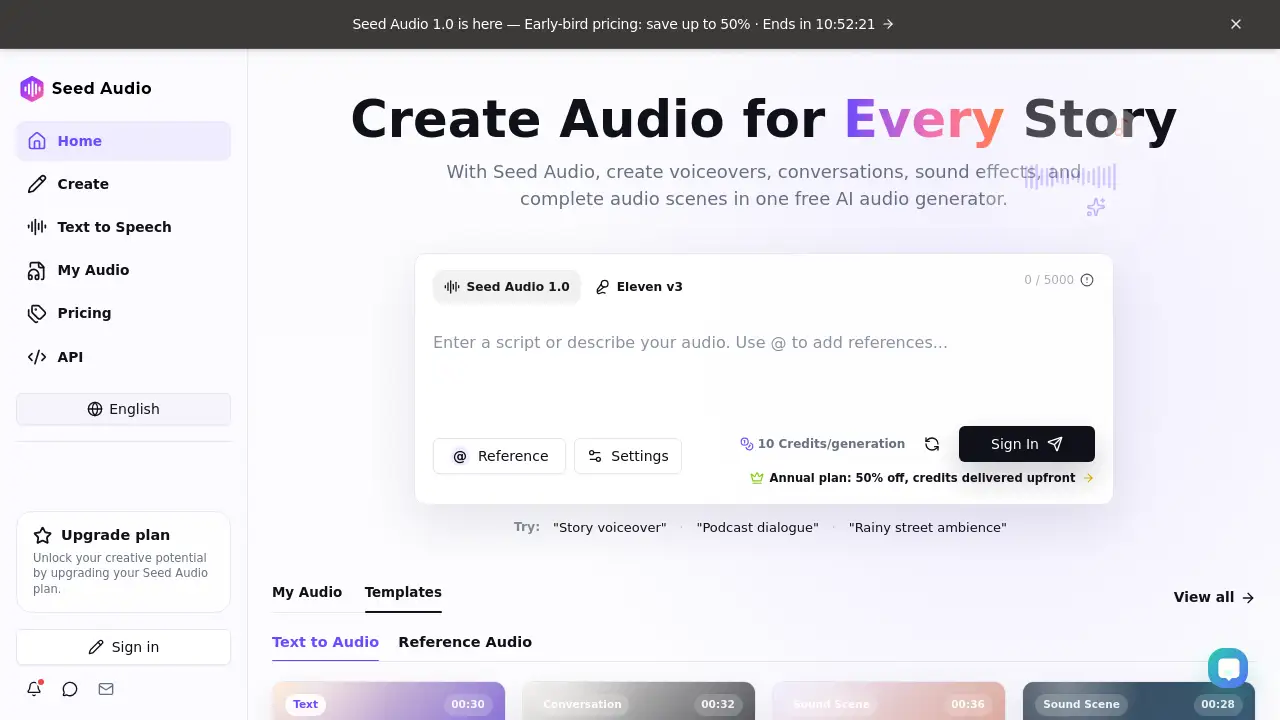
Seed Audio is a free AI audio generator and text-to-speech tool that lets anyone create voiceovers, multi-speaker dialogue, music, sound effects, and complete audio scenes from simple prompts. With Seed Audio, storytellers no longer need separate voice tracks, sound libraries, or complex mixing tools. The platform is designed for creators, podcasters, video editors, and hobbyists who need fast, expressive audio. Seed Audio 1.0 includes a new-generation AI model, a free plan, and an early-bird discount for paid upgrades. This review explains how Seed Audio works, its key features, practical use cases, pricing options, and possible limitations.
What is Seed Audio?
Seed Audio is an online AI audio generator that creates complete audio scenes from text prompts. It goes beyond standard text to speech by combining narration, emotions, dialogue, sound effects, music, and atmosphere in one generation. This means a user can type "a detective enters a rainy apartment and confronts a nervous witness," and Seed Audio returns a full cinematic sound scene.
The tool solves a common content creation problem: audio production often requires multiple tools. Voiceover software, music libraries, and sound effect packs are expensive and time-consuming. Seed Audio offers an all-in-one alternative for anyone who needs a simple AI audio generator. It is suitable for podcasters, YouTubers, game developers, students, and marketers who need audio without advanced editing skills. Because Seed Audio is web-based, users can access it from different devices without installing software.
Key Features of Seed Audio
Text to Speech and Voiceovers
Users can convert written scripts into natural-sounding speech. Seed Audio produces expressive narration with emotion, pacing, and atmosphere, making it useful for story voiceovers and explainer videos.
Multi-Speaker Dialogue
Create conversations between two or more characters in a single generation. This feature works well for podcasts, dramas, and character scenes because Seed Audio manages voices, emotion, and response timing automatically.
Sound Effects and Music Generation
Beyond voices, this AI audio generator can generate music, ambience, and sound effects as part of a scene. Users are not required to upload separate audio files, which simplifies the workflow for content creators.
Reference Audio Guidance
Users can add their own voice, music track, or ambience as a creative reference. Seed Audio uses this reference to guide tone, style, rhythm, and atmosphere, giving creators more control over the final output.
Scene Templates
The platform includes ready-to-use templates such as crime thriller calls, palace trial scenes, mythic declarations, sci-fi broadcasts, and podcast dialogues. These templates help users start quickly and explore the range of this AI audio generator.
Use Cases for Seed Audio
Story Voiceovers
Creators can generate narration with emotion, music, and atmosphere for stories, audiobooks, or video intros. Seed Audio helps turn written stories into finished audio scenes quickly.
Podcast Dialogue
Podcasters can produce natural-sounding conversations for episodes or demo clips. Seed Audio supports multi-speaker dialogue with laughter, quick responses, and conversational pacing.
Cinematic Sound Scenes
Game developers and video editors can build immersive environments with sound effects, movement, and spatial depth. This AI audio generator is a practical tool for foley and background ambience.
Marketing and Advertising
Marketers can create product demos, livestream sales pitches, and social media audio ads without hiring voice actors. Seed Audio's templates include livestream sales duos and future sci-fi broadcasts that fit branded content.
How to Use Seed Audio
- Describe the scene. Write a script, describe a moment, or start with a simple idea in the prompt box.
- Add references (optional). Upload a voice, music track, or ambience to guide the result.
- Generate the audio. Click generate and let Seed Audio create voices, dialogue, music, sound effects, and atmosphere together.
- Refine and export. Adjust the prompt, generate another version, and export the finished audio from My Audio.
Seed Audio, a free AI audio generator, generally supports a free generation limit with credits. Users can sign in to manage projects and access templates.
Target Audience for Seed Audio
- Podcasters
- YouTubers and video editors
- Independent filmmakers and game developers
- Digital marketers and social media managers
- Students and educators
- Writers and audiobook creators
- Hobbyists exploring AI audio generation
- Teams looking for an AI audio generator with a simple workflow
Is Seed Audio Free?
As a free AI audio generator, Seed Audio offers a plan that requires no credit card. Users can start creating immediately with a limited amount of credits. The homepage says "Start Creating for Free" and "No credit card required."
For users who need more capacity, Seed Audio 1.0 offers an early-bird pricing option with up to 50% off. The site also mentions an annual plan where credits are delivered upfront. Exact prices may change, so visit the official pricing page for current details.
| Plan | Price | Features |
|---|---|---|
| Free | $0 | Start creating with limited credits, access to templates, no credit card required |
| Paid (Early-bird) | Up to 50% off | More credits, credits delivered upfront with annual plan, access to Seed Audio 1.0 |
Seed Audio's Pros and Cons
| Aspect | Pros | Cons |
|---|---|---|
| Pricing | Free plan available, no credit card needed, early-bird discounts | Exact paid prices not shown on homepage |
| Features | Combines voice, dialogue, music, sound effects, and atmosphere | Newer AI model may need prompt adjustments for best results |
| Ease of Use | Simple prompt-based workflow, templates help beginners | Free credits may limit daily usage |
| Reference Audio | Upload voice, music, or ambience for style control | Requires clear source material to work well |
Frequently Asked Questions about Seed Audio
Is Seed Audio free to use?
Yes, Seed Audio offers a free plan that lets users create audio without a credit card. The exact number of credits available each day is not specified on the homepage, so users should check the site after signing in.
What can Seed Audio create?
Seed Audio can create voiceovers, multi-speaker dialogue, music, sound effects, and complete audio scenes. It is more than a text-to-speech tool because it combines several audio elements in one generation.
Can I use my own voice or music with Seed Audio?
Yes. The reference audio feature allows users to upload their own voice, music track, or ambience. Seed Audio uses these references to guide the tone, rhythm, and atmosphere of the final audio.
Do I need audio editing experience to use Seed Audio?
No. Seed Audio is designed for beginners and professionals. Users can write a prompt, pick a template, and generate audio without mixing or sound design experience.
Does Seed Audio work for podcast production?
Yes. Seed Audio supports multi-speaker dialogue with natural pacing, laughter, and quick responses. Podcasters can use it to create demo episodes, character conversations, or full audio scenes.
What is Seed Audio 1.0?
Seed Audio 1.0 is the latest version of the AI audio generator. This release introduces a new-generation AI model and early-bird pricing with up to 50% off for a limited time.
Seed Audio Tags
Seed Audio, AI audio generator, text to speech, free AI audio generator, multi-speaker dialogue, sound effects generator, AI voiceover tool, cinematic sound scenes, podcast audio generator, music with AI, audio scene creator, Seed Audio 1.0