Introduction
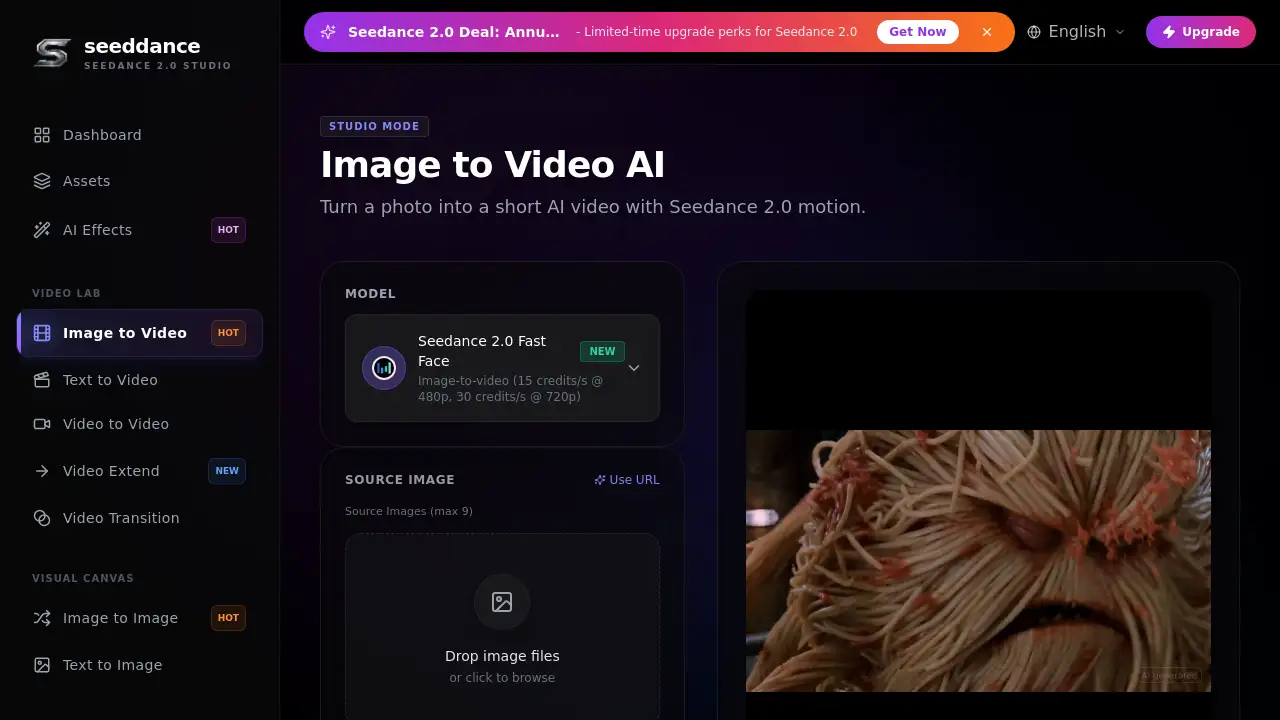
Seedance Image to Video is a free image to video AI generator powered by Seedance 2.0. This free AI video generator transforms a single photo into a short animated clip with smooth camera motion. Users can describe motion, control movement, and export ready-to-share clips. This makes Seedance Image to Video a useful choice for creators who want to animate photos quickly and simply.
What is Seedance Image to Video?
Seedance Image to Video is an online AI video generator that uses Seedance 2.0 to bring still images to life. The tool is designed for anyone who needs fast content from a photo: social media managers, video editors, marketers, and hobbyists. It solves the problem of static visuals by adding motion, depth, and camera movements without requiring animation skills.
With Seedance Image to Video, users upload a source image, write a prompt, and choose settings such as duration, aspect ratio, and resolution. The model then creates a short video based on the image and the prompt. The AI video generator also supports reference videos and reference audio, allowing more creative control. The result is a clip that preserves the main subject while showing natural motion.
Key Features of Seedance Image to Video
Motion Coherence with Seedance 2.0
Seedance Image to Video keeps the subject stable during motion. The AI creates coherent frame-to-frame transitions, which helps faces, edges, and key details stay intact. This is especially useful for camera motion like pan and zoom.
Multiple Motion Styles
Users can select subtle, balanced, or dynamic motion profiles. This makes Seedance Image to Video flexible for different types of projects and helps creators match the mood of the clip. It is a simple way to animate photos with different speeds.
High-Quality Output
Seedance Image to Video exports in HD, with higher resolutions available on supported plans and models. This is valuable for social media content that needs a polished look. The AI video generator keeps the output smooth and ready to share.
Smart Image Analysis
The AI analyzes the source photo to preserve important details. This helps the image to video AI generator keep the subject recognizable while moving. Faces and edges are maintained better during generation.
Camera Motion Control
With Seedance Image to Video, users can prompt camera moves such as pan, zoom, and dolly. The model translates those written instructions into actual motion in the output clip. This gives creators more control over the final look.
Use Cases for Seedance Image to Video
Social Media Videos
Seedance Image to Video can turn static photos into engaging short clips. This helps brands and creators maintain a consistent posting schedule without shooting new footage.
Video Intros and Outros
Use Seedance Image to Video to add movement to a title card or logo photo. The animated clip can work as an intro or outro for a YouTube video or podcast.
Product Showcases
Create video showcases from product images. Ecommerce teams can use Seedance Image to Video to present apparel, electronics, or home goods in a more dynamic way.
Presentation Slides to Animated Clips
Seedance Image to Video can transform static presentation slides into animated clips. This use case is practical for online courses, webinars, and corporate updates.
How to Use Seedance Image to Video
Using Seedance Image to Video is straightforward:
- Upload a source image. The AI video generator accepts JPG, PNG, WebP, and HEIC. Use an image at least 512x512 pixels for best results.
- Write a prompt that describes the motion. Focus on simple camera motion like pan, zoom, or dolly, plus subtle subject motion.
- Choose optional settings. Add a last frame, reference video, or reference audio if needed. Set duration, aspect ratio, and resolution.
- Generate the clip. The AI processes the image and prompt, then outputs a short video. Review it and adjust the prompt if needed.
This workflow makes Seedance Image to Video a practical image to video AI generator for quick iteration. Users can start with small changes and build toward the desired result.
Target Audience for Seedance Image to Video
Seedance Image to Video serves several types of users:
- Social media managers who need video content from existing images
- Content creators and YouTubers looking for intros, outros, and B-roll
- Ecommerce professionals who want product videos without a video shoot
- Marketers and advertisers seeking quick video variations
- Educators and trainers converting slides into animated lessons
- Editors who want to test an AI video generator without a big budget
Is Seedance Image to Video Free?
The AI video generator offers a free starting plan with credits. The current rate shows 75 credits for a standard generation, or 15 credits per second at 480p. Paid plans include more credits and higher limits. There is also a limited-time Seedance 2.0 annual plan with 50% off. For the latest pricing, users should check the official Seedance Image to Video page.
| Plan | Price | Features |
|---|---|---|
| Free | $0 | Initial credits, HD output, basic image to video AI generator features |
| Annual Plan | 50% off (limited-time) | More credits, higher limits, Seedance 2.0 upgrade perks |
Seedance Image to Video's Pros and Cons
Seedance Image to Video has several strengths and limitations to consider.
| Aspect | Pros | Cons |
|---|---|---|
| Ease of Use | Simple upload-prompt-generate flow; no editing skills needed | Output is short, so users may need to create multiple clips |
| Motion Quality | Good subject stability and smooth frame-to-frame motion | Complex prompts may require iteration to get the desired look |
| Pricing | Free credits available; discounted annual plan | Higher resolutions and longer durations may require paid plans |
| File Support | Accepts common image formats | Source images must meet minimum resolution for best results |
Frequently Asked Questions about Seedance Image to Video
Can I use Seedance Image to Video for free?
Yes. Seedance Image to Video provides free credits to start. Users can test the AI video generator without paying upfront. Paid plans are available for users who need more credits, longer clips, or higher limits.
What image formats does Seedance Image to Video support?
The AI video generator supports JPG, PNG, WebP, and HEIC. Images should be at least 512x512 pixels for best quality. For optimal output, upload a clear, well-lit image.
What kind of motion can I create with Seedance Image to Video?
Users can create simple camera motion such as pan, zoom, and dolly, as well as subtle subject movement. Seedance Image to Video works best when prompts describe small changes. Start with a short prompt and adjust based on the result.
How long are the videos generated by Seedance Image to Video?
Standard outputs are short clips designed for quick creation. Longer durations may be available on select plans. The AI video generator creates clips based on the selected settings and credits consumed.
Can I add a reference video or audio?
Yes. Seedance Image to Video allows optional reference video URLs and reference audio URLs. Users can add up to 3 reference videos and 3 reference audio files, with a total time of 15 seconds for videos and 15 seconds for audio. This gives creators more control over the final clip.
Is Seedance Image to Video suitable for beginners?
Yes. The interface is straightforward, and the AI video generator guides users through uploading, prompting, and generation. Beginners do not need prior animation experience to produce usable clips.
Seedance Image to Video Tags
Seedance Image to Video, image to video AI generator, Seedance 2.0, AI video generator, animate photos, camera motion, photo to video AI, free AI video generator, product video from image, social media video creator, AI animation tool, Seedance video prompts