Introduction
Text to Video AI turns text prompts and reference images into short, moving videos. The Dreamina AI video generator, available on SeedImagine, offers a simple online workflow for product videos, cinematic scenes, talking avatars, and social clips. This review explains how the tool works, what it costs, and who benefits from automating video creation.
What is Text to Video AI?
Text to Video AI is an online tool that uses artificial intelligence to generate short videos from written descriptions or still images. Instead of using a camera or learning complex editing software, users type a scene into a prompt box, and the Dreamina AI system creates a video clip that matches the description. For example, a user can write "a ceramic bottle rotating on a glowing podium" and receive a short visual sequence with smooth motion.
The tool also supports image to video animation, which means an uploaded picture can be brought to life while keeping the original subject and composition. This is useful for product photos, character designs, and artwork that need subtle movement rather than a full film production.
This type of AI video generator matters because it lowers the barrier to video creation. Short-form video is central to social media, ecommerce, and online advertising, yet traditional production requires cameras, actors, lighting, and editing skills. By turning a written paragraph into a finished clip, the platform gives creators and business owners a faster path from idea to publication.
Another advantage is flexibility. Multiple video models are available, so users can switch between different motion styles without rewriting the prompt. Framing, resolution, and clip length can be adjusted before generating, which helps the final output match the requirements of a specific platform or campaign.
Key Features of Text to Video AI
Text to Video Conversion
The core feature converts written prompts into moving shots. Users describe the subject, setting, and action, and the generator builds a short clip that fits the scene. Prompts can include details about lighting, camera angle, and visual style. For example, a scene like "a red car drifting around a corner in Tokyo at night" can turn into a short clip with natural motion.
Image to Video Animation
The image to video mode accepts a reference image and adds motion while preserving the look and composition. This works well for animating product photos, illustrations, character poses, and concept art.
Motion Direction Control
Users can guide what moves and how the camera behaves. Motion direction settings allow control over subject action, camera dolly, zoom, and overall pacing. A prompt can specify a slow zoom toward a subject, a side pan across a room, or a fast tracking shot behind a runner.
Format Planning
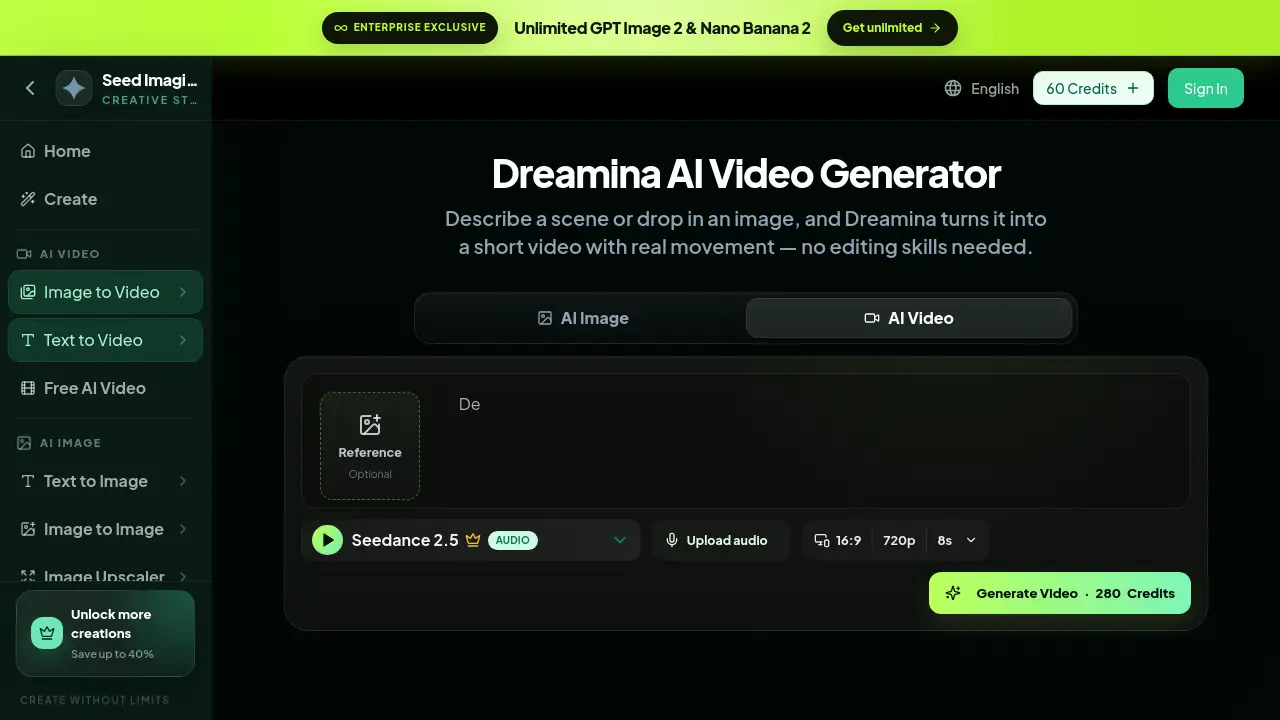
Framing can be set to vertical, square, or widescreen to match different distribution channels. The default format is 16:9 at 720p for 8 seconds, with additional choices available depending on the plan.
Talking Avatar Video
The platform can generate avatar-style clips where a character speaks or performs in front of a scene. This is useful for brand presenters, explainer videos, news-style content, and social media personalities. It also works for training videos and localized content where a presenter needs to appear without a physical studio.
Audio Upload Support
An audio file can be uploaded together with the prompt. The generator can then produce scenes that sync with narration, music, or ambient sound, making the finished clip feel more complete.
Use Cases for Text to Video AI
Ecommerce Product Videos
Online stores can create product launch clips and demo videos from a simple text prompt. This removes the need for a studio, camera crew, or expensive props. Seasonal promos, new arrival teasers, and explainer loops can all be generated from a few lines of text.
Cinematic Scene Creation
Writers, filmmakers, and concept artists can visualize a scene before production. The Dreamina AI generator can produce cinematic street scenes, character performances, and atmospheric establishing shots that help communicate a mood or setting.
Social Media Clips
Creators can generate vertical videos for TikTok, Instagram Reels, and YouTube Shorts. Format planning helps match the aspect ratio to each platform, and motion control keeps the pacing energetic enough for short attention spans.
How to Use Text to Video AI
- Open the Dreamina AI video generator page on SeedImagine.
- Choose Text to Video or Image to Video mode depending on the starting material.
- Write a prompt that describes the subject, action, and camera movement, or upload a reference image.
- Select a video model, aspect ratio, resolution, and duration.
- Click Generate and wait for the render to complete. Review the result and refine the prompt or motion direction if the clip needs adjustment.
Target Audience for Text to Video AI
- Content creators
- Social media managers
- Ecommerce sellers
- Digital marketers
- Independent filmmakers
- Small business owners
Is Text to Video AI Free?
The Dreamina AI video generator uses a credit-based system. New users receive 60 free credits, and paid plans offer more credits with savings up to 40% on higher tiers. The SeedImagine platform also mentions enterprise-exclusive plans with unlimited access to image models such as GPT Image 2 and Nano Banana. For current rates and available credits, check the official pricing page.
| Plan | Price | Features |
|---|---|---|
| Starter | Free / 60 Credits | Basic access to text to video and image to video tools |
| Paid Plans | Varies | More credits, faster generation, access to advanced AI models |
Text to Video AI's Pros and Cons
| Aspect | Pros | Cons |
|---|---|---|
| Ease of Use | Simple prompt workflow; no editing skills required | Output may need several attempts to match the exact vision |
| Speed | Generates short clips quickly | Longer videos consume more credits |
| Format Options | Supports vertical, square, and widescreen | Resolution choices may be limited on lower plans |
| Workflow | Combines text and image inputs in one tool | Some advanced models require paid credits |
Frequently Asked Questions about Text to Video AI
What is Text to Video AI?
Text to Video AI is a technology that generates short video clips from written text descriptions. The Dreamina AI platform on SeedImagine offers this feature online, together with image to video animation for users who want to animate an existing picture.
Is Text to Video AI free?
The service provides 60 free credits for new users, so people can test the generator before paying. Additional credits are available through paid plans, and discounts can apply on higher tiers.
Can I animate my own images?
Yes. The image to video mode accepts a reference image and animates it while preserving the subject and composition. This is helpful for turning still product photos or artwork into short motion clips.
What video formats and resolutions are supported?
Users can choose vertical, square, or widescreen framing. The standard default is 16:9 at 720p for 8 seconds, and other settings may be available depending on the selected plan and video model.
How long does it take to generate a video?
Generation time depends on the video model, clip length, and server load. Most short clips render within a few minutes, although complex prompts with many moving elements can take longer.
What prompts give the best results?
Clear prompts that state the subject, action, setting, and camera movement work best. For example, "a person walking through a rainy neon street, cinematic lighting, slow dolly shot" gives the model enough detail to produce a unified clip.
Text to Video AI Tags
Text to Video AI, Dreamina AI video generator, AI video generator, image to video, text to video converter, AI video creation tool, product video generator, cinematic AI video, talking avatar AI, social media video AI, free AI video generator, SeedImagine AI tools