Introduction
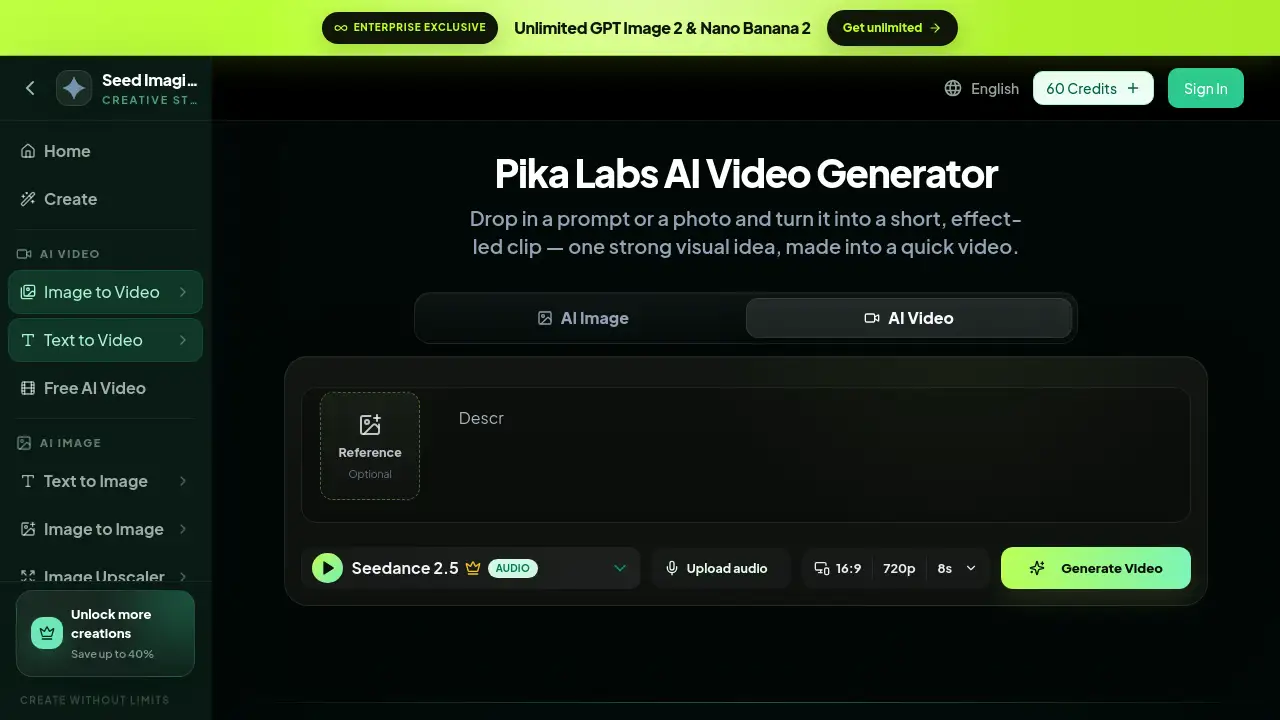
Image to Video AI from Seed Imagine brings Pika Labs AI video generator tools into one simple workspace. Users can create short AI videos by typing a prompt or uploading a photo. The service focuses on quick, effect-led clips with one strong visual idea. Image to Video AI makes it easy to turn still ideas into moving content for social feeds, product demos, and creative experiments.
What is Image to Video AI?
Image to Video AI is a video creation tool that uses Pika Labs AI video generator technology to turn text prompts and source images into short, focused clips. Instead of building complex scenes, the tool encourages users to start with one visible action or transformation. This keeps the output clear and satisfying.
The product solves a common problem: many people want to make short video content but do not have advanced editing skills. With Image to Video AI, anyone can describe an effect or upload a photo and get a quick video in return. It is designed for short-form formats such as social media posts, vertical clips, product reveals, and character animations.
The tool supports text-to-video and image-to-video workflows. This makes it useful for content creators, ecommerce teams, social media managers, and anyone exploring AI video creation. The focus is on small, effect-led video ideas that are fast to make and easy to share.
Key Features of Image to Video AI
Text-to-Video Generation
Users can type a simple prompt that describes a scene, an action, and a final look. The text-to-video feature then turns that description into a short AI video with a clear beginning, main event, and ending state.
Image-to-Video Animation
The image-to-video mode lets users upload a photo and animate it. The subject and composition stay close to the original while motion is added to a person, object, or background.
Transformation Effects
Pika Labs AI video generator excels at visual changes. Users can crush, melt, inflate, swap, or restyle an element within the frame. These transformation effects are popular for satisfying short clips.
Product Effects
Product images can be turned into motion clips with packaging reveals, playful movements, and commercial-looking effects. This is especially useful for ecommerce videos and campaign content.
Motion Control
Users can describe what should move, how fast it should move, and whether the camera should track, orbit, push in, or stay fixed. This gives more control over the final AI video without needing editing tools.
Social Clip Support
The output is designed for short-form platforms. Social clips, vertical shots, and quick visual ideas fit naturally into feeds where fast and bold motion performs well.
Camera Direction
The tool also accepts camera directions in the prompt. This helps users guide the viewer’s attention and create a more dynamic result from one source image or text idea.
Use Cases for Image to Video AI
Social Media Content
Short AI videos are perfect for Instagram, TikTok, YouTube Shorts, and similar platforms. A fast transformation or product motion clip can stop a viewer from scrolling.
Ecommerce Product Clips
Product images can be animated into short demo videos. This includes packaging reveals, fabric motion, and small product transformations that keep a clear commercial look.
Character Animation
Illustrations and character images can be brought to life. Actions, reactions, and gestures help give an animated figure a more natural feel.
Surreal Visual Experiments
Users can create miniature worlds, scale changes, material swaps, and unexpected room changes. These experimental clips work well for creative prototyping and visual testing.
Food and Lifestyle Videos
Food transformations, beauty check-ins, and lifestyle moments can be turned into clean vertical clips. These videos work well for brands that want quick and punchy content.
How to Use Image to Video AI
Using Image to Video AI is simple and follows a short creative flow:
- Start with a prompt or an image. Choose one subject and make sure the source frame clearly shows the shape, pose, or composition you want to keep.
- Describe the effect. Name the visible action, transformation speed, and the moment the final state appears.
- Lock the important details. Specify faces, products, backgrounds, camera behavior, or colors that should stay stable during the effect.
- Generate and refine. Watch the timing and details, then clarify anything that did not follow your direction.
The whole process is built around one strong visual idea, so the Pika Labs AI video generator can deliver a focused and readable result.
Target Audience for Image to Video AI
- Social media creators who need regular short clips
- Ecommerce marketers and product managers
- Digital advertisers and brand teams
- Animators and illustrators exploring motion
- Small business owners who want quick product videos
- Content agencies producing short-form assets
- Anyone curious about AI video creation
Is Image to Video AI Free?
Image to Video AI offers free credits so new users can start creating immediately. After that, paid plans are available for users who need more AI video and image creation capacity. The exact prices and plan details can be found on the official pricing page.
| Plan | Price | Features |
|---|---|---|
| Free | $0 | Free credits, access to text-to-video and image-to-video tools, basic Pika Labs AI video generator features |
| Paid | See official pricing | More credits, advanced AI image and video creation tools, additional creative workflows |
Image to Video AI's Pros and Cons
| Aspect | Pros | Cons |
|---|---|---|
| Ease of use | Simple prompt and image workflow | Results depend on clear prompts |
| Creative control | Users can direct motion and camera | Complex scenes may need refining |
| Output style | Perfect for short AI videos and social clips | Not built for long cinematic productions |
| Pricing | Free credits to start | Full features need a paid plan |
Frequently Asked Questions about Image to Video AI
What is Pika Labs?
Pika Labs is an AI video tool that turns prompts and images into short-form motion and visual transformation clips. It is the engine behind Image to Video AI on Seed Imagine.
Can I turn an image into a video?
Yes. Use a clear source image and describe the main subject motion, environmental movement, and camera behavior. The image-to-video mode will animate the existing composition.
Can I generate video from text?
Yes. Write one scene with a clear starting state, one main event, and an understandable final look. The text-to-video feature will turn that prompt into a short AI video.
How do I prompt a transformation effect?
Name the object, the change, the speed, what stays fixed, and how the result should look at the end. This helps the Pika Labs AI video generator understand the intended visual effect.
Can I make product and social videos?
Yes. Product images and concise visual ideas can become reveals, transformations, lifestyle motion, and vertical social clips.
How do I get a cleaner result?
Use a clean source, keep to one main action, avoid extreme camera motion, and be specific about what should stay unchanged.
Image to Video AI Tags
Image to Video AI, Pika Labs AI video generator, text-to-video, image-to-video, AI video generator, short AI videos, product effects, video transformations, social clips, AI video creation, photo to video AI