Introduction
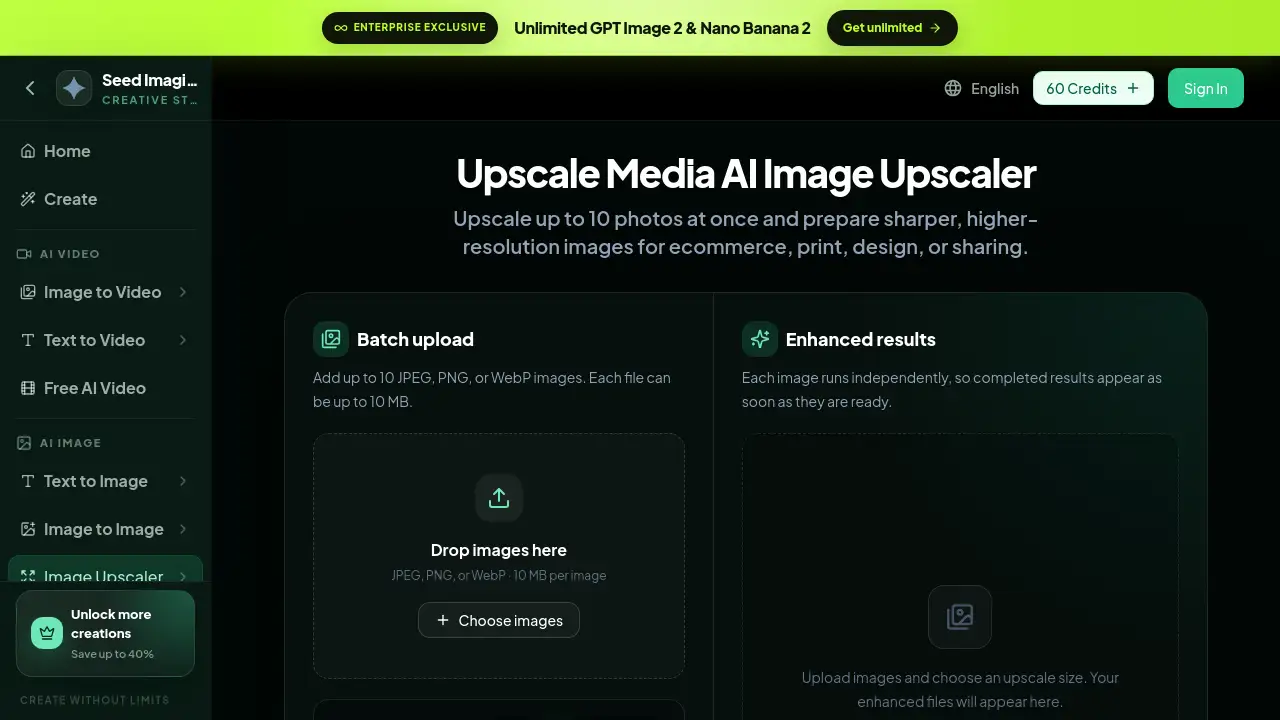
Upscale Media is an AI image upscaler from SeedImagine designed to enlarge photos, product images, portraits, anime, and AI art. It offers clear before-and-after comparisons and supports batch processing. This upscale media tool helps users create sharper, higher-resolution images for ecommerce, print, design, and sharing.
What is upscale media?
Upscale media is a web-based AI image upscaler available at seedimagine.com. It solves the common problem of small, blurry, or low-resolution images by increasing their size up to 8× while adding useful detail. The tool is suitable for ecommerce sellers, photographers, graphic designers, social media managers, and AI artists. It matters because high-resolution visuals are essential for professional online stores, print materials, and creative portfolios.
With an intuitive interface and built-in face enhancement, upscale media makes advanced image enlargement accessible to users without technical skills. Instead of installing complex software, users simply upload an image, choose an enlargement factor, and let the AI image upscaler produce a cleaner, larger file.
Key Features of upscale media
Batch upload and processing
Upscale media allows users to upload up to 10 JPEG, PNG, or WebP images at once. Each file can be up to 10 MB, making this a practical batch image upscaler for projects that need multiple enlarged assets.
Multiple upscale factors
Users can select 2×, 4×, 6×, or 8× enlargement. The upscale media interface keeps all options visible and simple, so users can match the output resolution to the destination, whether for web, social media, or print.
Face enhancement
A dedicated “Enhance faces” option applies face correction to portraits and people. This helps upscale media deliver cleaner results for facial edges, skin detail, hair strands, and fabric texture.
Before and after comparison
Upscale media provides side-by-side before-and-after results. Users can inspect source resolution, output resolution, file size, and visible detail to judge the improvement. This clear comparison is one of the main advantages of using upscale media for image quality checks.
Independent result processing
Each image in a batch runs independently. Upscale media displays each completed result as soon as it is ready, so users do not have to wait for the entire batch to finish before downloading useful files.
Web-based workflow
No software installation is required. The upscale media tool runs directly in a browser as part of the SeedImagine creative suite, which also includes AI video, text-to-image, and image-to-image tools.
Use Cases for upscale media
Ecommerce product photography
Online sellers can enlarge product photos to 4× resolution. With upscale media, this improves product outlines, highlights, surface texture, and background separation, which helps online stores look professional and trustworthy.
Portrait and family photo restoration
Users can upscale portraits and old photos to prepare them for printing or digital sharing. The face enhancement option adds correction for facial edges, hair, and skin, making old or low-quality pictures more usable.
AI art and digital illustration
AI artists and designers can upscale digital artwork without losing line work, curved edges, gradients, or color boundaries. An 8× upscale can turn a small concept image into a detailed, gallery-ready file.
Print and graphic design
Print projects often require high-resolution source files. Upscale media prepares images for posters, flyers, product labels, and other printed materials, reducing the risk of pixelation.
Content creation and social media
Marketers and content creators can upscale images for social posts, banners, and ad creatives. Sharper files tend to look more polished on high-density phone and desktop screens.
How to Use upscale media
Using the upscale media AI image upscaler takes only a few simple steps:
- Upload the original image. Choose the highest-quality JPEG, PNG, or WebP file available, or upload up to ten images for batch upscaling.
- Select an upscale size. Pick 2×, 4×, 6×, or 8× depending on the pixel dimensions you need.
- Enable face enhancement if needed. Turn on “Enhance faces” when the image contains portraits or people.
- Run the upscaler. Start the upscale media process and wait for each image to appear in the results section.
- Compare and download. Use the before-and-after view to inspect the enlarged result, then save the high-resolution file.
Target Audience for upscale media
- Ecommerce sellers and online store owners
- Photographers and portrait editors
- Graphic and print designers
- AI artists and digital illustrators
- Social media managers and content creators
- Business owners who need a reliable AI image upscaler
Is upscale media Free?
The pricing details are not fully listed on the upscale media product page, but the tool uses a credit-based system. Each batch shows an estimated cost in credits before processing. The platform offers a 60 Credits option and claims to save up to 40% on larger plans. Enterprise users can access unlimited GPT Image 2 and Nano Banana 2 through SeedImagine’s enterprise plan.
| Plan | Price | Features |
|---|---|---|
| 60 Credits | See official pricing page | Pay-per-use credits for AI tools including upscale media |
| Enterprise | Contact sales | Unlimited GPT Image 2 & Nano Banana 2, exclusive access |
For exact credit prices and current free trial availability, users should visit the official SeedImagine pricing page.
upscale media's Pros and Cons
| Aspect | Pros | Cons |
|---|---|---|
| Pricing | Credit system allows flexible purchases; bulk plans may save up to 40% | Occasional users may find credit costs less predictable |
| Features | 2× to 8× upscaling, batch upload, face enhancement | No explicit editing tools beyond upscaling |
| Ease of use | Simple web interface with clear before-and-after view | Requires sign-in and credits to process images |
| Batch processing | Up to 10 images at once; independent processing | File size limit of 10 MB per image |
| Output quality | Sharp results for ecommerce, portrait, and AI art | Output quality depends on the source image |
Frequently Asked Questions about upscale media
What is upscale media?
Upscale media is an AI image upscaler from SeedImagine. It enlarges images using artificial intelligence, offering up to 8× resolution increases and clear before-and-after comparisons.
What image formats does upscale media support?
Upscale media supports JPEG, PNG, and WebP files. Each uploaded file can be up to 10 MB, and users can add up to 10 images per batch.
Can I upscale multiple images at once?
Yes. Upscale media supports batch upload and batch upscaling. Each image runs independently, so completed results appear without waiting for the entire batch to finish.
What upscale sizes are available?
Users can choose 2×, 4×, 6×, or 8× enlargement. For example, a 320 × 180 px source image becomes 1280 × 720 px with a 4× upscale.
Does upscale media improve faces?
Yes. The “Enhance faces” option adds face correction for portraits and people. This helps preserve facial edges, hair strands, skin detail, and fabric texture.
Is upscale media free?
The product page does not confirm a completely free plan. Upscale media uses credits, and the platform sells credit packages such as 60 Credits. Users should check the official pricing page for the latest free trial or credit offers.
upscale media Tags
upscale media, AI image upscaler, image upscaler, upscale images, batch image upscaler, photo upscaler, 4x upscale, 8x upscale, high resolution image, face enhancement, before and after upscaler, SeedImagine upscaler