Introduction
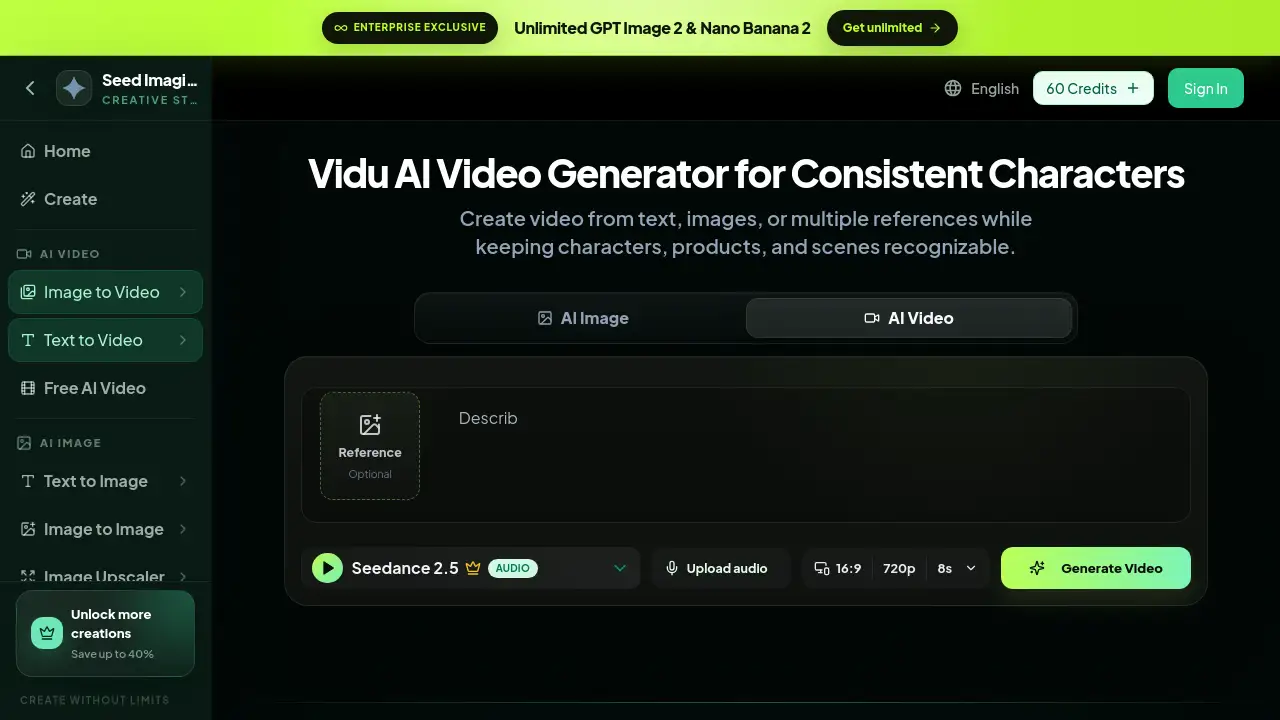
Character Video AI is an online AI video generator powered by Vidu AI. It lets users create video from text, images, or multiple references while preserving consistent characters, products, and scenes. This review looks at the main features, typical use cases, and pricing of Character Video AI for creators, marketers, and animators.
What is Character Video AI?
Character Video AI is a specialized AI video generator built around the Vidu AI model. It solves a common problem in AI video creation: characters often change appearance between shots. With this tool, users can upload reference images, write prompts, and generate short clips that keep the same character or product in frame. It is designed for people who need quick visual content without deep editing skills. Because it runs in a browser, it works for solo creators and small teams who want an efficient way to animate artwork, present product ideas, or build character-driven stories.
Key Features of Character Video AI
Character Video AI includes several practical features that make video creation more controlled.
Text to Video Generation
Users can type a prompt and let Vidu AI turn words into a short video. This is helpful for storyboarding, concept previews, and social media clips.
Image to Video Animation
Users can upload a photo or drawing and animate it. The tool uses reference materials to add movement to faces, objects, and scenes while keeping the original look.
Consistent Character and Product Control
With multiple reference images, users can keep characters and products recognizable across different shots. This is especially important for brands and storytellers who need stability in visual identity.
Key Frame Control
The tool allows users to control key frames, which means specific actions or poses can be set at certain points in the video. This gives creators more direction over the final result.
Online Artwork Animation
No software installation is needed. Users can animate artwork online, from anime illustrations to product mockups, using only a browser.
Optional Audio Input
The tool page includes an optional audio upload field. This allows creators to connect sound with motion, which is useful for music clips, dialogue scenes, and product demos.
Use Cases for Character Video AI
Character Video AI is flexible enough for many different creative projects.
Recurring Character Scenes
Creators can build short scenes with the same character to test animation styles or tell a mini-story.
Product Story Videos
Brands can place a product in different backgrounds and actions without losing its identity. Vidu AI videos help ecommerce teams show product features in a lively way.
Anime and Creative Shorts
Artists can animate still anime artwork by turning illustrations into motion clips. This is useful for fan art, concept work, and music videos.
Photo to Gentle Motion
Users can take a portrait or landscape photo and make it move slightly. This works well for emotional moments, memory videos, and simple lifestyle content.
Social Media Content Creation
Social media managers can generate quick video variations for posts by using text prompts and reference images. This reduces the time needed to produce daily content.
How to Use Character Video AI
Using Character Video AI is straightforward and follows a simple online workflow.
- Open the Vidu AI tool page on the Seed Imagine platform.
- Choose a video mode: text to video or image to video.
- Upload a reference image if needed, or type a detailed prompt in the prompt box.
- Select video settings such as aspect ratio, resolution, and duration.
- Press the generate button, preview the clip, and download or save the result.
Target Audience for Character Video AI
- Content creators who need fast video ideas
- Marketers and brand managers who want consistent product visuals
- Animators and digital artists exploring AI animation
- Ecommerce sellers creating product videos
- Social media managers making short-form content
- Filmmakers creating pre-visualization clips
Is Character Video AI Free?
Character Video AI uses a credit-based system, and the tool page shows a 60 Credits sign-in option. This suggests that users can start with a limited number of credits before choosing a paid plan. Detailed pricing, including enterprise options, is available on the official pricing page.
| Plan | Price | Features |
|---|---|---|
| Entry option | 60 Credits displayed on site | Limited access to Vidu AI video generation |
| Paid plans | See official pricing page | More credits, advanced features, enterprise support |
Character Video AI's Pros and Cons
| Aspect | Pros | Cons |
|---|---|---|
| Features | Supports text, image, and multi-reference input | Best results may require prompt practice |
| Character control | Keeps characters and products consistent | Key frame control may feel technical for new users |
| Accessibility | Runs online with no software install | Internet connection required |
| Pricing | Credit entry option; enterprise plans available | Exact cost is not listed on the tool page |
Frequently Asked Questions about Character Video AI
Can Character Video AI keep the same character across different scenes?
Yes. The tool uses reference images and Vidu AI to maintain consistent characters. This is one of the key strengths of Character Video AI.
Do I need a separate Vidu AI account to use Character Video AI?
No. Character Video AI is a tool page that gives access to Vidu AI video generation in one place. Users can sign in and start creating without leaving the platform.
Can I upload my own images to make videos?
Yes. The image to video feature allows users to upload a photo, artwork, or product image and turn it into a moving clip.
Can I generate videos from written descriptions?
Yes. The text to video feature lets users type a scene description and generate a matching video clip.
Does Character Video AI support audio?
The tool page includes an optional audio upload feature. This allows users to add sound or music to the generated video.
Is Character Video AI free to use?
It appears to be credit-based. The site shows a 60 Credits sign-in option, and users can check the official pricing page for full plan details.
Character Video AI Tags
Character Video AI, Vidu AI, AI video generator, text to video, image to video, consistent characters, key frame control, anime video generator, product video AI, online video animator, AI animation tool, multi-reference video