Introduction
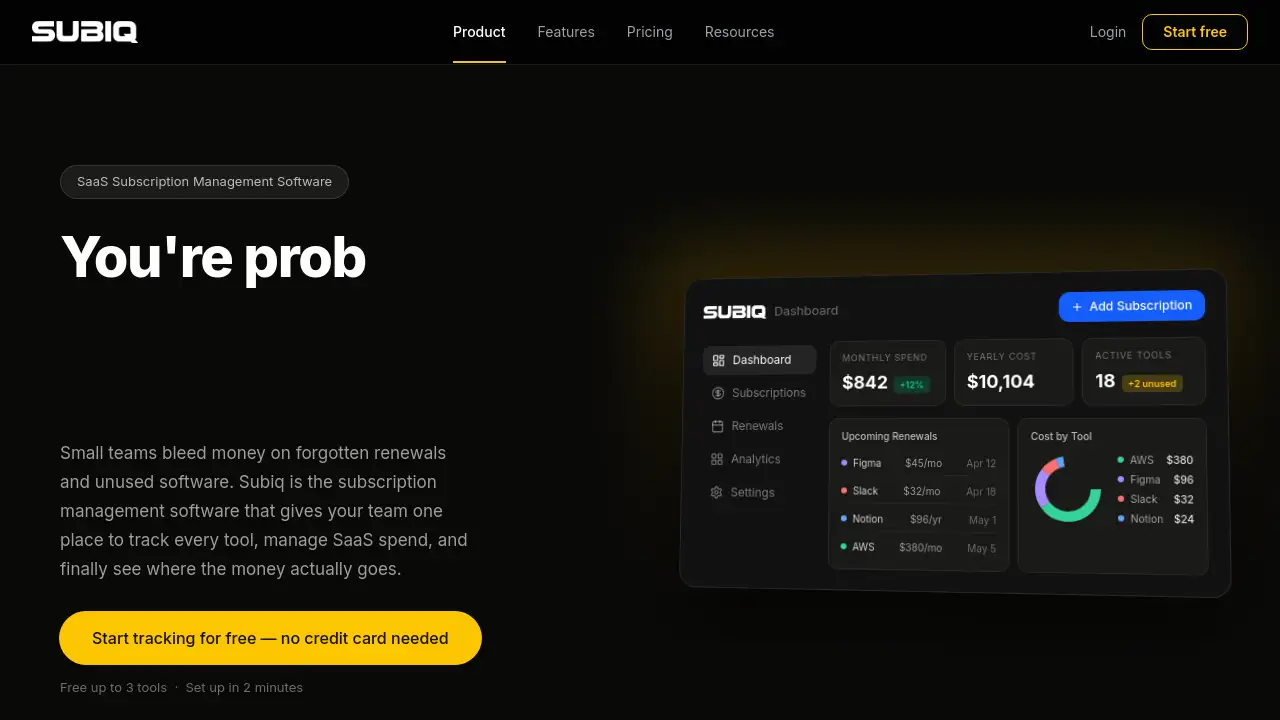
Subiq is a SaaS management platform designed to help small teams track subscriptions, control software spend, and reduce SaaS costs.
What is Subiq?
Subiq is a SaaS subscription management software built specifically for small teams. It addresses the common and costly problem of forgotten renewals and unused software licenses. The platform provides a centralized dashboard to replace messy spreadsheets, giving teams full SaaS spend visibility and control. By automating review cycles and renewal alerts, Subiq helps organizations manage their software subscriptions, prevent surprise charges, and identify savings opportunities, effectively reducing their overall SaaS costs.
Key Features of Subiq
One-Page Subscription Tracking
Subiq consolidates all SaaS subscriptions into a single dashboard, ensuring nothing is forgotten and providing a real-time overview of software spend.
Automated Renewal Alerts
The platform sends proactive notifications before any subscription renews, enabling teams to cancel, downgrade, or renegotiate, a core function of SaaS renewal management.
Team Collaboration & Review Requests
Team members can be invited to contribute, and administrators can schedule automated monthly or quarterly review requests to confirm which tools are actively used, enhancing software license tracking.
Tool Status & Savings Calculation
Team members can tag each subscription as active, unused, or cancelled, and Subiq automatically calculates potential savings based on this status, directly supporting SaaS cost management.
Simple Setup Without Integrations
Subiq requires no complex integrations or onboarding calls. Teams can start managing software subscriptions by manually adding tools, importing a file, or inviting team members to contribute their own.
Use Cases for Subiq
Conducting a Proactive SaaS Audit
Small teams can use Subiq to quickly inventory their entire tool stack, identify forgotten subscriptions, and assess usage, forming the basis for effective SaaS cost management.
Preventing Unnecessary Auto-Renewals
Teams can leverage Subiq’s renewal alerts to gain a heads-up before contracts renew, allowing time to evaluate necessity and avoid paying for unused software subscriptions.
Streamlining Monthly Software Reviews
The platform automates the process of sending review requests to team members, making regular check-ins on tool usage a simple, scheduled part of SaaS spend visibility.
Identifying and Cancelling "Ghost" Subscriptions
By having team members flag tools as unused, administrators can clearly see which subscriptions are dead weight and cancel them to reduce overall SaaS costs.
How to Use Subiq
- Add Your Tools: Start by adding your team's subscriptions to the dashboard. This can be done manually, by importing a CSV file, or by inviting team members to add their own tools.
- Schedule Reviews: Set up automated review requests to be sent to your team on a monthly or quarterly schedule. This prompts members to confirm which tools they actually use.
- Analyze and Act: Review the dashboard to see which tools are tagged as unused and view the automatically calculated potential savings. Use these insights to decide what subscriptions to keep or cancel.
Target Audience for Subiq
- Startup founders and solo entrepreneurs tracking their initial software stack.
- Small to medium-sized business (SMB) teams managing a growing number of SaaS tools.
- Finance or operations managers responsible for controlling software spend and budgeting.
- Team leaders who need visibility into what tools their members are using and paying for.
Is Subiq Free?
Subiq offers a free plan with a paid upgrade path. The pricing is structured as follows:
| Plan | Price | Key Features |
|---|---|---|
| Free | $0/month | Track up to 5 tools, spend dashboard, renewal alerts, import/export. |
| Pro | $15/month (billed annually) | Unlimited tools, team invites & roles, automated review requests, tool status tracking, savings calculation. |
| Business | $39/month (billed annually) | Everything in Pro, plus unlimited team members, custom onboarding, and dedicated support. |
A free plan is available to start with, and no credit card is required for sign-up.
Subiq's Pros and Cons
| Aspect | Pros | Cons |
|---|---|---|
| Setup & Ease of Use | Very quick setup (under 2 minutes), no complex integrations required. | Lacks deep, automated integrations with accounting or billing software. |
| Pricing & Value | Free tier available; Pro plan can pay for itself by cancelling one unused subscription. | The free plan is limited to 5 tools, which may be restrictive for some teams. |
| Features & Focus | Excellent, focused features for SaaS spend visibility and renewal management. | May lack advanced features required by very large enterprises (e.g., advanced contract management). |
| Target Audience | Perfectly tailored for the needs and workflows of small teams and startups. | Larger organizations with complex governance needs may require a more robust platform. |
Frequently Asked Questions about Subiq
What is SaaS subscription management software?
SaaS subscription management software is a tool that helps businesses track, manage, and optimize their recurring software subscriptions. It provides visibility into spending, usage, and renewal dates to prevent waste and control costs.
How does Subiq help reduce SaaS costs?
Subiq helps reduce SaaS costs by providing a clear overview of all subscriptions, sending alerts before renewals to allow for cancellation, and facilitating team reviews to identify and cut unused tools. Its automated savings calculation shows the direct financial impact of these actions.
Can I import my existing spreadsheet into Subiq?
Yes, Subiq allows users to import their existing subscription lists via a file upload (like a CSV), making it easy to transition from manual software license tracking in spreadsheets to the platform.
Who in my team should have access to Subiq?
Typically, a finance lead, operations manager, or team lead would be an administrator. It’s also beneficial to invite all team members who use software tools so they can participate in review requests and provide accurate usage data.
Does Subiq automatically cancel subscriptions for me?
No, Subiq does not automatically cancel subscriptions. It provides the alerts, data, and insights—like flagging unused tools—to inform your decisions. The actual cancellation action must be taken by a team member within the vendor's platform.
What happens if I exceed 5 tools on the Free plan?
If you exceed the 5-tool limit on the Free plan, you will need to upgrade to the Pro plan to continue tracking an unlimited number of SaaS subscriptions.
Subiq Tags
SaaS management, subscription tracking software, SaaS cost reduction, software spend management, SaaS renewal alerts, subscription management platform, SaaS cost control, small business SaaS tools, software license tracking, reduce SaaS spend, SaaS audit tool, manage software subscriptions