Introduction
Free YouTube, TikTok, and Instagram transcript generator.
What is Transcript.im?
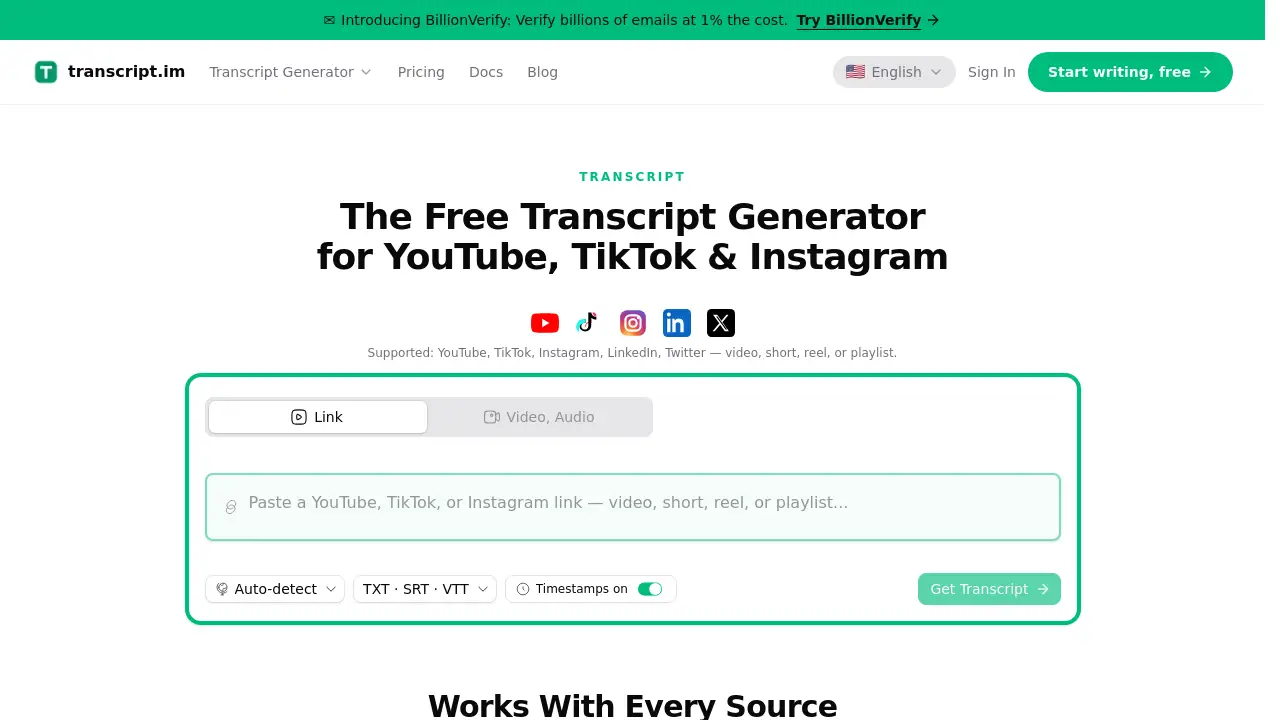
Transcript.im is an online transcript generator that turns YouTube, TikTok, and Instagram links — or uploaded video and audio files — into clean, timestamped text. It is built for creators, students, marketers, journalists, and teams that need searchable, editable transcripts without manual typing.
The platform works as a free YouTube transcript generator, a free TikTok transcript generator, and a free Instagram transcript generator. When captions already exist, it pulls them. When they do not, AI transcription creates a timestamped transcript from the spoken audio. Users can upload a video or audio file up to 5 GB on the Video or Audio tab.
After the text is ready, Transcript.im becomes more than a basic transcript generator. The timestamped transcript can be translated into 7 supported languages, summarized, outlined, or turned into a mind map. It can also be exported as TXT, SRT, or VTT for subtitles, editing, or publishing. This makes it useful for content repurposing, study notes, meeting minutes, sales pitches, and localized ad variations.
Key Features of Transcript.im
Free YouTube, TikTok, and Instagram Transcript Generators
Paste a YouTube, TikTok, or Instagram link and get a clean, timestamped transcript. The free transcript generator checks existing captions first and uses AI transcription when captions are missing.
AI Transcription for Uploaded Files
Upload a local video or audio file up to 5 GB and let AI transcription handle the spoken audio. This is helpful for lectures, interviews, podcasts, and internal recordings that are not hosted online.
Translate Transcripts Into 7 Languages
Translate a transcript in one click while keeping timestamps intact. The translated text can be compared side by side with the original and exported as TXT, SRT, or VTT.
Summaries, Outlines, and Mind Maps
Ask AI to summarize a transcript, build an outline, or create a mind map from the text. Every summary point can be traced back to the moment it was spoken.
Batch Transcription and Merged Exports
Run up to 4 concurrent extractions, queue a channel backlog or a semester of lectures, and retry failed items individually. Export the whole batch as one ZIP or a merged TXT, CSV, or SRT file.
Timestamped Text and Flexible Export Options
Keep every line tied to its original timecode. Export the final transcript as TXT, SRT, or VTT for blogs, subtitles, show notes, or video editing workflows.
Use Cases for Transcript.im
Content Repurposing
Turn a YouTube transcript into a blog post, newsletter, thread, or fresh video script. A TikTok transcript can become a short-form ad script or a follow-up post without rewatching the clip.
Study and Meeting Notes
Transcribe recorded lectures, tutorials, and calls into summaries, outlines, or mind maps. Students and teams can search the text later instead of scrubbing through hours of audio.
Sales and Marketing
Use an Instagram transcript or TikTok transcript to build personalized sales pitches, localized ad variations, and landing page copy. The same recording can speak to different segments with small changes.
Localization and Subtitles
Translate a transcript and export SRT or VTT files so subtitles line up in another language. This helps creators localize videos without re-recording the original audio.
Podcast Highlights and Searchable Archives
Find quotes, key points, and strong moments inside a podcast transcript. Keep months of recordings as searchable text instead of scattered audio files.
How to Use Transcript.im
- Paste a YouTube, Instagram, or TikTok link, or upload a video or audio file up to 5 GB.
- Let the transcript generator check for existing captions or use AI transcription when none are found.
- Review the clean, timestamped transcript in the chosen language.
- Use AI to translate, summarize, outline, or create a mind map from the text.
- Export the result as TXT, SRT, or VTT, or download a merged batch file.
Target Audience for Transcript.im
- Content creators and video editors
- Social media managers and agencies
- Students, teachers, and researchers
- Marketers and sales teams
- Podcasters and journalists
- Remote teams that need searchable meeting notes
- Localization and subtitling professionals
Is Transcript.im Free?
Transcript.im advertises free YouTube, TikTok, and Instagram transcript generators. The homepage describes a free transcript generator flow, including link pasting, file uploads up to 5 GB, AI transcription, translation, summaries, mind maps, and TXT/SRT/VTT exports. Batch features such as 4 concurrent extractions, retries, and merged exports are also listed.
Pricing details beyond the free tools are not fully specified in the reference information. Users who need current plan limits, upload quotas, or paid options should check the official Transcript.im website or signup page for the latest terms.
Transcript.im's Pros and Cons
| Aspect | Pros | Cons |
|---|---|---|
| Pricing | Free transcript generator tools for YouTube, TikTok, and Instagram | Full paid plan details and usage limits are not clear from the reference |
| Features | AI transcription, translation, summaries, outlines, mind maps, and batch exports | Accuracy can vary with audio quality, accents, and source captions |
| Usability | Simple link paste or file upload up to 5 GB | Large files and long videos may take time to process |
| Scale | 4 concurrent extractions, retry on failure, merged TXT/CSV/SRT exports | Batch speed depends on source length, caption availability, and provider capacity |
| Output | Timestamped transcript with TXT, SRT, and VTT export options | Some platform-specific or private links may fail and need retrying |
Frequently Asked Questions about Transcript.im
Is Transcript.im a free YouTube transcript generator?
Yes. Transcript.im presents itself as a free YouTube transcript generator, and it also offers free TikTok and Instagram transcript tools. It pulls existing captions when available or uses AI transcription when they are not.
Can I upload my own video or audio file?
Yes. Transcript.im accepts local video or audio files up to 5 GB. This is useful for lectures, meetings, podcasts, and other recordings that are not already online.
Does Transcript.im translate transcripts?
Yes. It supports translation into 7 languages and keeps timestamps so subtitles still line up. The translated transcript can be exported as TXT, SRT, or VTT.
Can it summarize or create a mind map from a transcript?
Yes. The platform can generate a summary, an outline, or a mind map from a YouTube transcript, TikTok transcript, Instagram transcript, or uploaded file. Each point can be traced back to the timestamped text.
Does Transcript.im support batch transcription?
Yes. It offers 4 concurrent extractions, queue controls, retry on failure, and merged exports. This helps with channel backlogs, lecture archives, or a week of client calls.
Are the transcripts timestamped?
Yes. Transcript.im focuses on clean, timestamped text. The timestamps help users find exact quotes, align subtitles, and edit scripts without losing the original context.
Transcript.im Tags
Transcript.im, free transcript generator, YouTube transcript generator, TikTok transcript generator, Instagram transcript generator, AI transcription, timestamped transcript, translate transcript, summarize transcript, mind map generator, batch transcription, export SRT VTT