Introduction
Photo restoration is the process of bringing old, damaged, or faded images back to life. With AI photo restoration, anyone can restore old photos online by removing scratches, repairing tears, reviving faded colors, and recovering face details. The Upscayl Photo Restoration tool is built for family albums, vintage portraits, and historical archives. It runs in the browser, supports JPG, PNG, WEBP, and ZIP uploads, and lets users process up to five images at once. Photo restoration matters because old prints continue to fade and crack, so making a clean digital copy helps preserve family history, recognize important faces, and prepare images for sharing, archiving, or printing.
What is Photo Restoration?
Photo restoration refers to repairing visual damage and age-related wear in old photographs. The Upscayl Photo Restoration tool applies AI to old scans and digital copies, cleaning scratches, dust, stains, tears, faded color, and blur. It is suitable for families, genealogy researchers, archivists, photographers, and anyone who has old images in poor condition. Photo restoration is important because old prints continue to degrade over time. A restored digital copy preserves people, places, and memories for sharing, archiving, or printing. AI photo restoration can also colorize black-and-white photos, making historic images feel more alive while keeping their period character. People who restore old photos for family history projects will find the whole process fast and straightforward.
Key Features of Photo Restoration
Scratch and Tear Repair
AI photo restoration removes scratches, dust, stains, creases, and light water damage from old images. It also rebuilds cracks, torn edges, and small missing areas using visual information from the surrounding photo. This lets users restore old photos without manual editing.
Photo Colorization
Photo colorization adds natural-looking color to black-and-white and sepia photos. The AI suggests realistic skin tones, clothing colors, and backgrounds, which makes the tool more useful for vintage portraits and inherited snapshots.
Face Detail Recovery
Face detail recovery helps restore soft, blurry, or damaged faces in old photos. AI enhances eyes, facial contours, hair, and skin texture while trying to keep each person recognizable. This feature is especially valuable when this tool is used for family memories or genealogical records.
Faded Color Restoration
Old prints often become yellow and lose contrast. Faded color restoration corrects dull tones, yellowing, and color loss, making images look balanced and vivid again. This feature works alongside other photo restoration options to refresh the entire photograph.
Denoise, Sharpen, and Upscale
The tool reduces grain and digital noise, sharpens soft details, and increases resolution. This prepares restored photos for albums, screens, archives, and larger prints. Combining denoise and upscale with photo restoration helps old images appear cleaner while retaining their original character.
Batch Upload Up to 5 Images
Users can upload up to five images at once in JPG, PNG, WEBP, or ZIP formats, with a maximum of 20 MB per file. Batch upload speeds up the workflow for large family collections or archive projects. It is also a convenient way to restore old photos in batches.
Use Cases for Photo Restoration
Family Albums
This tool is ideal for repairing childhood photos, wedding pictures, reunions, and everyday family snapshots. Families can restore old photos by removing scratches, water stains, and faded colors, so albums can be shared with relatives or printed for keepsakes.
Portraits and Gifts
Users can use this tool to restore and colorize vintage portraits for framed prints, memory gifts, or holiday presents. Face detail recovery keeps ancestors recognizable, and photo colorization adds new life to black-and-white photos.
Genealogy and Archives
Historical and archive photos often have damaged edges, missing details, dust, and age marks. AI photo restoration rebuilds these images while preserving the original scene, which is valuable for genealogy research, local history projects, and inherited collections. Archivists can also restore old photos for local history displays.
How to Use Photo Restoration
Using the Upscayl Photo Restoration tool follows a simple three-step process:
- Upload an old photo or scan. Choose a supported image up to 20 MB. A clean, straight scan with visible facial detail gives the AI more useful information to work with.
- Let AI repair and restore. The system detects scratches, tears, stains, faded color, missing details, and damaged faces, and then restores the image as a complete photo.
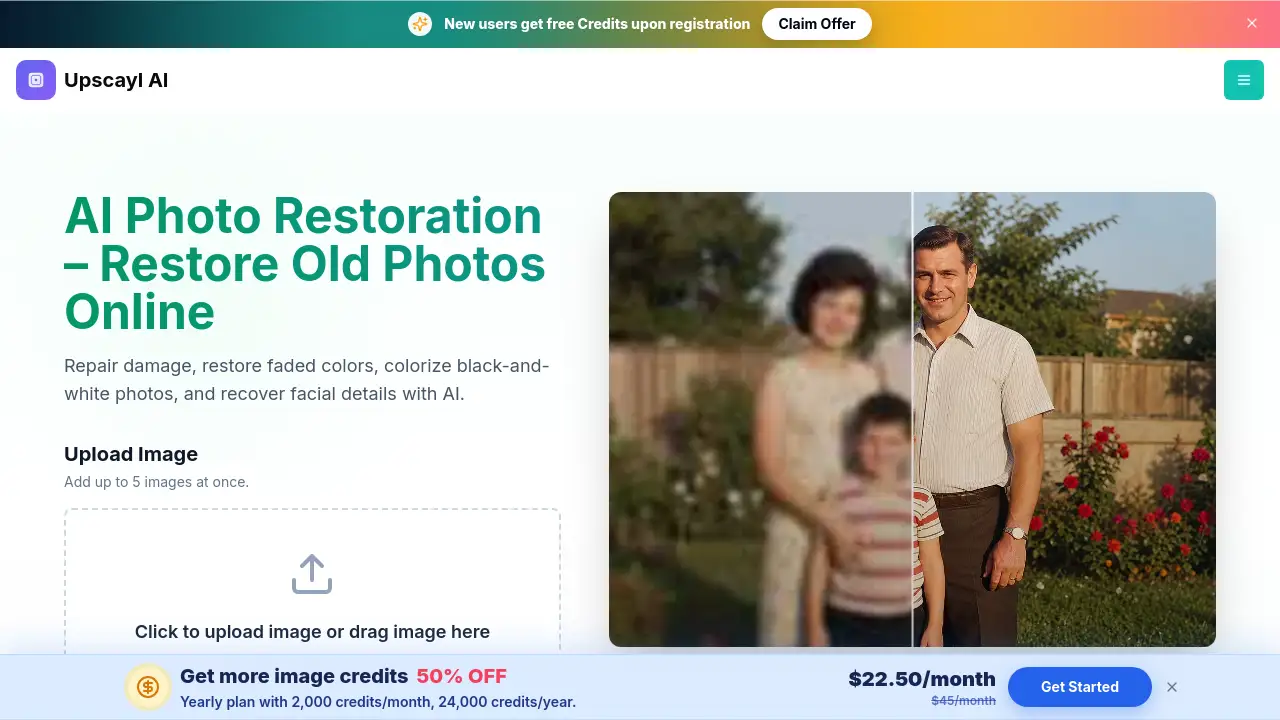
- Compare and download. Review the result next to the original scan, check reconstructed details, and download the restored photo for sharing, archiving, or printing.
No software installation is needed because photo restoration happens online in the browser. It is one of the simplest ways to restore old photos online.
Target Audience for Photo Restoration
- Families and individuals who want to restore old photos from personal collections
- Genealogists and family historians preserving ancestor portraits
- Archivists and heritage organizations repairing historical images
- Photographers working with vintage prints and client restorations
- Gift makers and memory keepsake creators
- Anyone looking for a simple AI photo restoration tool
Is Photo Restoration Free?
The Upscayl Photo Restoration tool is free to try with credits provided to new accounts. An account is required to process and download images, and each successful restoration uses credit according to the current plan rules. Users can restore old photos with the initial free credits, then choose a paid plan when they need more. The exact price of paid credits may change, so users should check the official pricing page for the latest details.
| Plan | Price | Features |
|---|---|---|
| Free trial | $0 | New account credits; upload up to 5 images at once; AI features; process and download restored images |
| Paid credits | Varies | Additional credits for more restorations; same AI features; use credits per successful restoration |
Photo Restoration's Pros and Cons
| Aspect | Pros | Cons |
|---|---|---|
| Pricing | Free trial credits for new accounts | Paid credits required after trial; exact price depends on current plan rules |
| Features | AI handles scratches, tears, faded color, face recovery, colorization, and upscaling | AI interpretation may not be perfect for heavily damaged or missing areas |
| Ease of Use | Simple browser upload with no software installation | Account required to process and download |
| Batch Processing | Up to 5 images can be uploaded at once | File size limited to 20 MB per image |
Frequently Asked Questions about Photo Restoration
What is old photo restoration?
AI photo restoration analyzes aging and physical damage in the source image, then repairs scratches, tears, stains, fading, missing details, and damaged faces. It can also restore color, add color to black-and-white photos, reduce blur, and improve resolution. This makes it helpful for family albums, vintage portraits, and archives.
Can I restore old photos online?
Yes. Upload a family photo, vintage portrait, or historical scan in the browser. AI photo restoration repairs the damage, restores the image, and then lets you compare both versions and download the result. The whole process lets users restore old photos online without installing software.
What kinds of photo damage can AI photo restoration repair?
AI photo restoration can repair common age and storage damage, including scratches, dust, stains, light water damage, creases, tears, faded color, yellowing, grain, noise, blur, and small missing areas. It can also colorize black-and-white photos and recover facial details.
Can photo restoration add color to black-and-white photos?
Yes. Photo colorization adds natural-looking color to black-and-white and sepia photos while restoring faded contrast and tonal detail. Because historical colors are often interpreted, keeping the original scan for reference is recommended.
Can AI photo restoration recover faces in old family photos?
Yes. AI can recover eyes, facial contours, hair, skin texture, and other recognizable details in old portraits and group photos. For heavily reconstructed faces, it is wise to compare the restored image with the original when identity accuracy matters.
Is this photo restoration tool free?
It is free to try with credits provided to new accounts. An account is required to process and download images, and each successful restoration uses credit according to the current plan rules. After the initial credits, users can buy more credits as needed.
Photo Restoration Tags
Photo restoration, AI photo restoration, restore old photos, photo colorization, repair scratches, face detail recovery, restore damaged family photos, colorize black-and-white photos, restore vintage portraits, denoise old photos, upscale old images