Introduction
Waifu2x is an AI image upscaler designed for anime, manga, scans, and digital art. It helps enlarge low-resolution images and reduce visible JPEG artifacts. With Waifu2x, users can process one image or a batch and choose the output size before downloading. This makes Waifu2x a useful choice for anyone who wants sharper, cleaner artwork without complicated software.
What is waifu2x?
Waifu2x is an AI image upscaler that works online to enlarge small images while removing noise and compression artifacts. It is especially suited to anime, manga, line art, scans, and AI-generated illustrations. The tool is built into the Upscayl workspace, so users can upload files, choose a processing mode, and check the result before saving.
The main problem Waifu2x solves is simple: standard resizing stretches pixels and makes defects more visible. Waifu2x reconstructs edges, smooths color transitions, and preserves line art better than basic resize. For anyone who needs to upscale anime images frequently, Waifu2x offers a faster and more focused alternative to manual editing.
Key Features of waifu2x
Upscale Anime and Manga Images
Users can use Waifu2x to upscale anime images by selecting 2x, 4x, 6x, or 8x output. The tool helps turn a small anime image, manga panel, scan, or illustration into a larger file without relying on basic stretched resize.
Reduce JPEG Artifacts and Noise
Waifu2x cleans up blocky compression, rough color transitions, and noise around outlines. This is helpful for compressed anime screenshots and reposted images where JPEG artifacts become more obvious after enlargement.
Keep Line Art and Colors Clear
The AI image upscaler preserves the visual separation between outlines, flat color areas, shading, gradients, text, and small illustrated details. This is important for manga scans and sketches with thin ink lines.
Batch Image Upscaler
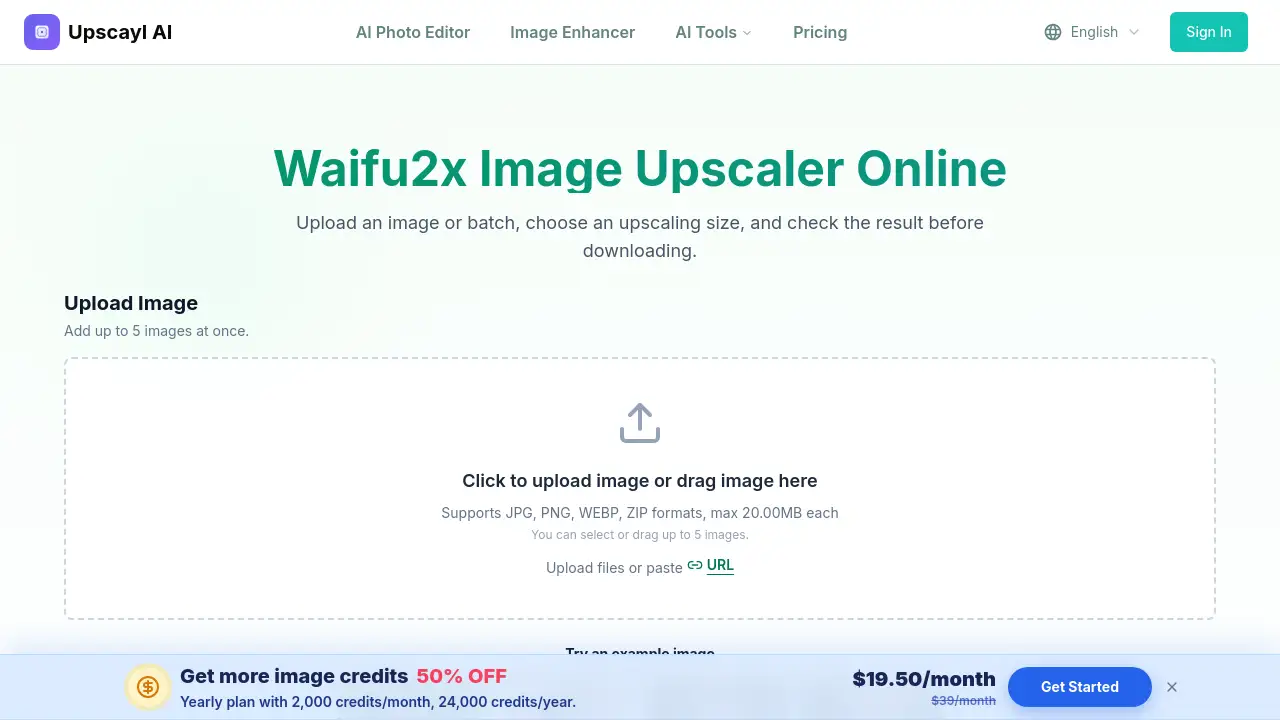
Waifu2x allows users to add up to 5 images at once. Each image can be processed in the same queue, and the user can check every completed result before downloading it individually or with the batch.
Face Enhance Option
The workspace includes a Face Enhance option. This is useful when enlarging character art, screenshots, or portraits where facial details need extra attention. Waifu2x applies this option during the same workflow.
Flexible Output Format
Users can choose the output format in the controls before processing. The Waifu2x online workspace accepts JPG, PNG, WEBP, and ZIP files, with a maximum of 20MB per file.
Use Cases for waifu2x
Clean Digital Illustrations
Artists can upscale anime images with Waifu2x online while checking thin outlines, facial details, flat colors, and smooth shading. Waifu2x is convenient for preparing artwork for prints or portfolios.
Compressed Anime Screenshots
Viewers and editors can repair screenshots from anime episodes where JPEG blocks, halos, or blocky gradients are visible around characters and backgrounds. Waifu2x helps reduce those defects before enlarging.
Manga Panels and Scans
Waifu2x can process black-and-white or color manga while checking lettering, screentones, ink lines, cross-hatching, and panel borders. This is useful for scanlation teams and manga fans.
Sketches and Drawn Outlines
Artists can create a larger working image from line art while watching for softened pencil texture, broken strokes, or overly smooth edges. This AI image upscaler lets them compare the result with the source.
AI-Generated Illustrations
Waifu2x online can increase the resolution of generated artwork and inspect eyes, hands, accessories, text, and background geometry after processing. This helps creators improve AI art before sharing.
Photographic Images
For photographs, users should choose Auto / Photo mode instead of Anime / Art. Waifu2x can upscale photos while treating skin, hair, fabric, and natural texture differently from anime line art.
How to Use waifu2x
Using Waifu2x online is straightforward:
- Upload an image or batch: Choose JPG, PNG, or WebP files from your device. The workspace accepts up to 5 images and also supports ZIP uploads for convenience.
- Choose the image type: Select Anime / Art for illustrations or Auto / Photo for photographs. This helps Waifu2x apply the right cleanup.
- Choose the scale: Pick 2x, 4x, 6x, or 8x depending on how large the output should be. Start with 2x for predictable results.
- Compare and download: Check the full-size result for outlines, eyes, text, screentones, gradients, and repeated patterns. Then download the image in your preferred format.
Target Audience for waifu2x
- Anime artists and illustrators who need to upscale anime images without losing line quality.
- Manga scanlation teams who process manga panels and scans.
- Digital art creators who want a faster AI image upscaler for large exports.
- Anime fans who want to improve compressed screenshots.
- AI art users who need higher-resolution versions of generated illustrations.
- Photographers and casual users who want to upscale photos with Auto / Photo mode.
Is waifu2x Free?
Waifu2x online can be started with free usage available on Upscayl. The current credit cost, batch limit, and available scale options are displayed in the image upscaling workspace. Users can upload one image or a batch, process it, and check the output before deciding whether to buy more credits. Since pricing may change, it is best to check the official Upscayl waifu2x page for the latest details.
waifu2x's Pros and Cons
| Aspect | Pros | Cons |
|---|---|---|
| Pricing | Free usage available for new users | Credit costs can add up for frequent batch processing |
| Features | Good AI image upscaler for anime, manga, and art; batch and Face Enhance options | Results depend on source quality; aggressive cleanup can soften fine details |
| Ease of use | Simple upload, select, and compare workflow | Limited to 5 images per batch and 20MB per file |
Frequently Asked Questions about waifu2x
What does Waifu2x do?
Waifu2x is an AI image upscaler that enlarges low-resolution images and helps reduce visible noise and compression artifacts. It is especially suited to anime, manga, line art, scans, and digital illustrations.
Can Waifu2x reduce JPEG artifacts?
Yes. Waifu2x can reduce blocky compression, ringing, color noise, and rough edges around lines. Results depend on the source, so users should compare text, faces, gradients, and small details with the original image.
Which upscaling size should I choose?
Start with 2x for a predictable enlargement with less reconstruction. Choose 4x, 6x, or 8x when more pixels are needed, then inspect the output at full size because larger scales can make reconstruction changes easier to see.
Does Waifu2x work with manga scans?
Yes. Users can upscale manga panels and scans, including black-and-white artwork. It is important to check small text, screentones, cross-hatching, and thin panel lines because repeated patterns may change during processing.
Can Waifu2x upscale photos?
Yes. For photographs and realistic portraits, choose Auto / Photo mode instead of Anime / Art so natural skin, hair, fabric, and background texture receive photo-focused processing.
Is Waifu2x online free?
Waifu2x online offers free usage on Upscayl. The current credit cost and batch limits are displayed in the workspace, so users can see the exact cost before processing.
waifu2x Tags
Waifu2x online, AI image upscaler, upscale anime images, anime upscaler, manga upscaler, batch image upscaler, reduce JPEG artifacts, upscale digital art, Waifu2x batch, photo upscaler, online image enlarger, Upscayl Waifu2x