Introduction
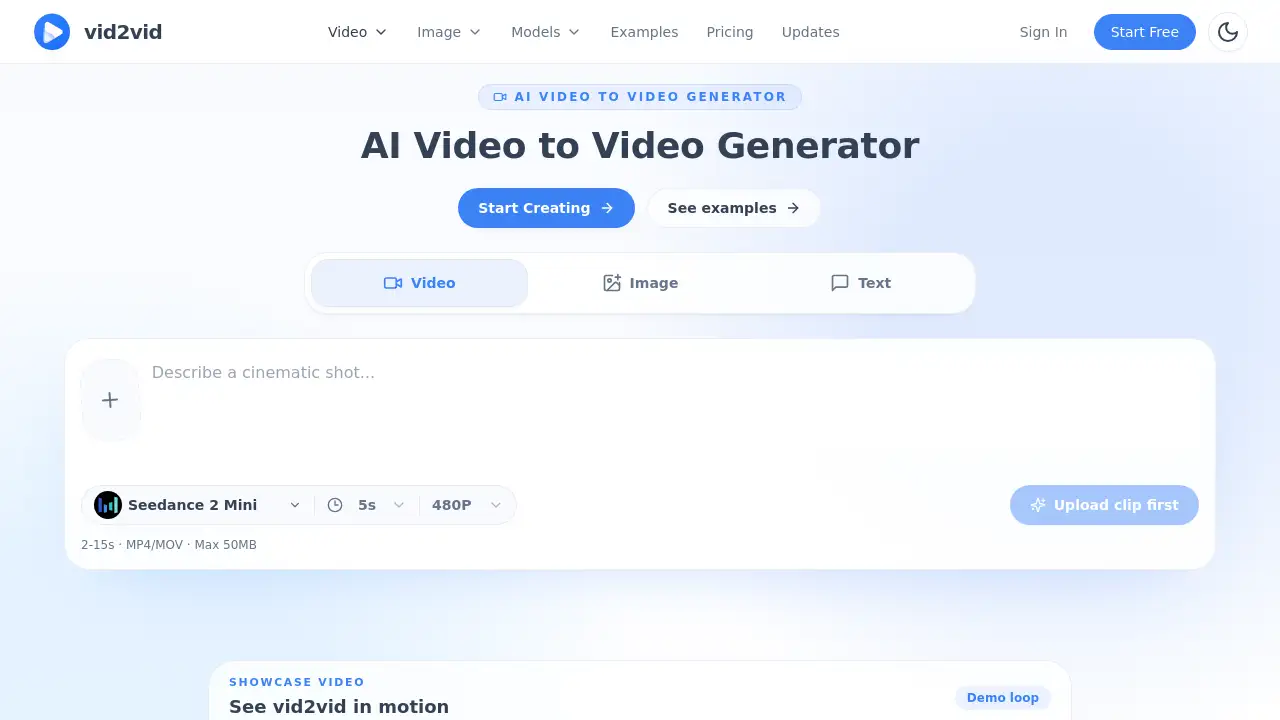
The AI video to video generator vid2vid transforms short clips, images, and text prompts into stylized remixes while preserving the original motion, framing, and timing. This review explores how the tool simplifies clip restyling, image animation, and text-to-video creation for content creators and marketers.
What is vid2vid?
vid2vid is an online creative studio that uses artificial intelligence to modify existing video clips, still images, or written prompts into new visual styles. The core function is a video to video remix process: users upload a short video, describe the desired look in plain language, and the AI generates a new version that keeps the original movement and composition but changes the atmosphere, texture, or artistic direction. Beyond clip restyling, the platform also supports image to video animation and text to video shots, making it a versatile tool for rapid iteration on visual content.
The tool is designed for anyone who needs faster creative workflows — from musicians experimenting with surreal music videos to brand teams producing multiple campaign assets without reshooting. By automating style transfer and motion generation, vid2vid helps users move from reference to final deliverable in minutes, not hours.
Key Features of vid2vid
AI Video to Video Generator
Upload any short clip and describe the new style (e.g., “make it look like a 1980s neon noir film”). The AI preserves the original motion, framing, and timing while applying the visual transformation. This is the flagship video to video workflow for fast iteration on structured clips.
Image to Video Animation
Turn still references into motion-driven shots. Upload an image (from a concept sketch to a product photo) and generate a short animated sequence with depth, rhythm, and movement. Ideal for bringing static campaign assets or storyboards to life.
Text to Video Shots
Enter a text prompt — such as “a paper origami forest at sunset” — and vid2vid creates a matching video clip. This text to video capability allows users to generate entirely new content from scratch when no source footage is available.
Visual Consistency Across Scenes
When building recurring characters or branded worlds, vid2vid helps maintain identity and style across multiple clips. The AI uses reference-led iteration to reduce visual drift, keeping colors, textures, and scene logic consistent from shot to shot.
Preserve Subject and Composition
Even during heavy style changes, the subject and overall composition remain recognizable. For example, a real-world forest can be reshaped into an origami world while the central subject stays intact.
Use Cases for vid2vid
Music Videos and Visual Experiments
Push existing clips into stylized, cinematic, surreal, or genre-driven treatments without rebuilding each scene. Musicians and visual artists can quickly try multiple looks for a single performance or narrative shot.
Product Promos and Campaign Assets
Animate still product imagery to create motion-rich ads. Test multiple visual directions for launch campaigns or paid social media ads in minutes rather than days.
Recurring Characters and Branded Worlds
For serialized content like web series or brand mascots, maintain emotional and visual continuity across scenes. Use reference images to guide the AI and keep identity consistent.
Concept Visualization and Storyboarding
Turn rough concepts or reference images into animated previews. This helps directors, game designers, and ad agencies pitch ideas with moving visuals before full production.
How to Use vid2vid
- Choose your input – Upload a short video clip, an image, or type a text prompt on the vid2vid homepage.
- Describe the new look – In clear, plain language, tell the AI what style, atmosphere, or texture you want (e.g., “watercolor painting with soft lighting”).
- Generate and review – Click the generate button and wait a few moments for the AI to produce the result.
- Refine if needed – Adjust the prompt or use a different reference image to iterate until satisfied.
- Download and share – Export the final video in a format suitable for social media, presentations, or further editing.
Target Audience for vid2vid
- Content creators (YouTubers, TikTokers, Instagram influencers) needing quick style variations
- Music video directors and visual artists experimenting with surreal effects
- Marketing teams producing product ads and campaign assets at scale
- Game developers and world builders looking for animated concept art
- Freelance designers and small studios that want to offer fast client deliverables
Is vid2vid Free?
The official website does not display a detailed pricing page. A free tier is likely available for new users to test the AI video to video generator with limited features or credits. For full access, users should visit the vid2vid pricing section (accessible from the homepage) or contact the team for plan details. The table below reflects common freemium models for similar tools:
| Plan | Price | Features |
|---|---|---|
| Free | $0 | Limited generations, watermarked exports, basic resolution |
| Pro | $X/month | Unlimited generations, high resolution, priority queue, no watermark |
| Enterprise | Custom | Team seats, API access, dedicated support |
(Check https://vid2vid.io for current pricing.)
vid2vid's Pros and Cons
| Aspect | Pros | Cons |
|---|---|---|
| Ease of Use | Simple upload-and-prompt workflow; no technical skills needed | May require multiple iterations for perfect results |
| Features | Three creation modes (video, image, text); strong consistency tools | No offline editing; relies on internet connection |
| Speed | Generates clips in seconds to minutes | Longer processing for high-resolution outputs |
| Creativity | Wide range of styles; can preserve subject composition | Output quality depends on prompt clarity and source quality |
| Pricing | Likely has a free tier for testing | Paid plans may be expensive for heavy users; unclear pricing |
Frequently Asked Questions about vid2vid
What is the difference between video to video and image to video in vid2vid?
In video to video, you upload a short clip and restyle it while keeping the original motion and timing. In image to video, you upload a still image and the AI adds motion, depth, and rhythm to turn it into a short animation. Both are accessible from the main AI video to video generator interface.
Can I use vid2vid to create text to video without any source footage?
Yes. The text to video feature lets you describe a scene in plain language, and the AI generates a matching clip. This is useful when you have no existing video or image to start from.
How long does it take to generate a video?
Generation time depends on clip length and resolution. Most short clips (a few seconds) are produced within 30 seconds to a couple of minutes. Higher output settings may take longer.
Is the output watermarked on the free plan?
Typically, free tiers of AI video tools include a watermark. The vid2vid website suggests a free option, but users should confirm whether watermarks apply. Upgrading to a paid plan usually removes them.
Can I keep the same character or style across multiple videos?
Yes. The platform’s visual consistency feature uses reference images and prompts to maintain identity across scenes. This is particularly useful for branded content and serialized projects.
Do I need any video editing experience to use vid2vid?
No. The workflow is designed for non-technical users. You simply upload, type a prompt, and generate. No timeline editing, keyframing, or complex settings are required.
vid2vid Tags
AI video to video generator, video remix, clip restyling, image to video animation, text to video shots, AI video creator, visual consistency tool, motion-based style transfer, creative AI studio, video generation platform, product ad animation, surreal video effects