Introduction
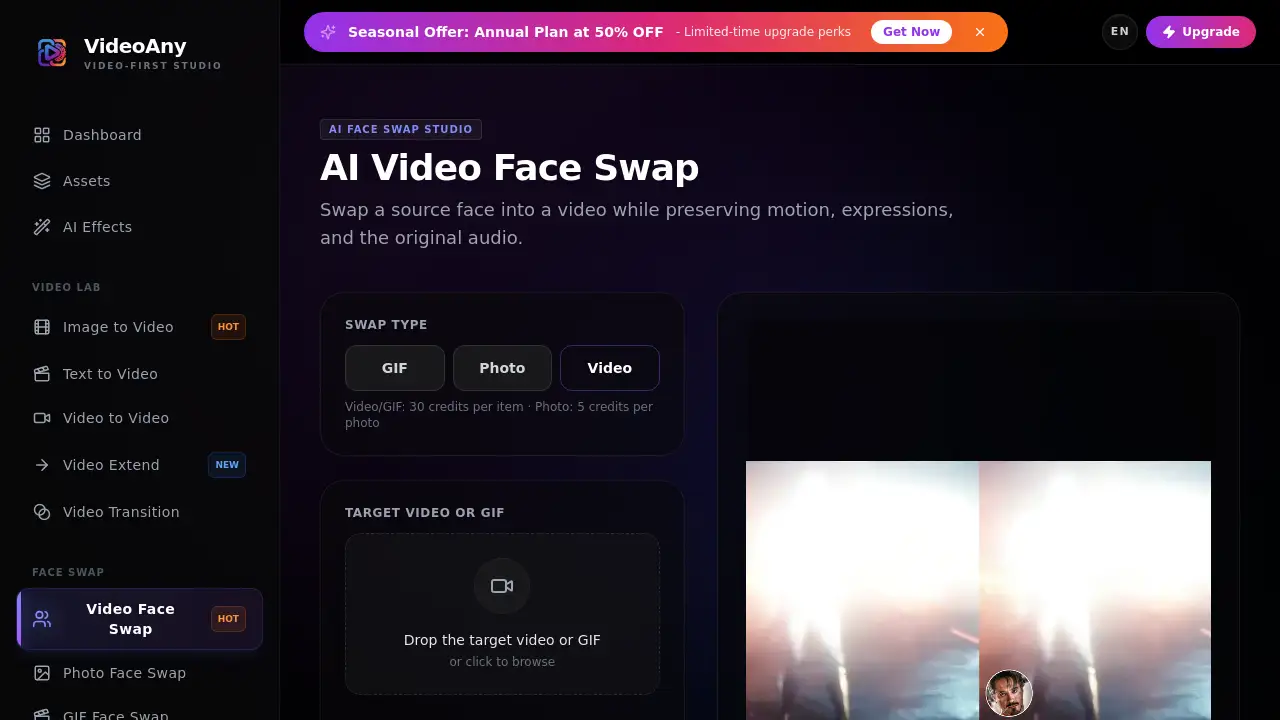
If a user needs to replace a face in a video clip, Video Face Swap from VideoAny is a practical AI tool. It lets users upload a target video and a source face image, then generate an AI video face swap that keeps motion, expressions, and audio intact. This makes the process fast for creators who want consistent results.
What is Video Face Swap?
Video Face Swap is a browser-based feature inside VideoAny’s AI Face Swap Studio. It solves a common problem: editing a face in moving footage manually takes time, but an AI video face swap can do the job automatically. The system analyzes the target video, tracks the selected face across frames, and blends in the source face image. The result is a face swap video that keeps the original performance, lighting, and timing.
This video face swap tool is useful for video editors, content creators, marketers, and anyone who needs fast AI face swap results. Any AI video face swap system needs to track movement and expressions, and this tool does that well. It matters because it turns a complex effect into a simple upload-and-generate workflow. The tool also encourages responsible use by requiring permission for both the video and the face image.
Key Features of Video Face Swap
Frame-Consistent AI Replacement
The core feature of this video face swap is frame consistency. The AI tracks a face through each frame and updates the swapped appearance so the clip stays smooth. This prevents flicker and keeps the face swap video stable across the entire duration.
Preserves Motion and Expression
Video Face Swap keeps the target person’s movements, facial expressions, and eye direction. That means a person can smile, turn, or talk while the new face follows naturally. This is an essential element of a convincing AI video face swap.
Retains Original Audio
The tool swaps only the visual face layer. Original dialogue, background noise, and music remain untouched. This helps when creators make a face swap video for a scene that requires the same voice and timing. In short, this video face swap tool gives creators more freedom without losing audio.
Browser-Based Workflow
There is no software to install. Users upload a clip and a face image, then run the swap directly in the browser. This lowers the barrier for anyone who wants to make an AI video face swap without advanced editing skills.
Built-In Prompt Guide
VideoAny provides short tips for better results, such as using a clear front-facing face and avoiding obstructions. These tips help users improve their video face swap quality from the first attempt.
Use Cases for Video Face Swap
Content Creation for Social Media
Creators can use Video Face Swap to make trending videos, parody clips, or interactive content. This AI video face swap saves time and removes the need for manual tracking.
Short Film and Video Projects
Independent filmmakers can use a video face swap to replace an actor’s face in reshoots or test different casting choices. The AI preserves the original performance and audio.
Marketing and Personalized Ads
Marketers can create localized ads by swapping a face in a product video. This face swap video style is effective for testing creative ideas without reshooting.
Entertainment and Education
Educators and entertainers can insert faces into existing clips for lessons, skits, or comments. The video face swap tool is easy to use and gives fast output.
How to Use Video Face Swap
- Go to VideoAny and open the Video Face Swap tool.
- Upload a target video or GIF that contains the face to replace.
- Upload a clear source face image.
- Click generate. The AI video face swap processes the clip and lets users preview the result.
- Save or download the face swap video.
This simple video face swap workflow works in minutes and requires no editing timeline.
Target Audience for Video Face Swap
- Content creators and social media influencers
- Video editors and post-production teams
- Marketers and advertising agencies
- Filmmakers and animators
- Educators and online course creators
- Hobbyists who want a reliable AI video face swap
Is Video Face Swap Free?
Video Face Swap works on a credit system. A video or GIF swap costs 30 credits, while a photo face swap costs 5 credits. For those who need an AI video face swap for a single clip, the credit system keeps costs simple. The platform also runs seasonal offers; for example, the Annual Plan is available at 50% off for a limited time. Exact prices are not listed in the public reference, so check VideoAny's official pricing page for current rates.
| Plan | Price | Features |
|---|---|---|
| Credit Pack | Pay per use | 30 credits per video/GIF face swap, 5 credits per photo face swap |
| Annual Plan | 50% OFF (limited-time) | Faster queues, higher resolutions, expanded usage options |
Video Face Swap's Pros and Cons
| Aspect | Pros | Cons |
|---|---|---|
| Ease of use | Simple upload and generate | Limited control over fine details |
| Output quality | Frame-consistent AI video face swap | Results depend on clear source footage |
| Audio | Original audio retained | Cannot change voice in the same step |
| Pricing | Credit-based, no subscription needed | Cost depends on number of swaps |
| Responsibility | Clear content policy | Still requires careful permission management |
Frequently Asked Questions about Video Face Swap
Which video formats are supported?
The uploader accepts MP4, WebM, MOV, and GIF files up to 50MB. For an AI video face swap, MP4 and MOV are common choices. For best results, use a target video with stable lighting and a clearly visible face.
Will the original audio remain?
Yes. Video Face Swap changes the visual face layer and keeps the original audio from the target video. This makes it useful for dialogue scenes and music videos.
How do I improve temporal consistency?
Use a clear source portrait and a target clip with stable lighting, visible faces, and minimal occlusion. These conditions help the AI video face swap remain stable frame by frame.
Do I need permission to use the video and face?
Yes. Users must own or have explicit permission to edit both the video and the face image. Non-consensual deepfakes and impersonation are prohibited.
What is the cost of a video face swap?
A video or GIF face swap costs 30 credits. A photo face swap costs 5 credits. Seasonal discounts may apply to VideoAny plans.
Does Video Face Swap work on GIFs?
Yes. The same video face swap tool accepts GIF files, so users can swap faces in animated images as well.
Video Face Swap Tags
Video Face Swap, AI video face swap, face swap video, video face swap online, swap face in video, AI face swap, VideoAny, face swap tool, video editing AI, face swap maker, video face swap maker, face swap generator.