Introduction
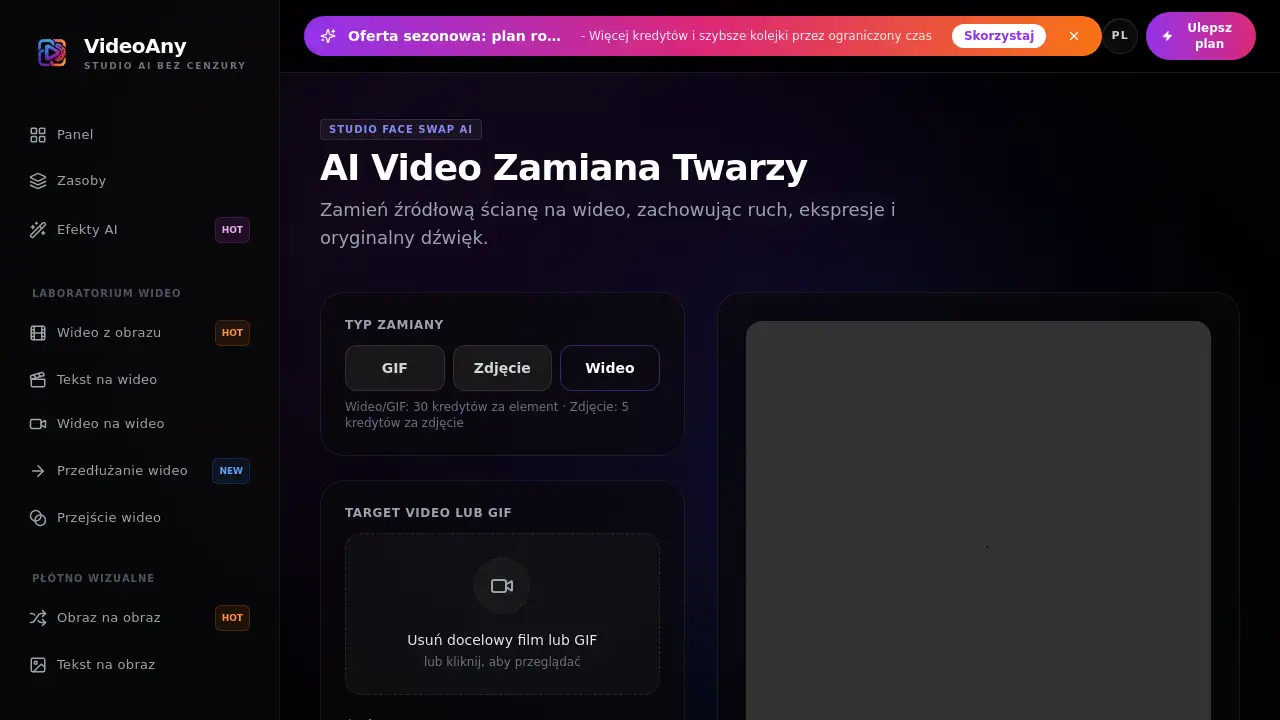
Zamiana twarzy is an AI face swap tool from VideoAny that lets users replace a face in a video, GIF, or photo while keeping motion, expressions, and sound. This face swap online solution is designed for content creators, marketers, and anyone who needs quick video face swap edits without manual compositing. With a simple upload, the tool generates a new clip that matches the chosen face image.
What is zamiana twarzy?
Zamiana twarzy is the Polish term for face swap, and VideoAny uses it as the name of its AI face swap feature. In practice, zamiana twarzy lets you change a face in a target video, GIF, or photo. You upload a target clip and a source face photo. The AI tracks the selected face, swaps in the new identity, and keeps the original expressions, movements, and audio. It is a frame-consistent face swap, not a simple overlay.
This solves a common problem: manual video editing is time-consuming and requires skills in motion tracking and compositing. With this AI face swap tool, the process becomes almost automatic. It suits YouTubers, social media managers, e-learning creators, and anyone looking for an efficient video face swap online. This matters because realistic face swapping can now be done quickly and safely when users follow the rules.
Key Features of zamiana twarzy
AI video face swap
Use the AI model to replace a face in a video while preserving motion, expression, timing, and sound. The video face swap function works directly in the browser.
Frame-consistent face tracking
The zamiana twarzy model follows the selected face across frames and blends the source identity into different poses and expressions. This helps create a coherent video face swap result without obvious flicker.
Audio preservation
The original sound in the target clip remains unchanged. This is important for dialogues, voiceovers, and scenes with music.
Upload and generate in three steps
Upload the target video or GIF, add a clear source face photo, then generate and save the result. There is no complex timeline or keyframe editing.
GIF and photo support
The same face swap logic also works for GIF files and still photos. A photo face swap costs fewer credits than a video or GIF face swap.
File format and size support
The tool accepts MP4, WebM, MOV, and GIF files up to 50MB. This covers most short clips used for social media.
Built-in consent rules
VideoAny asks users to confirm they have the rights to use both the uploaded video and the face image. This reduces the risk of unauthorized deepfake content.
Use Cases for zamiana twarzy
Social media content
Creators can make funny or engaging videos by placing a favorite face into a popular clip. A quick AI face swap makes this process much faster than editing software.
Marketing and product demos
Brands can personalize short ad videos by swapping faces in localized versions for different regions. A video face swap online workflow helps them test variations quickly.
Education and training
Teachers and trainers can create demo videos with a consistent presenter face, or illustrate concepts using familiar characters. The AI face swap tool can keep the audio and expression intact.
Entertainment and fan projects
Hobbyists can create parody videos, short films, or fan edits using clips they own or have permission to use. Zamiana twarzy is a flexible face swap solution for these projects.
How to Use zamiana twarzy
- Go to the VideoAny video face swap page.
- Upload the target video or GIF that contains the face you want to replace.
- Upload a clear source face photo. For best results, choose a front-facing photo with even lighting.
- Click generate, wait for preview, then save the finished file. Each video or GIF swap consumes 30 credits, while a photo swap consumes 5 credits.
This is the core workflow for zamiana twarzy. The process is short, so users can test multiple clips quickly.
Target Audience for zamiana twarzy
- Content creators and YouTubers
- Social media managers and influencers
- Marketing teams and small businesses
- Educators and trainers
- Filmmakers and video editors
- Hobbyists working on parody or fan projects
Is zamiana twarzy Free?
VideoAny uses a credit-based pricing system for zamiana twarzy. Video or GIF face swaps cost 30 credits per item, while photo face swaps cost 5 credits per photo. There is no specific free plan mentioned in the available product information. New users should check the official VideoAny website for the latest pricing, credit packs, and trial options.
| Plan | Price | Features |
|---|---|---|
| Pay-per-use | 30 credits per video/GIF | Video face swap, audio preservation, frame consistency |
| Pay-per-use | 5 credits per photo | Photo face swap, simple upload |
zamiana twarzy's Pros and Cons
| Aspect | Pros | Cons |
|---|---|---|
| Ease of use | Simple three-step upload, no editing skills needed | Limited to short clips up to 50MB |
| Output quality | Preserves motion, expressions, and audio | Best results require clear and stable lighting |
| Pricing | Pay-per-use with credits; photo swaps are cheap | Video swaps cost 30 credits each |
| Safety | Includes consent and usage rules | Users must monitor their own rights and permissions |
Frequently Asked Questions about zamiana twarzy
What file formats can I use?
Zamiana twarzy accepts MP4, WebM, MOV, and GIF files up to 50MB. This covers common clips from phones, cameras, and online downloads.
Does the video face swap preserve audio?
Yes. The AI face swap changes only the visual face layer. The original audio track, including speech and music, remains unchanged.
How many credits does a video face swap cost?
A video or GIF face swap uses 30 credits per item. A photo face swap uses 5 credits per photo. The exact credit pack prices are available on the VideoAny site.
What kind of source photo gives the best result?
Use a clear, front-facing portrait with even lighting and no strong filters. Avoid blurry images and extreme angles to get a consistent result.
Is zamiana twarzy allowed for all videos?
No. Users must have rights and permission for both the target media and the face image. Unauthorized deepfakes, impersonation, or illegal content are prohibited.
Can I use this AI face swap for GIFs?
Yes. The same tool supports face swap in GIF files, and the credit cost is the same as for video: 30 credits per GIF.
zamiana twarzy Tags
zamiana twarzy, AI face swap, video face swap, face swap online, face swap tool, face swap video, AI zamiana twarzy, face swap GIF, face swap photo, deepfake tool, frame-consistent face swap, VideoAny face swap