Introduction
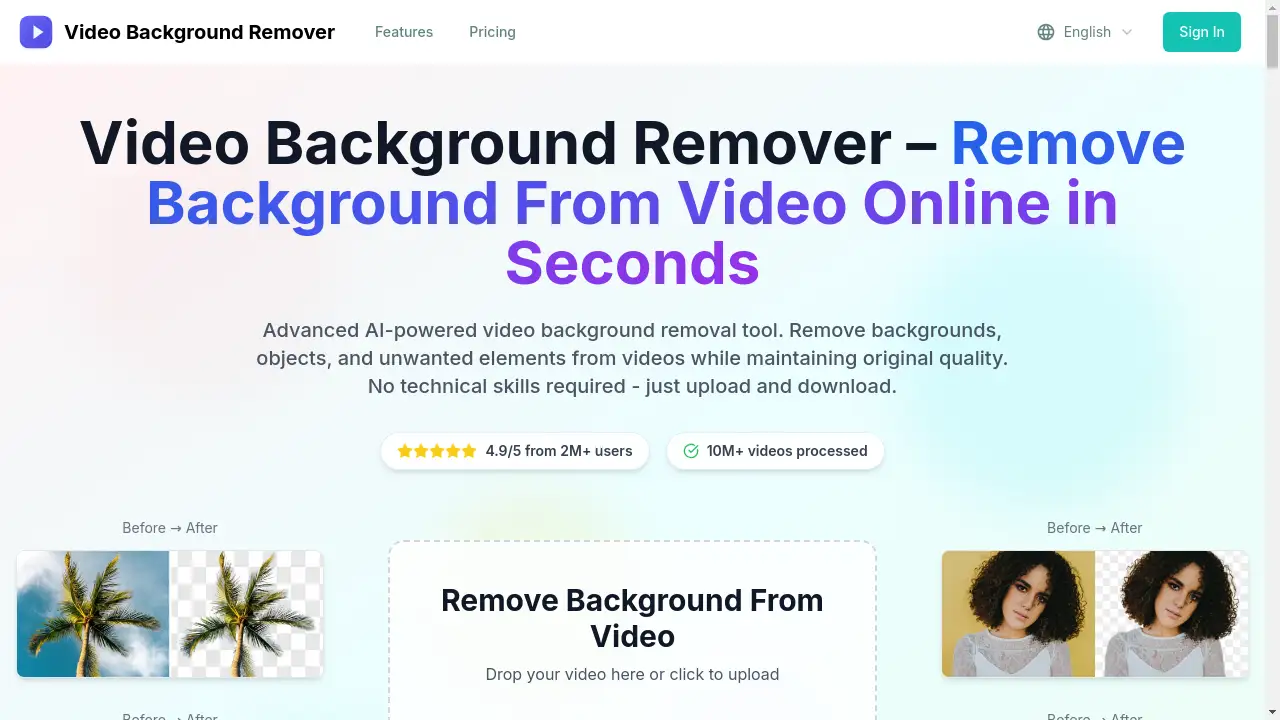
Video Background Remover is an AI-powered online tool for removing backgrounds from videos quickly and for free.
What is Video Background Remover?
Video Background Remover is an online application that utilizes advanced artificial intelligence to automatically separate subjects from their backgrounds in video files. It solves the common and time-consuming challenge of video editing, where manually removing backgrounds typically requires complex software, a green screen setup, and significant technical skill. This tool is suitable for anyone needing to create professional-looking videos without the associated complexity, from individual content creators and e-commerce sellers to marketing teams. Its importance lies in democratizing high-quality video editing, making it accessible, fast, and cost-effective for a broad audience.
Key Features of Video Background Remover
AI-Powered Background Removal
The tool uses cutting-edge AI and deep learning algorithms to automatically detect subjects and remove backgrounds with high precision, eliminating the need for manual selection.
Fast and Simple Process
Users can achieve background-free videos in just minutes by simply uploading their file; no complicated software installation or green screen is required.
High-Quality Video Output
It removes the background without compromising the original video quality, preserving details and edge precision while exporting in HD.
Multi-Format Support
The online video background remover supports a wide range of video formats, including MP4, MOV, AVI, MKV, and WMV, ensuring compatibility with most files.
Privacy and Security
Uploaded videos are automatically deleted from the server within 24 hours, guaranteeing user privacy and data security during the background removal process.
Cross-Device Accessibility
As a web-based tool, it works seamlessly on desktop computers, mobile phones, and tablets without requiring any software downloads.
Use Cases for Video Background Remover
E-commerce Product Videos
Create clean, professional product showcase videos by removing distracting backgrounds, perfect for online stores and marketplaces.
Content Creation for Social Media
Content creators can easily produce engaging videos with custom backgrounds for platforms like YouTube, TikTok, and Instagram.
Professional Presentation and Training Videos
Speakers and educators can remove cluttered office or home backgrounds to maintain a polished, focused appearance in their videos.
Marketing and Advertising Material
Marketing teams can quickly generate videos with transparent or branded backgrounds for advertisements and promotional campaigns.
How to Use Video Background Remover
Using the Video Background Remover tool involves a straightforward three-step process:
- Upload Your Video: Visit the website and drag-and-drop your video file into the upload area or click to browse. The tool supports formats like MP4, MOV, and AVI.
- Let AI Process: The advanced AI technology automatically analyzes the video, detects the subject, and removes the background. Processing typically takes just a couple of minutes.
- Download the Result: Once processing is complete, preview the background-free video and download the final HD-quality file to your device.
Target Audience for Video Background Remover
- Individual Content Creators (YouTubers, social media influencers)
- E-commerce Sellers and Small Business Owners
- Marketing Professionals and Advertising Agencies
- Educators, Trainers, and Online Course Creators
- Freelancers and Video Editing Hobbyists
Is Video Background Remover Free?
The tool offers a free service with limitations, alongside tiered subscription plans for higher usage. The available pricing plans are:
| Plan | Price (Monthly, Billed Annually) | Key Features |
|---|---|---|
| Starter | $7.90/month | 120 video background removals per month, HD output, basic support, all popular formats. |
| Professional (Most Popular) | $15.90/month | 300 removals, priority processing, advanced AI algorithms, premium support, batch processing. |
| Business | $36.00/month | 720 removals, API access, team collaboration tools, custom branding, 24/7 priority support. |
All annual plans offer a 20% discount compared to monthly billing. Users can visit the official website for the most current pricing and any free trial offers.
Video Background Remover's Pros and Cons
| Aspect | Pros | Cons |
|---|---|---|
| Ease of Use | Extremely simple, no technical skills or green screen needed. | Limited creative control compared to professional desktop software. |
| Speed & Efficiency | Delivers results in minutes, much faster than manual editing. | Processing speed for long or very high-resolution videos may vary. |
| Cost | Affordable subscription tiers with a free option available. | High-volume users on the Business plan may find it costly. |
| Output Quality | Maintains original HD quality with precise edge detection. | May require minor manual touch-ups for videos with very complex scenes. |
| Accessibility | Web-based and works across all devices without installation. | Requires a stable internet connection to upload and process files. |
Frequently Asked Questions about Video Background Remover
What video formats does the Video Background Remover support?
The tool supports a wide range of common video formats, including MP4, AVI, MOV, MKV, and WMV, ensuring compatibility with most files from cameras, phones, and other devices.
Do I need a green screen to use this tool?
No, a green screen is not required. The AI-powered video background remover uses advanced algorithms to detect subjects and remove backgrounds directly from any video.
How long does it take to remove a background from a video?
Typically, the process takes about 2 minutes from upload to download. The exact time can depend on the video's length and resolution, but it is designed for fast background removal.
Is my video data kept private and secure?
Yes. The service guarantees privacy and security by automatically deleting all uploaded video files from its servers within 24 hours of processing.
Can I use Video Background Remover on my phone or tablet?
Yes, the tool is a web-based online video background remover that works seamlessly on desktop computers, mobile phones, and tablets through a standard web browser.
What is the difference between the Starter and Professional plans?
The Professional plan offers more monthly video background removals (300 vs. 120), includes priority processing, batch processing capabilities, and premium support compared to the Starter plan.
Video Background Remover Tags
video background remover, remove background from video, AI video background remover, online video background remover, free background remover, remove video background online, video editing tool, AI video editor, background removal software, green screen alternative, HD video background removal, content creator tool