Introduction
ViewMax Studio is an AI video generator that turns a prompt into ready-to-post shorts, complete with scripts, voiceovers, burned-in captions and UGC ads. This review covers how the AI video generator works, what it creates, pricing, pros and cons, and who it suits. It is built for TikTok, Reels and YouTube Shorts.
What is Viewmax Studio?
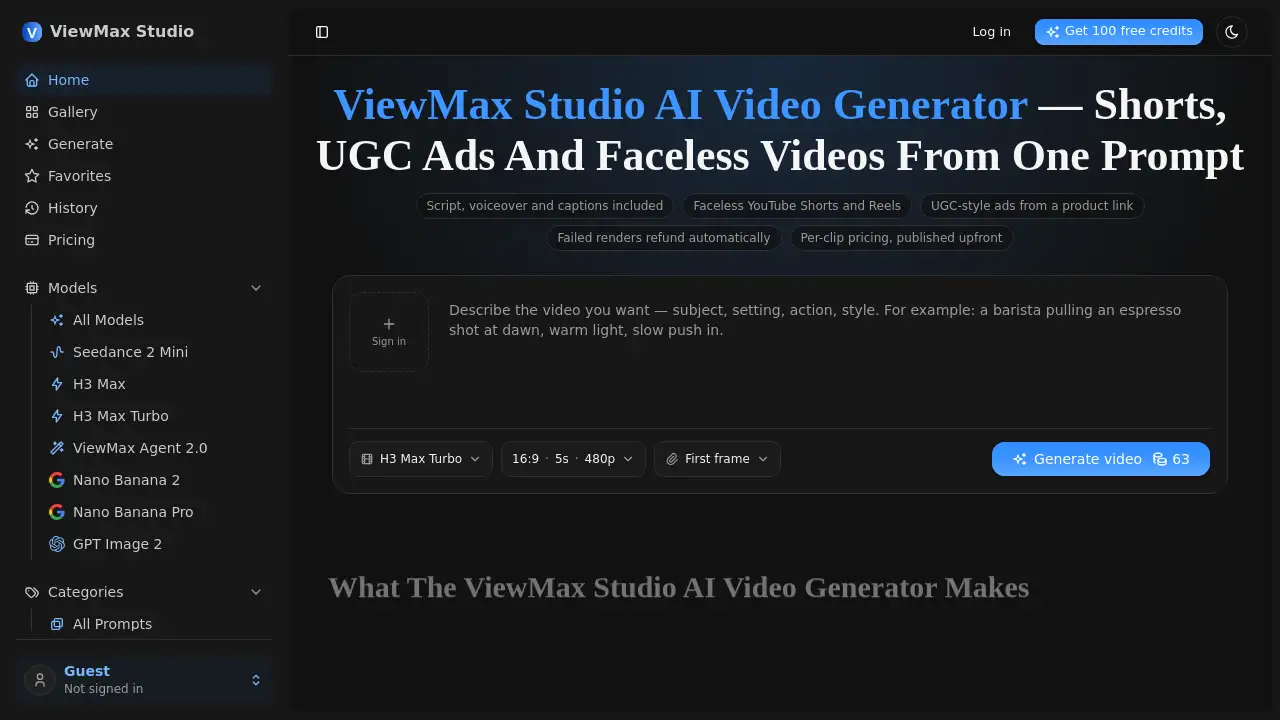
ViewMax Studio is an AI video generator designed for short-form video. It solves a common production problem: creating consistent video content without a camera, editing timeline or production crew. A user describes a video or pastes a script, and ViewMax Agent 2.0 can plan a shot list, render the scenes, add narration and burn in on-screen text in one pass.
This AI video generator is aimed at solo creators, faceless channel operators, marketers and small businesses. It supports vertical 9:16 for Shorts, Reels and TikTok, as well as wide formats. It offers multiple models, 480p through 1080p output, commercial rights on paid plans, upfront per-clip credit costs, and automatic refunds for failed renders. The tool matters because short-form platforms reward volume, and an AI video generator can help maintain posting cadence without a full production workflow.
Key Features of Viewmax Studio
Prompt-to-Video Generation with ViewMax Agent 2.0
Describe a video in plain English, or paste a script up to 5,000 characters. ViewMax Agent 2.0 plans its own shot list, renders the scenes and cuts them into a finished short.
Script, Voiceover and Captions in One Pass
The AI video generator combines scripting, narration and burned-in captions rather than requiring separate tools. This helps create faceless videos, explainers and story clips with fewer manual steps.
UGC-Style Ads from a Product Link
Generate creator-style product ads with a spoken hook and captions. This makes it easier to test multiple ad angles for TikTok, Reels and YouTube Shorts without filming each variation.
Vertical and Wide Format Support
Choose vertical framing for Shorts, Reels and TikTok, or wide framing for YouTube and ads. The output is composed for the selected aspect ratio instead of being cropped down from a different format.
Upfront Credit Pricing and Automatic Refunds
The credit cost appears before rendering, so users can review the cost before committing. If a render fails, credits are refunded automatically rather than requiring a support request.
Commercial Rights on Paid Plans
Paid plans include commercial rights, and exports are watermark-free. There is no per-project licence or attribution line mentioned in the product information.
Use Cases for Viewmax Studio
Faceless YouTube Shorts and TikTok Channels
Create narrated vertical videos without appearing on camera or recording a personal voiceover. This suits faceless channels that need regular short-form uploads.
UGC-Style Ad Testing
Test several UGC ad hooks and angles at a lower cost than a filmed shoot. Marketers can compare variations and scale the strongest performer.
Product and Landing Page Videos
Generate a short product clip for a landing page or e-commerce page. The video can explain a product visually without scheduling a studio shoot.
Explainer and Training Videos
Turn a concept into a narrated explainer or training clip. This works for onboarding, policy summaries and internal communication where a simple video is more engaging than text.
Story and Narration Channels
Cut long-form narration into scenes for story channels. ViewMax Agent 2.0 is designed to create a sequence rather than only a single continuous shot.
How to Use Viewmax Studio
- Describe the video or paste a script. Use plain English, or provide up to 5,000 characters of script.
- Pick a model, aspect ratio and length. Select vertical for Shorts, Reels and TikTok, or wide for YouTube and ads.
- Check the credit cost on the render button. The cost is shown before anything runs.
- Render the video. The AI video generator processes the prompt and returns an MP4.
- Export and publish. The finished clip stays in history and can be downloaded for posting.
Target Audience for Viewmax Studio
- Solo content creators posting short-form video regularly
- Faceless YouTube and TikTok channel operators
- Performance marketers testing UGC ads and hooks
- Small businesses needing product or explainer videos
- Social media managers producing vertical clips at volume
- Trainers and internal teams creating simple explainer content
Is Viewmax Studio Free?
New accounts receive 100 free credits on signup, with no card required. That is enough to test a five-second clip on the fastest model. After that, users buy credits or choose a monthly plan.
| Plan | Price | Features |
|---|---|---|
| Free trial | $0 | 100 credits on signup, enough for a five-second clip on the fastest model |
| Basic | $19.50/month billed yearly ($234/year) | 5,000 credits per month, about 200 clips, standard models, commercial licence, standard support |
| Pro | $34.50/month billed yearly ($414/year) | 10,000 credits per month, about 400 clips, all models, commercial licence, priority support |
| Max | $59.50/month billed yearly ($714/year) | 20,000 credits per month, about 800 clips, all models plus new releases, commercial licence, priority support |
Credit packages are also available. The official pricing page should be checked for current monthly rates, credit packages and plan details.
Viewmax Studio's Pros and Cons
| Aspect | Pros | Cons |
|---|---|---|
| Pricing | Per-clip credit costs shown upfront; failed renders refund automatically; commercial rights on paid plans | High-volume production can increase credit use; monthly and yearly pricing may differ |
| Features | Script, voiceover, captions and rendering in one pass; vertical format support; multiple models | Not for genuine testimonials or real team footage; limited frame-exact art direction |
| Workflow | No camera, crew or editing timeline required; fast short-form output | Shared queue with one active job per plan; output depends on prompt and model choice |
| Audience | Useful for faceless videos, UGC ads, product clips and explainers | Less suited to live-action brand films or complex custom animation |
Frequently Asked Questions about Viewmax Studio
What is ViewMax Studio?
ViewMax Studio is an AI video generator for short-form video. It can turn a prompt or script into a finished clip with narration, captions and vertical or wide framing.
Is ViewMax Studio free?
New accounts get 100 free credits without a card. This covers a short test render. After that, users pay for credits or a monthly plan.
How much does ViewMax Studio cost?
The Basic plan is listed at $19.50 per month billed yearly, Pro at $34.50 per month billed yearly, and Max at $59.50 per month billed yearly. Credit packages are also available.
What video formats does ViewMax Studio support?
It supports vertical 9:16 for Shorts, Reels and TikTok, plus wide formats for YouTube and ads. Output ranges from 480p to 1080p depending on the selected model.
Can ViewMax Studio make UGC-style ads?
Yes. The AI video generator can create creator-style product ads with a spoken hook and burned-in captions. This helps marketers test multiple angles quickly.
Do users own the videos and can they use them commercially?
Paid plans include commercial rights, and exports are watermark-free. It is best to review the official terms for specific commercial use cases.
Viewmax Studio Tags
ViewMax Studio, AI video generator, AI shorts generator, faceless video maker, UGC ad generator, TikTok video generator, YouTube Shorts maker, Reels video maker, text-to-video tool, AI voiceover video, burned-in captions, product video generator