Introduction
An AI video generator that helps creators build short-form video content with a built-in virality prediction score.
What is AI Video Generator?
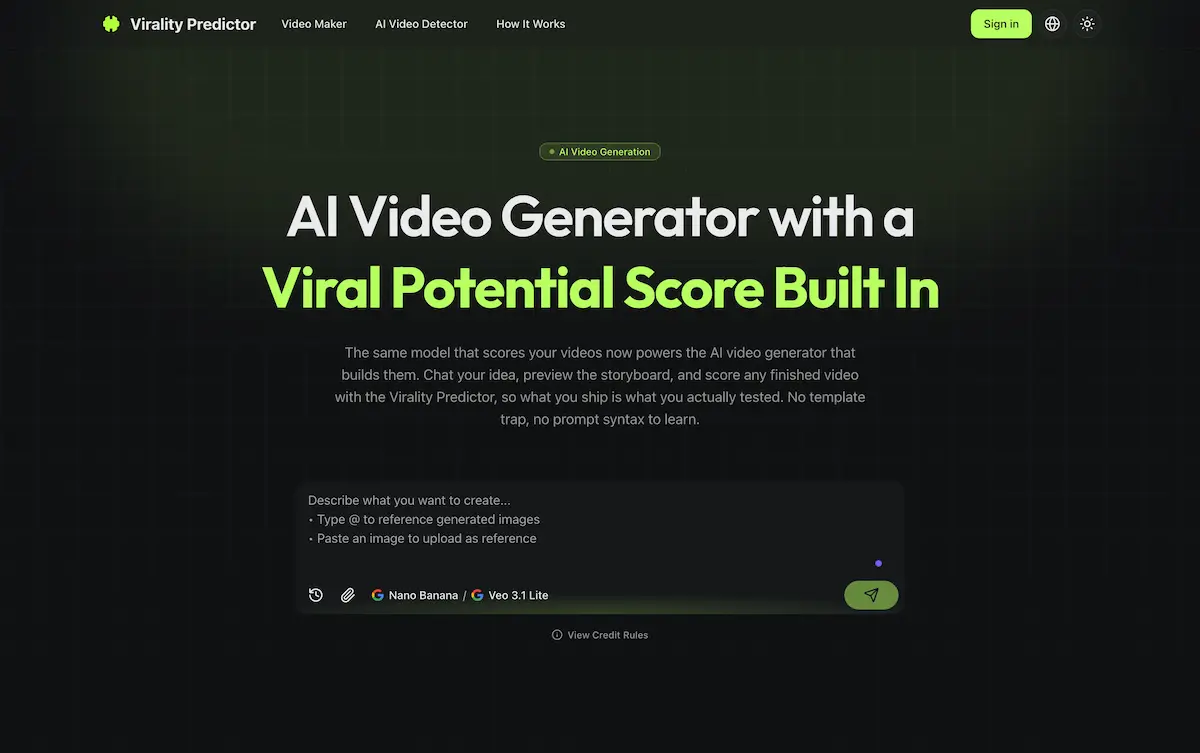
The Virality Predictor Video Maker is an AI video generator designed to help creators produce short-form video content that has a better chance of performing well on platforms like TikTok and YouTube Shorts. It tackles the common issues of "AI slop" and platform throttling by integrating a predictive scoring model directly into the creative workflow. Unlike one-click, template-based tools, this platform allows users to develop their video ideas through a conversational chat, preview a storyboard, and score the final video for its viral potential before posting. This process is particularly beneficial for content creators and small brands who need to maximize their content's reach and engagement while minimizing wasted time and resources on low-performing videos.
Key Features of AI Video Generator
Chat-First Workflow
Users can describe their video concept in plain English rather than using complex prompt engineering, allowing for natural, iterative idea development before any major resource commitment.
Storyboard Preview and Approval
The tool generates a four-to-six frame storyboard for users to review and approve frame-by-frame, ensuring the creative direction is locked in before the more costly rendering process begins.
Built-In Virality Predictor Scoring
After a video is rendered, creators can request a score based on Hook Score, Hold Rate, and overall Viral Potential, providing a data-backed signal on the video's likely performance before publication.
UGC-Style Presets
The generator includes settings that mimic the pacing, jump cuts, and caption styles of successful User-Generated Content (UGC), helping videos avoid the generic "AI look" that platforms may penalize.
Multi-Platform Format Support
It automatically formats videos for the target platform, whether it's vertical 9:16 for TikTok and Reels, horizontal 16:9 for YouTube, or square for Instagram feed posts.
Cost-Effective Iteration
The workflow separates cheap storyboard editing (approximately 1 credit per action) from the more expensive final render, allowing creators to refine their ideas economically.
Use Cases for AI Video Generator
Social Media Content Creation
Ideal for creators and influencers who need a consistent stream of engaging short-form videos for TikTok, YouTube Shorts, or Instagram Reels and want to improve their hit rate.
Brand Marketing and UGC Campaigns
Small businesses and marketers can use it to quickly produce authentic-looking UGC-style ad content that is optimized for platform algorithms and audience retention.
Newsletter or Blog Content Repurposing
Writers and publishers can transform their written articles or newsletter content into compelling video summaries to expand their reach on video-centric platforms.
Rapid Creative Prototyping
Video editors and agencies can use the chat and storyboard features to quickly prototype concepts and visualize shots before committing to full-scale production.
How to Use AI Video Generator
The process for using this AI video maker is straightforward and designed to minimize risk.
- Chat Your Idea: Start by typing a description of your video idea into the chat interface or uploading a reference image. The AI may ask clarifying questions about audience or style.
- Approve the Storyboard: Review the generated storyboard of four to six frames. You can request changes through the chat to adjust the hook, swap shots, or change pacing until you are satisfied.
- Render the Final Video: Once the storyboard is approved, initiate the render. This step incurs the main credit cost but is done with confidence in the approved visual plan.
- Score and Iterate: After rendering, you can request a Viral Potential score for the finished video. If the score is low, the tool highlights weak points, allowing you to return to the storyboard stage for cheap revisions before re-rendering.
Target Audience for AI Video Generator
- Social media creators and influencers (1k–100k followers).
- Small business owners and digital marketers.
- Content teams and agencies producing short-form video ads.
- Writers and bloggers looking to repurpose content into video format.
- Anyone frustrated with the low performance or high cost of other AI video generation tools.
Is AI Video Generator Free?
The tool operates on a credit-based system. A free tier is available via Google sign-in, which provides 10 starter credits to experiment with the chat and storyboard features. For ongoing use, subscription plans are required to replenish credits. The key pricing principle is that chatting and storyboard edits cost very little (around 1 credit), while rendering a final video costs significantly more.
| Action | Approximate Credit Cost | Note |
|---|---|---|
| Chat Turn / Storyboard Edit | ~1 credit | Allows for cheap iteration. |
| Final Video Render | Higher, variable cost | Depends on model and length. Committed only after storyboard approval. |
AI Video Generator's Pros and Cons
| Aspect | Pros | Cons |
|---|---|---|
| Workflow & Value | Cost-effective iteration; pay for the final render only after validating the idea. | Final rendering step is more expensive, requiring credit management. |
| Output Quality | Integrates virality scoring to guide creation towards higher-performing content. | Does not guarantee virality; the score is a predictive signal. |
| Ease of Use | No prompt engineering needed; uses a simple chat and storyboard interface. | New users must understand the two-step (chat/render) credit cost structure. |
| Platform Safety | Designed to create videos that avoid the "low-quality AI" signals platforms throttle. | Algorithm changes are constant; no tool can guarantee platform reach. |
Frequently Asked Questions about AI Video Generator
How is this different from other AI video generators?
Unlike one-click generators, this tool uses a chat-first, storyboard-approval workflow that separates inexpensive idea iteration from the costly final render. Its key differentiator is the optional Virality Predictor score, which provides feedback on a video's potential performance before you post.
Can I start from an image instead of text?
Yes. The AI video generator supports both text-to-video and image-to-video workflows. You can upload a reference image to kickstart the storyboard creation process.
Does the Viral Potential score guarantee my video will go viral?
No tool can guarantee virality. However, the score is based on metrics like Hook Score and Hold Rate, which correlate with platform retention signals. In early testing, videos scoring 80+ reached 100K views at roughly four times the rate of unscored AI clips.
Is there a free trial?
Yes, signing in with Google provides 10 starter credits. This is enough to explore the chat and storyboard features and understand the workflow before any paid commitment.
Can I edit the video after it's rendered?
The workflow emphasizes iteration at the storyboard stage. If you score a finished video and it's low, the tool advises on what to fix, prompting you to go back to the chat and storyboard to make changes before rendering a new version.
What platforms are the videos optimized for?
The AI video maker automatically formats videos for major platforms, including vertical 9:16 for TikTok/Shorts/Reels, horizontal 16:9 for YouTube, and square for Instagram feed.
AI Video Generator Tags
AI video generator, viral potential score, text to video AI, AI video maker, short-form video creator, TikTok video maker, YouTube Shorts generator, virality predictor, UGC video AI, storyboard video tool, social media video tool, AI content creation