Introduction
Seedance 2.0 is a powerful multimodal AI video generator that creates consistent videos with synchronized audio from text and images.
What is Seedance 2.0?
Seedance 2.0 is an advanced multimodal AI video generator developed by ByteDance and accessible via VisualGPT. It is designed to solve a common problem in AI-generated content: inconsistency. Many AI tools struggle to maintain a character's appearance, style, or scene details across different shots, leading to jarring visual morphing. Seedance 2.0 addresses this directly. It allows users to input text prompts alongside reference images and videos, giving the AI precise control over the output. This ensures strong character and scene consistency, making it possible to create multi-shot stories and coherent narratives. The model also generates or syncs native audio—including dialogue, sound effects, and music—in a single step. It is an ideal tool for filmmakers, content creators, marketers, and animators who need to produce professional, production-ready AI videos quickly without constant re-rolls or manual editing.
Key Features of Seedance 2.0
True Multimodal Input Control
Seedance 2.0 accepts a rich combination of inputs, including text prompts, up to 9 reference images, and multiple videos, allowing for precise control over character design, camera movement, and scene pacing.
Native Audio-Visual Sync
This AI video generator creates video and audio together in a single pass, ensuring perfect lip-syncing for dialogue and harmonious alignment of sound effects and music with the on-screen action.
Unmatched Story and Character Consistency
The core strength of this consistent character video tool is its ability to maintain facial features, clothing, and environmental details flawlessly across different shots and camera angles, enabling seamless multi-shot storytelling.
Professional Output Flexibility
Users can customize their videos by selecting from various aspect ratios (like 16:9 or 9:16) and generating clips, with the model designed to deliver smooth transitions and high-quality, coherent results.
Use Cases for Seedance 2.0
Short Film and Narrative Production
Independent filmmakers can use this multimodal video generator to produce short films, animatics, or storyboards, leveraging its consistency to keep characters uniform throughout a scene.
Social Media and Marketing Content
Content creators and marketers can quickly generate engaging, consistent video ads, product demos, or branded storytelling content for platforms like TikTok, Instagram, and YouTube.
Music Video Creation
Musicians and producers can input their audio tracks to have Seedance 2.0 automatically generate a synchronized music video that visually interprets the rhythm and mood of the song.
Concept Visualization and Pre-visualization
Animators, game developers, and writers can bring their concepts to life by using reference artwork to generate consistent character videos, helping to visualize scenes before full-scale production.
How to Use Seedance 2.0
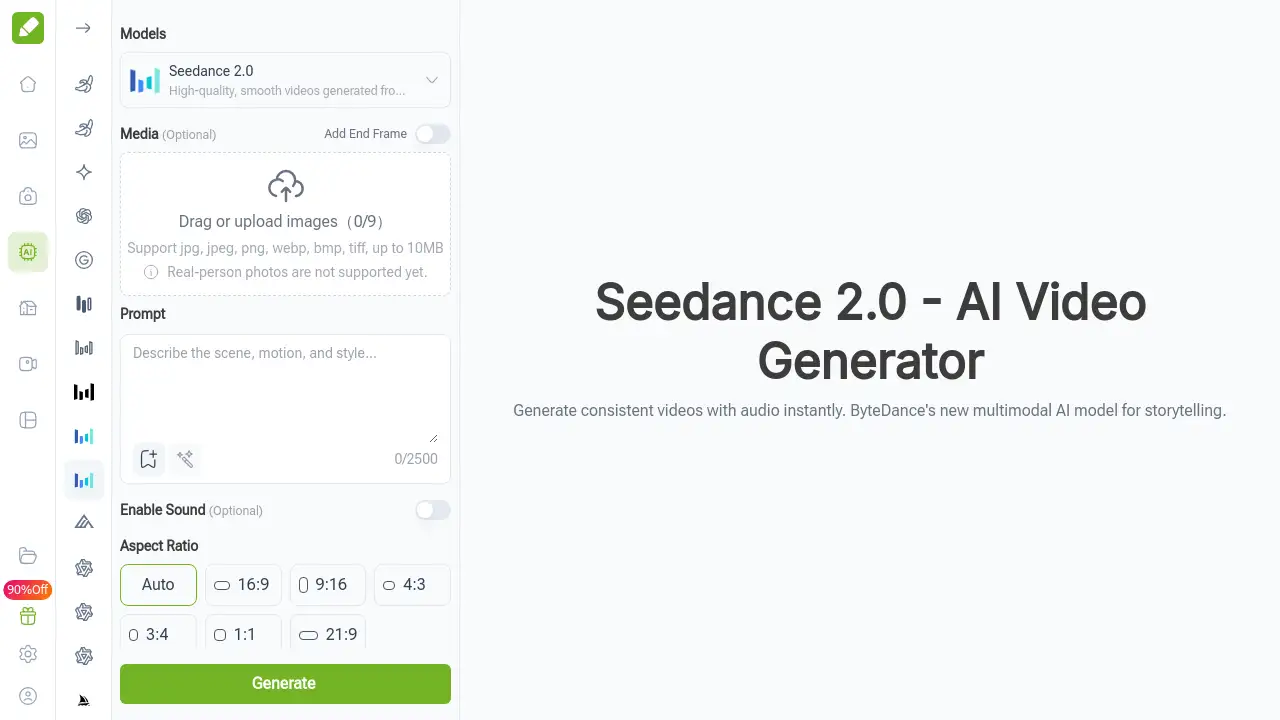
Using Seedance 2.0 on VisualGPT is a straightforward, three-step process designed for user-friendly operation.
- Upload Multimodal References: Select the Seedance 2.0 model and upload your guiding materials. You can add up to 9 images and several video clips to define character looks, styles, and specific motions for the AI.
- Craft Your Prompt and Settings: In the text box, describe the scene, action, and mood in detail. Then, choose your desired output settings, such as the video aspect ratio (e.g., 16:9 for widescreen) and duration.
- Generate and Download: Click the "Generate" button. The Seedance 2.0 model will process all inputs—text, images, and audio—to create a cohesive video. Preview the result and download the final video file directly to your device.
Target Audience for Seedance 2.0
- Independent Filmmakers and Directors
- Digital Content Creators and Influencers
- Marketing and Advertising Professionals
- Animators and Motion Graphics Artists
- Musicians and Music Producers
- Writers and Storytellers seeking visual aids
Is Seedance 2.0 Free?
Based on the reference information, VisualGPT offers free online access to try Seedance 2.0. The homepage prominently states "Free online access available!" and features a "Free Try" call-to-action. For detailed information on any usage limits, premium tiers, or commercial licensing terms, users should visit the official VisualGPT website or its pricing page.
Seedance 2.0's Pros and Cons
| Aspect | Pros | Cons |
|---|---|---|
| Output Quality | Excellent character and style consistency across shots; native, synced audio generation. | Video length per generation is limited (typically a few seconds), requiring stitching for longer pieces. |
| Usability | Cloud-based; no powerful local hardware needed; intuitive web interface. | May have a learning curve to master effective multimodal prompting for best results. |
| Features | True multimodal input (image, video, audio, text); high degree of creative control. | Real-person photo generation is explicitly noted as not yet supported. |
| Accessibility | Free tier available for testing and basic use. | Full commercial usage terms and pricing structure beyond the free tier are not detailed in the provided content. |
Frequently Asked Questions about Seedance 2.0
What makes Seedance 2.0 different from other AI video models?
Seedance 2.0 stands out as a multimodal AI video generator with a strong focus on input control and consistency. Unlike models that are primarily text-driven, it allows you to upload multiple images and videos as references to lock in character appearance and motion. Its integrated audio-visual AI engine also generates sound and video together for perfect sync.
Can I use Seedance 2.0 to create videos with my own voiceover?
Yes. You can upload your own audio file, such as a voiceover or music track. The Seedance 2.0 model will then generate a video where the character's lip movements and the scene pacing are synchronized to your uploaded audio, functioning as a powerful audio-driven generation tool.
How long can the videos generated by Seedance 2.0 be?
Currently, each generation with Seedance 2.0 produces a short clip. The interface suggests durations like 5 seconds, and references indicate a typical range of 4-15 seconds. To create longer narratives, users can generate multiple consistent clips and edit them together seamlessly.
Do I need technical expertise or special software to use it?
No. Seedance 2.0 is accessed through a web browser on the VisualGPT platform. The complex processing happens on ByteDance's servers, so you don't need a high-end computer or any specialized software—just an internet connection.
What kind of images work best as references?
Reference images that clearly show the character's face, clothing, and style yield the best results for consistent character video generation. The model uses these to maintain details across frames. Note that the tool currently does not support generating videos from real-person photographs.
Is the content created with Seedance 2.0 free for commercial use?
While Seedance 2.0 is a professional-grade tool suitable for commercial projects like ads and films, the specific licensing for generated content depends on VisualGPT's terms of service. Users intending to use videos commercially should review the platform's official licensing and usage policies.
Seedance 2.0 Tags
Seedance 2.0, AI video generator, multimodal video generator, consistent character video, audio visual AI, ByteDance AI, free AI video maker, text to video, video from images, AI storytelling, synchronized audio video, VisualGPT, AI content creation