Introduction
Audio Enhancer Ai is a free online speech cleaner.
What is Audio Enhancer Ai?
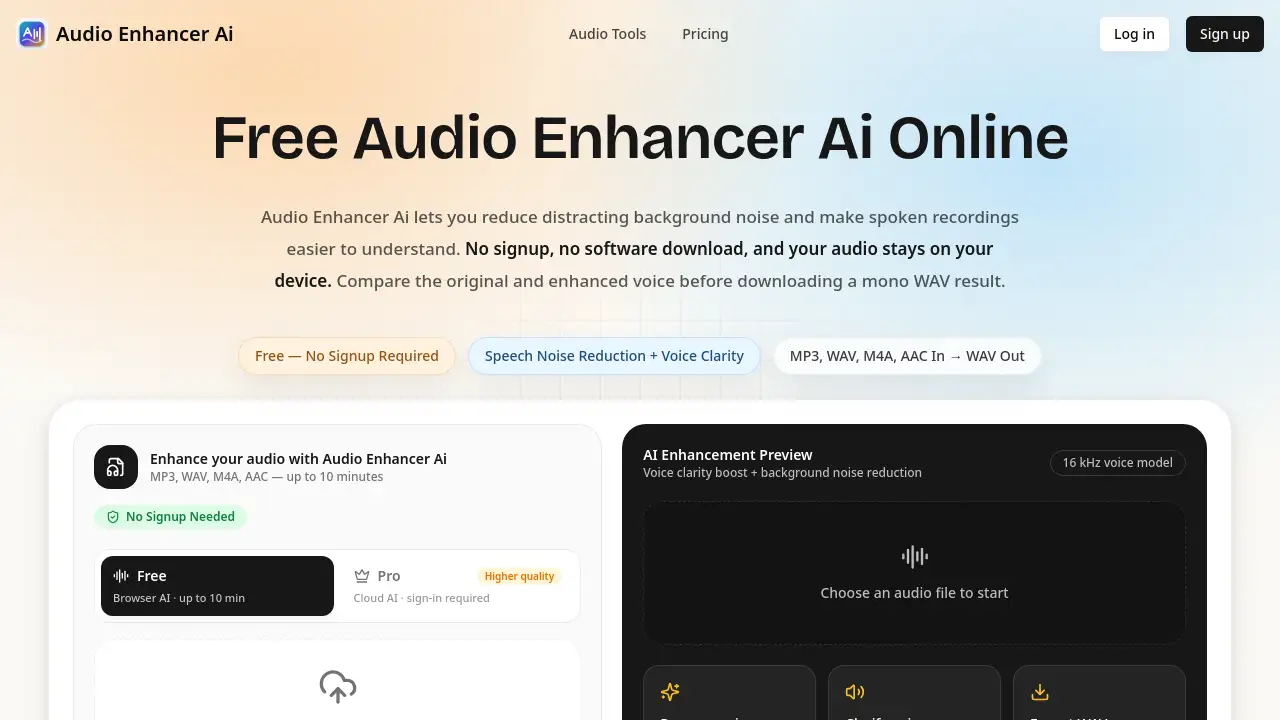
Audio Enhancer Ai is a browser-based audio enhancer for spoken recordings. It addresses a common problem: voice memos, interviews, meetings, lectures, and narration often contain steady background noise that makes speech harder to follow. The tool acts as a background noise remover and AI voice enhancer, helping users reduce distraction and improve voice clarity without installing software. Users can upload a short audio file, run a speech-focused denoise model, compare the original and enhanced versions, and download a mono WAV.
The free workflow is designed for one main speaker who is already audible above moderate noise. It is not a full music mastering suite, source separator, or damaged-audio repair tool. As a free online audio enhancer, Audio Enhancer Ai matters because it gives creators and teams a simple way to clean short speech clips while keeping free processing local in the browser.
Key Features of Audio Enhancer Ai
Background Noise Reduction
Reduce steady fan, AC, hiss, hum, room tone, and similar interference around an audible main voice with a focused background noise remover workflow.
AI Voice Enhancement
Improve voice clarity in voice memos, interviews, meetings, lectures, and narration by using an AI voice enhancer built for spoken audio.
Private Browser Processing
Process audio locally in the browser so the free workflow does not upload files to servers or use recordings for model training.
Before-and-After Preview
Compare the original and enhanced audio before downloading to check noise reduction and listen for possible artifacts.
Transparent Output Details
Review processed duration, file size, and sample rate before exporting a 16-bit mono WAV file.
Short Spoken Clip Support
Clean MP3, WAV, M4A, or AAC files up to 10 minutes, keeping the workflow focused on short spoken recordings rather than music production.
Use Cases for Audio Enhancer Ai
Podcasts
Clean short host or guest excerpts when steady background noise competes with an audible speaker. Full podcast mastering is not included.
YouTube and Video Creators
Process an extracted spoken audio track before placing it back into a video project. The browser tool does not accept or export video files.
TikTok and Social Media
Clean phone-recorded voice clips when the speaker remains clear above moderate room noise.
Courses and Webinars
Reduce room noise in short lessons, lectures, webinars, or training excerpts so instructors are easier to follow.
Meetings and Interviews
Reduce fan, AC, hiss, hum, or room tone in short exported meeting and interview recordings.
Business and Sales Content
Prepare clearer audio for sales videos, support clips, onboarding material, voice messages, and customer-facing demos.
How to Use Audio Enhancer Ai
- Open the Audio Enhancer Ai website in a modern browser.
- Drag and drop an MP3, WAV, M4A, or AAC file up to 10 minutes.
- Let the AI audio enhancer load the speech-denoise model and reduce background interference.
- Preview the enhanced result and compare it with the original recording.
- Download the mono WAV file if the voice clarity and noise reduction meet the user’s needs.
Target Audience for Audio Enhancer Ai
- Podcasters and interviewers who need quick cleanup of short speech clips.
- YouTube, TikTok, and social media creators working with spoken audio tracks.
- Course creators, teachers, and webinar hosts preparing short lessons or training excerpts.
- Meeting organizers, interviewers, and business teams with exported voice recordings.
- Journalists, researchers, and anyone who records voice memos or spoken notes.
Is Audio Enhancer Ai Free?
Audio Enhancer Ai is free to use for the browser-based speech denoising workflow. The available information states that no signup, account, credit card, or trial expiration is required for the free tier. It supports files up to 10 minutes and exports mono WAV audio. The page also mentions paid plans for higher volume or advanced features, but specific prices and plan details are not listed in the available information. Users should check the official website for current paid-plan details.
| Plan | Price | Features |
|---|---|---|
| Free | $0 | Browser-based speech denoising, no login, local processing, preview, mono WAV download, files up to 10 minutes |
| Paid plans | Not listed | Higher volume or advanced features may be available; check the official site for current details |
Audio Enhancer Ai's Pros and Cons
| Aspect | Pros | Cons |
|---|---|---|
| Pricing | Free tier with no signup required | Paid plan details are not clearly listed in the available information |
| Privacy | Free workflow processes audio in the browser | Local processing may depend on browser and device performance |
| Features | Speech-focused background noise reduction and voice clarity enhancement | Does not include music mastering, dereverb, source separation, or loudness normalization |
| Workflow | Simple three-step process with before-and-after preview | Limited to short spoken recordings up to 10 minutes |
| Output | Downloadable 16-bit mono WAV | Mono WAV only; no video file support |
Frequently Asked Questions about Audio Enhancer Ai
Is Audio Enhancer Ai really free and login-free?
Yes. The free online audio enhancer can be used without an account, credit card, or software download. Users can upload a supported file, enhance it, preview the result, and download the WAV.
What audio formats and file lengths are supported?
The browser tool accepts MP3, WAV, M4A, and AAC files up to 10 minutes. Enhanced audio is exported as a mono WAV file.
Will the AI voice enhancer make every recording sound perfect?
No. The speech-denoise model aims to preserve the main voice while reducing steady background noise, but difficult recordings can still sound metallic or processed. Users should compare both versions before downloading.
Are my audio files private?
The free workflow processes audio on the user’s device in the browser, according to the product information. Files are not uploaded to servers or used for model training in that free tier.
Can it remove music, echo, or overlapping voices?
It is designed mainly for steady noise such as fan, AC, hiss, hum, and room tone around an audible speaker. It is not a music masterer, dereverb model, source separator, or damaged-audio repair suite, so those cases may need other editing tools.
Can I use enhanced audio commercially?
Yes. Audio that users lawfully upload and enhance can be used in commercial projects such as podcasts, videos, courses, ads, and client work.
Audio Enhancer Ai Tags
Audio Enhancer Ai, AI audio enhancer, free audio enhancer, background noise remover, AI voice enhancer, reduce background noise, improve voice clarity, online speech cleaner, browser audio editor, private audio processing, mono WAV download, spoken recording enhancer