Introduction
Transcribe Audio to Text with AI is a browser-based audio transcription service from AudioTranscription.io. It allows anyone to transcribe audio to text from meetings, podcasts, lectures, and voice memos in minutes. With support for 30+ languages, SRT subtitles, and AI summaries, it makes speech to text conversion practical for creators, teams, and students. This review explores the product’s features, use cases, and whether it is a good option when you need to transcribe audio to text consistently.
What is Transcribe Audio to Text with AI?
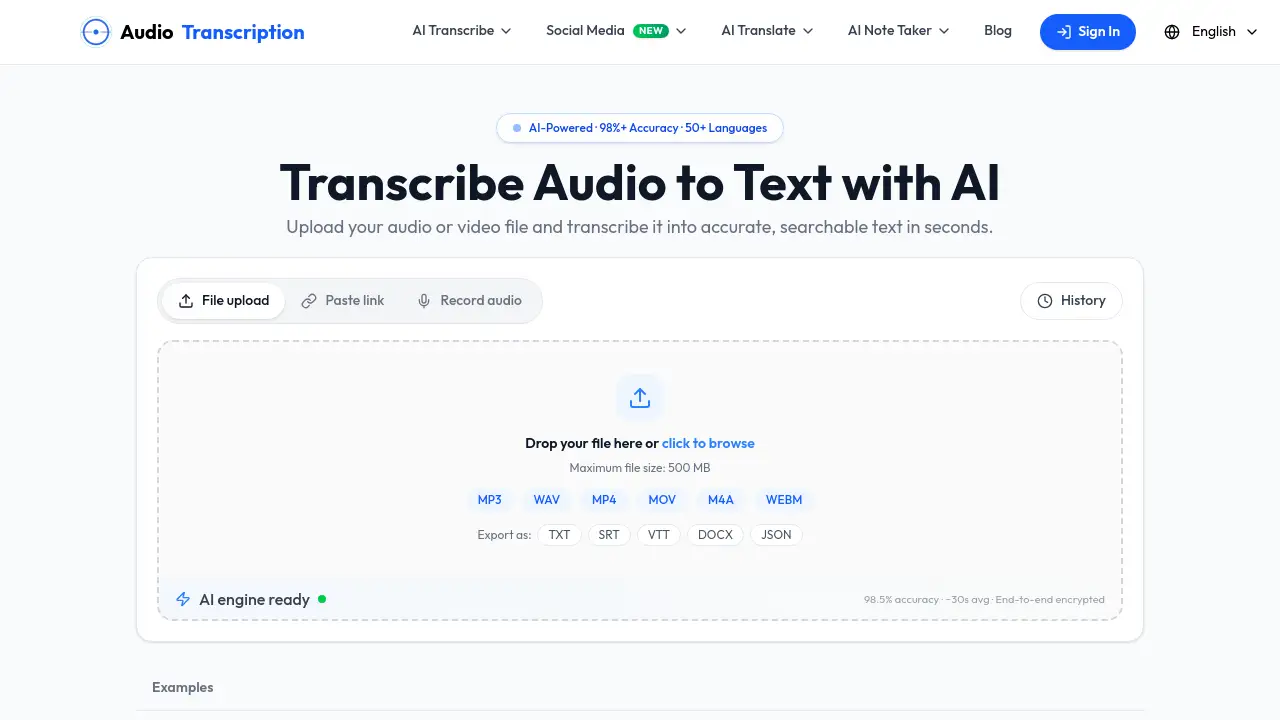
This product solves the time-consuming problem of manual transcription. Instead of replaying recordings and typing notes, users can upload an audio or video file and let AI handle the work. The service can transcribe audio to text from MP3, WAV, M4A, MP4, MOV, WEBM, and other common formats. It also accepts YouTube links, making it easy to transcribe audio to text from online content.
The platform is designed for journalists, researchers, content creators, students, and business professionals. People use it when they want to transcribe audio to text for interview quotes, meeting notes, podcast show notes, subtitles, or study materials. Because the AI is trained to understand natural speech, accents, and multiple speakers, it delivers useful results for real-world recordings. For anyone who regularly needs to transcribe audio to text, this tool removes the need for manual typing and helps turn spoken content into searchable written records.
Key Features of Transcribe Audio to Text with AI
AI Trained for Real-World Speech
The transcription engine handles natural conversations, different accents, and varied speaking speeds. This makes it easier to transcribe audio to text from meetings, interviews, podcasts, and recordings with multiple speakers.
Fast Turnaround for Long Recordings
Speed is a major advantage. A 30-minute recording can transcribe audio to text in under 60 seconds. Long files are processed efficiently, so users do not have to wait hours to get a full transcript.
Supports Audio and Video Files
Users can upload MP3, WAV, M4A, AAC, FLAC, MP4, MOV, and WEBM files. The system extracts audio tracks from video files automatically, which means users can transcribe audio to text without converting formats first.
No Account Required
The workflow is simple: upload a file, get a transcript, and download the result. There is no registration, credit card, or software installation needed. This makes it fast to transcribe audio to text even for one-time users.
Clean, Editable Transcripts
Transcripts come with timestamps, speaker labels, and punctuation. Users can edit any line and click a timestamp to hear the original audio. Export options include TXT, DOCX, PDF, SRT, and VTT, which is useful for subtitle creation and content publishing.
Secure Processing with Privacy Protection
Recordings are processed securely and deleted immediately after transcription. Files are used only for transcription and are never shared with third parties. This privacy-focused approach makes it safe to transcribe audio to text for sensitive meetings or interviews.
Use Cases for Transcribe Audio to Text with AI
Meetings and Interviews
Journalists, researchers, and teams can transcribe audio to text from meetings and interviews. The resulting transcripts are searchable by keyword, and exact quotes can be pulled with timestamps. This saves hours of note-taking and makes it easier to review important discussions.
Video and Podcast Transcripts
Creators can transcribe audio to text from podcasts, YouTube videos, webinars, and voice recordings. Transcripts and subtitles improve accessibility and boost SEO. They also provide material for blog posts, social media clips, and show notes.
Lectures and Voice Memos
Students and educators can transcribe audio to text from lectures, online classes, and voice memos. Clean, organized notes help learners focus on the material instead of typing. Later, transcripts can be searched without re-listening to entire recordings.
How to Use Transcribe Audio to Text with AI
Using the tool is straightforward.
- Upload an audio or video file by dragging and dropping it onto the page, or paste a YouTube link. Supported formats include MP3, WAV, M4A, AAC, FLAC, MP4, MOV, and WEBM. The maximum file size is 500 MB.
- Let the AI process the file. It detects language, speaker changes, and punctuation automatically. A 30-minute recording usually takes 30 to 90 seconds.
- Review and edit the transcript in the interactive editor. Click any word to hear the original audio, correct errors, rename speakers, and split paragraphs.
- Export the final transcript as TXT, DOCX, PDF, SRT, or VTT. The output is formatted and ready to use.
This simple workflow makes it easy to transcribe audio to text without any technical setup.
Target Audience for Transcribe Audio to Text with AI
- Journalists and researchers who need interview transcripts with timestamps.
- Podcasters and video creators who want subtitles and show notes.
- Students and educators converting lectures into searchable notes.
- Business teams transcribing meetings and discussions.
- Remote workers and consultants who record calls and need quick audio transcription.
- Translators and subtitle editors working with multilingual content and SRT subtitles.
Is Transcribe Audio to Text with AI Free?
The homepage states that users can “Transcribe your recordings with AI — free, fast, and accurate.” There is no account or credit card required to start transcribing. However, detailed pricing plans and specific limits are not clearly listed on the homepage. Users who need ongoing access or larger workloads should check the official pricing page for current information.
| Plan | Price | Features |
|---|---|---|
| Starter access | Free to start | Upload audio/video, AI transcription, no account required |
| Detailed plans | Not listed on homepage | Check official pricing page for limits and premium features |
Transcribe Audio to Text with AI's Pros and Cons
| Aspect | Pros | Cons |
|---|---|---|
| Ease of use | No account, no software installation, simple drag-and-drop upload | Detailed pricing and usage limits are not clearly shown |
| Transcription speed | Fast turnaround; a 30-minute file often transcribes in under 60 seconds | Processing time may vary with file size and audio clarity |
| Format support | Wide range of audio and video formats; export to TXT, DOCX, PDF, SRT, VTT | Maximum file size of 500 MB may limit very long recordings |
| Accuracy | AI trained for accents, natural speech, and multi-speaker audio | Clear recordings are still recommended for best transcription accuracy |
| Privacy | Files are deleted immediately and never shared with third parties | Transcripts are not stored in a user account dashboard |
Frequently Asked Questions about Transcribe Audio to Text with AI
How accurate is the AI transcription?
The platform uses AI trained for real-world speech, accents, and different speaking speeds. It aims to deliver strong transcription accuracy. For best results, users should upload clear recordings with minimal background noise.
Can I transcribe audio to text from video files?
Yes. Users can upload video formats like MP4, MOV, and WEBM. The system extracts the audio track and transcribes it automatically. This makes it easy to transcribe audio to text from video content without separate conversion tools.
Does the tool support subtitle exports?
Yes. Transcripts can be exported as SRT and VTT, which are both subtitle formats. This is especially useful for creators who want to add captions to videos or podcasts.
Do I need to create an account to use it?
No. The service allows users to upload files and receive transcripts without registration, credit card, or software installation. This makes it convenient to transcribe audio to text on demand.
How long does transcription take?
A 30-minute recording typically takes less than 60 seconds to convert. The exact time depends on file length, file size, and server load. Long recordings are still processed efficiently.
Are my uploaded files kept private?
No. Recordings are processed securely and deleted immediately after transcription. The service states that uploaded files are used only for transcription and are never shared with third parties.
Transcribe Audio to Text with AI Tags
Transcribe audio to text, AI transcription, audio transcription tool, convert audio to text, speech to text, SRT subtitles, video transcription, podcast transcription, meeting transcription, lecture transcription, voice memo to text, automatic transcription