Introduction
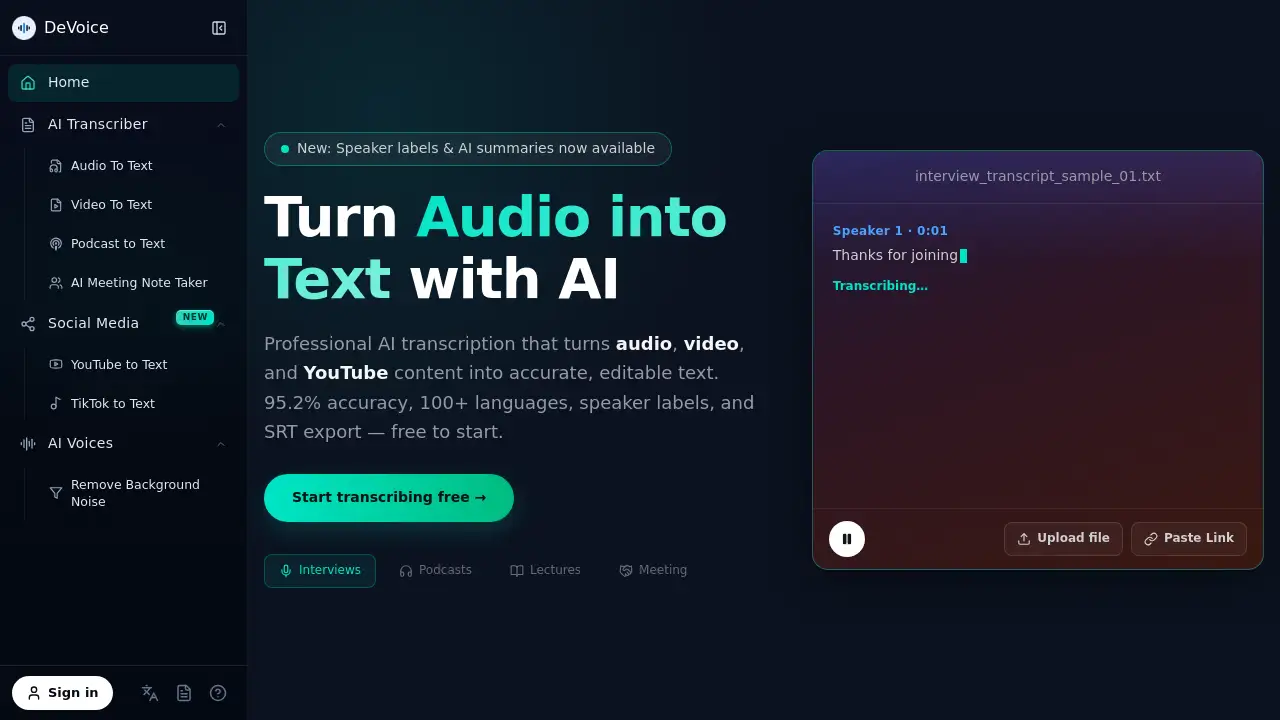
DeVoice is an AI transcription platform that converts audio, video, and speech into accurate, editable text. With 95.2% claimed accuracy, support for 100+ languages, speaker labels, and SRT export, it is designed for interviews, meetings, podcasts, and YouTube content. The service includes a free tier, making it easy to start using AI transcription online.
What is DeVoice - AI Transcription for Audio, Video & Speech?
DeVoice is an online speech-to-text converter built for anyone who needs fast, reliable AI transcription. It solves the common problem of turning long recordings into searchable, editable text without manual effort. Users can upload files like MP3, WAV, M4A, MP4, and MOV, or paste links from YouTube, TikTok, Instagram, X, and Facebook. This makes it a versatile audio-to-text tool for journalists, creators, students, and remote teams.
The platform uses advanced AI models to handle accents, background noise, and multiple speakers. It also provides speaker labels, AI summaries, and subtitle exports. For people who need video-to-text conversion, DeVoice offers a simple workflow: upload or paste a link, wait a few seconds, and download a clean transcript. The main benefit is speed. Professionals no longer need to replay hours of recordings because AI transcription turns spoken content into text they can search, copy, and repurpose.
Because it supports over 100 languages, the tool is suitable for global users who need speech-to-text services across different markets. Whether someone needs an AI transcription service for a client interview or a study lecture, DeVoice keeps the process simple and accessible. The platform also works well as an audio-to-text converter for podcasters who want show notes, captions, and articles from one episode.
Key Features of DeVoice - AI Transcription for Audio, Video & Speech
Accurate AI Speech Recognition
DeVoice uses advanced AI speech recognition to convert speech to text with high accuracy, even with accents, fast speech, and background noise. This makes the AI transcription tool dependable for interviews, lectures, and noisy recordings.
Fast Online Transcription
Users can transcribe audio and video into editable text within seconds. There is no software installation, so the online speech-to-text tool works directly in a browser. This fast AI transcription is useful for deadline-driven projects.
Supports Audio & Video Files
DeVoice supports MP3, WAV, M4A, MP4, MOV, and more. This flexibility makes it a practical audio-to-text and video-to-text converter for many AI transcription workflows.
Multi-Language Speech to Text
The platform converts speech to text in 100+ languages, including English, Spanish, French, German, Japanese, and Chinese. This broad language support helps teams create transcripts in their preferred language without losing AI transcription accuracy.
Speaker Labels & AI Summaries
Speaker labels separate each person in a conversation, which is useful for interviews and meetings. AI summaries provide a quick overview of the key points in a transcript, saving users time when reviewing long AI transcription outputs.
SRT Export & Subtitle Tools
DeVoice allows users to export transcripts as SRT files for subtitles and captions. This feature makes it easy to repurpose video content across platforms like YouTube, TikTok, and Instagram. Many users pair this with AI transcription to generate captions quickly.
Secure & Private Processing
Uploaded files are encrypted and automatically deleted after processing. This privacy-focused approach makes the AI transcription service suitable for sensitive business discussions.
Use Cases for DeVoice - AI Transcription for Audio, Video & Speech
Meeting Notes
Teams can use DeVoice to turn meeting audio into searchable text. Instead of replaying calls, employees can search for decisions and action items in the AI transcription.
Content Repurposing
Creators can transcribe podcasts and videos into text with AI transcription. A single episode then becomes blog posts, social media captions, newsletters, and video subtitles.
Accessibility and Education
Educators and course creators can use audio-to-text conversion to make lectures and tutorials more accessible. Students can search, skim, and translate AI transcription transcripts to improve learning.
How to Use DeVoice - AI Transcription for Audio, Video & Speech
Using DeVoice for AI transcription is straightforward:
- Upload your audio or video file, or paste a YouTube link.
- Choose source language or leave it on automatic detection.
- Optionally enable speaker separation and ask for an AI summary.
- Wait a few seconds for the speech-to-text engine to process the file.
- Review, edit, copy, or download the transcript in TXT, SRT, or DOCX.
The entire workflow is designed for users who need quick AI transcription without technical setup. The free tier allows daily transcription, so it is easy to test the product before upgrading. For content teams, this means faster speech-to-text turnaround for podcasts, interviews, and video clips.
Target Audience for DeVoice - AI Transcription for Audio, Video & Speech
- Journalists and podcasters who need accurate AI transcription for interviews
- Content creators who repurpose videos into text and SRT subtitles
- Remote teams looking for meeting notes and decision records
- Students and educators who want accessible lecture transcripts
- Marketers and researchers who need searchable audio-to-text archives
- Non-native speakers who rely on speech-to-text in 100+ languages
Is DeVoice - AI Transcription for Audio, Video & Speech Free?
DeVoice offers a free-to-start plan. According to the homepage, users receive free transcriptions per day without entering a credit card. This gives new users a chance to test the AI transcription quality. For users who need higher volumes or advanced features, the official website likely provides paid tiers, but exact pricing information is not listed in the reference content.
| Plan | Price | Features |
|---|---|---|
| Free | $0 | Daily free transcription credits, no credit card required, access to core speech-to-text features |
DeVoice - AI Transcription for Audio, Video & Speech's Pros and Cons
| Aspect | Pros | Cons |
|---|---|---|
| Pricing | Free tier available without credit card | Paid plan pricing not clearly listed in public info |
| Accuracy | High accuracy for 100+ languages and accents | Accuracy can still vary with poor audio quality |
| Features | Speaker labels, AI summaries, SRT export for AI transcription | Some AI output may require editing before final use |
| Ease of Use | No installation, fast browser-based transcription | Upload limits may apply to free users |
| Privacy | Files encrypted and deleted after processing | May not fit users who prefer local processing |
Frequently Asked Questions about DeVoice - AI Transcription for Audio, Video & Speech
How accurate is DeVoice AI transcription?
DeVoice claims 95.2% accuracy for AI transcription. The actual accuracy depends on audio quality, speaker clarity, background noise, and language. Cleaner recordings usually produce better speech-to-text results.
What file formats does DeVoice support?
Users can upload MP3, WAV, M4A, MP4, MOV, and other common formats. The platform also supports YouTube links, so users can perform video-to-text conversion without downloading files first. This makes the AI transcription process simpler for social media creators.
Can DeVoice handle multiple speakers?
Yes, DeVoice offers speaker labels. The AI transcription system can separate different speakers in an audio or video file, which is useful for interviews, meetings, and podcast recordings.
Does DeVoice support SRT subtitle export?
Yes, SRT export is available. This allows users to turn audio-to-text transcripts into subtitles for YouTube, TikTok, Instagram, and other video platforms. It is a popular AI transcription output format.
Is DeVoice free to use?
The platform is free to start. Users receive a certain number of free transcriptions per day with no credit card. Paid plans may be available for higher usage, but exact pricing is not published in the reference information.
Will my uploaded files remain private?
DeVoice says uploaded files are encrypted and automatically deleted after processing. This privacy measure is important for users who transcribe sensitive meeting recordings or client interviews.
DeVoice - AI Transcription for Audio, Video & Speech Tags
AI transcription, speech to text, audio to text, video to text converter, DeVoice, SRT export, speaker labels, AI summaries, online transcription, transcribe YouTube videos, 100+ languages transcription, free audio transcription