Introduction
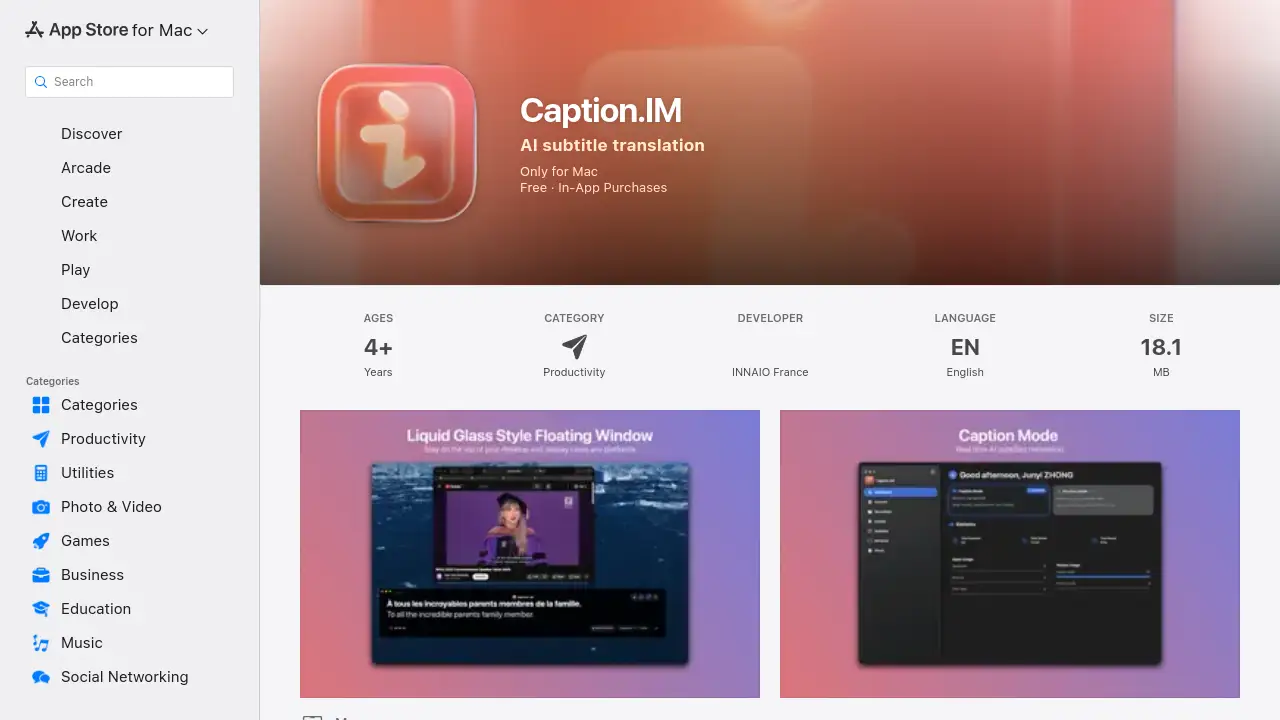
Caption.IM is a powerful AI subtitle translation tool for Mac that provides real-time captions and meeting notes.
What is Caption.IM?
Caption.IM is a Mac application that functions as an AI captioning assistant, designed to transcribe and translate audio in real-time. The core problem it solves is the need for immediate, accurate subtitles during video calls, online courses, or while watching videos, especially for accessibility or multilingual understanding. Unlike web-based tools, this software processes audio directly from the macOS system, allowing it to work with any application. It is suitable for professionals, students, content creators, and anyone who needs to follow audio content more easily. Its significance lies in its privacy-first approach, as all processing can happen locally on the device, meaning sensitive conversations are not sent to external servers. This focus on local AI processing makes Caption.IM a compelling choice for users concerned with data security.
Key Features of Caption.IM
Real-Time Transcription
It instantly converts any audio playing on your Mac into live captions, perfect for meetings, lectures, or media playback.
Instant Translation
The app can translate spoken language into subtitles in multiple languages, aiding comprehension for multilingual teams or international content.
Floating Subtitle Window
Captions are displayed in a sleek, transparent overlay that stays on top of other windows, ensuring a seamless and non-intrusive viewing experience.
AI Meeting Summaries
After conversations, it can automatically generate structured summaries and highlight key insights, turning discussions into actionable notes.
Works with Any App
The tool captures system audio, so it is compatible with Zoom, Google Meet, Teams, YouTube, podcasts, and virtually any other audio source on a Mac.
Privacy-First Local AI
Speech recognition and processing can run entirely on the user's Mac, ensuring that no audio data is sent to the cloud or external servers.
Optimized for Apple Silicon
The app is optimized for M1, M2, M3, and later chips, delivering fast performance with minimal latency and efficient power consumption.
Use Cases for Caption.IM
Remote Meetings
Enhance video conferences on platforms like Zoom or Teams with live captions and post-meeting summaries for better clarity and record-keeping.
Online Learning
Students can follow along with online courses or lectures more effectively, with real-time subtitles aiding comprehension and note-taking.
Multilingual Collaboration
Teams with members speaking different languages can use the instant translation feature to understand each other in real-time during calls.
Accessibility Support
The app provides crucial support for individuals who are deaf or hard of hearing by generating subtitles for any audio content on their computer.
Content Creation
Creators watching reference videos or conducting interviews can use the tool to generate accurate transcripts and translations quickly.
How to Use Caption.IM
- Download and Install: Obtain Caption.IM from the Mac App Store and install it on a Mac running macOS 15.6 or later.
- Launch the App: Open Caption.IM from your Applications folder. The app will request permission to access system audio.
- Start Captioning: Play audio from any source (e.g., a meeting, video, or podcast). The app will automatically begin generating real-time captions in its floating window.
- Adjust Settings: Users can typically customize the subtitle language, translation target, and window appearance from within the app's interface.
- Generate Summaries: After a meeting ends, the AI can be prompted to create a structured summary from the transcribed conversation.
Target Audience for Caption.IM
- Remote professionals and hybrid teams
- Students and online learners
- Multilingual teams and international businesses
- Individuals seeking accessibility tools
- Content creators, researchers, and journalists
- Anyone who frequently participates in video calls or consumes audio/video content
Is Caption.IM Free?
Caption.IM is free to download with optional in-app purchases for advanced features. The available subscription plans are listed on its App Store page.
| Plan | Price | Details |
|---|---|---|
| Premium Monthly | €9.99 | Subscription for premium features. |
| Premium Annually | €108.99 | Annual subscription for premium features. |
| Pro Monthly | €14.99 | Subscription for professional-tier features. |
| Pro Annually | €163.99 | Annual subscription for professional-tier features. |
The specific features included in each tier are best confirmed on the official Caption.IM website or within the app.
Caption.IM's Pros and Cons
| Aspect | Pros | Cons |
|---|---|---|
| Privacy & Security | Strong privacy-first model with local AI processing; no data collection. | Requires local computing power, potentially limiting performance on older Intel Macs. |
| Compatibility | Works with any app that outputs system audio, offering great versatility. | Exclusively for macOS, with no support for Windows, iOS, or other platforms. |
| Performance | Optimized for Apple Silicon, offering fast and efficient real-time transcription. | Requires macOS 15.6 or later, which may exclude users on older operating systems. |
| Usability | Features a praised, elegant UI with a floating window for seamless use. | As a newer app, it has a limited number of public user ratings and reviews. |
| Pricing | Offers a free tier for basic functionality. | Subscription costs for advanced features like AI summaries may be high for individual users. |
Frequently Asked Questions about Caption.IM
What kind of audio sources does Caption.IM work with?
Caption.IM works with any audio played through your Mac's system sound. This includes video calls (Zoom, Teams, Meet), streaming videos (YouTube, Netflix), podcasts, online courses, and locally stored media files.
Does Caption.IM work without an internet connection?
Yes, a key feature is its local AI processing capability. If you select the local speech recognition mode, the app can transcribe and translate audio entirely on your device without needing an active internet connection.
Is my conversation data kept private?
According to the developer's privacy policy, the app can be configured to not collect any data. When using local processing mode, your audio never leaves your Mac, ensuring a high degree of privacy for sensitive meetings.
What Macs are compatible with Caption.IM?
The app requires macOS 15.6 or later. It is specifically optimized for Macs with Apple Silicon chips (M1, M2, M3, etc.) for the best performance but may also run on compatible Intel-based Macs.
Can I translate subtitles into any language?
The app supports real-time translation into multiple languages. The exact list of supported languages is available within the app's settings, typically covering major global languages.
How accurate is the real-time transcription?
The transcription accuracy is based on advanced AI models. The developer has released updates, like version 1.0.1, specifically to improve transcription accuracy by rebuilding the audio processing pipeline for better results.
Caption.IM Tags
AI subtitle translation, real-time captions for Mac, live transcription software, meeting summary AI, local AI processing, macOS captioning tool, privacy-first transcription, translate subtitles, floating subtitle window, Apple Silicon optimized, video call accessibility, online course captions