Introduction
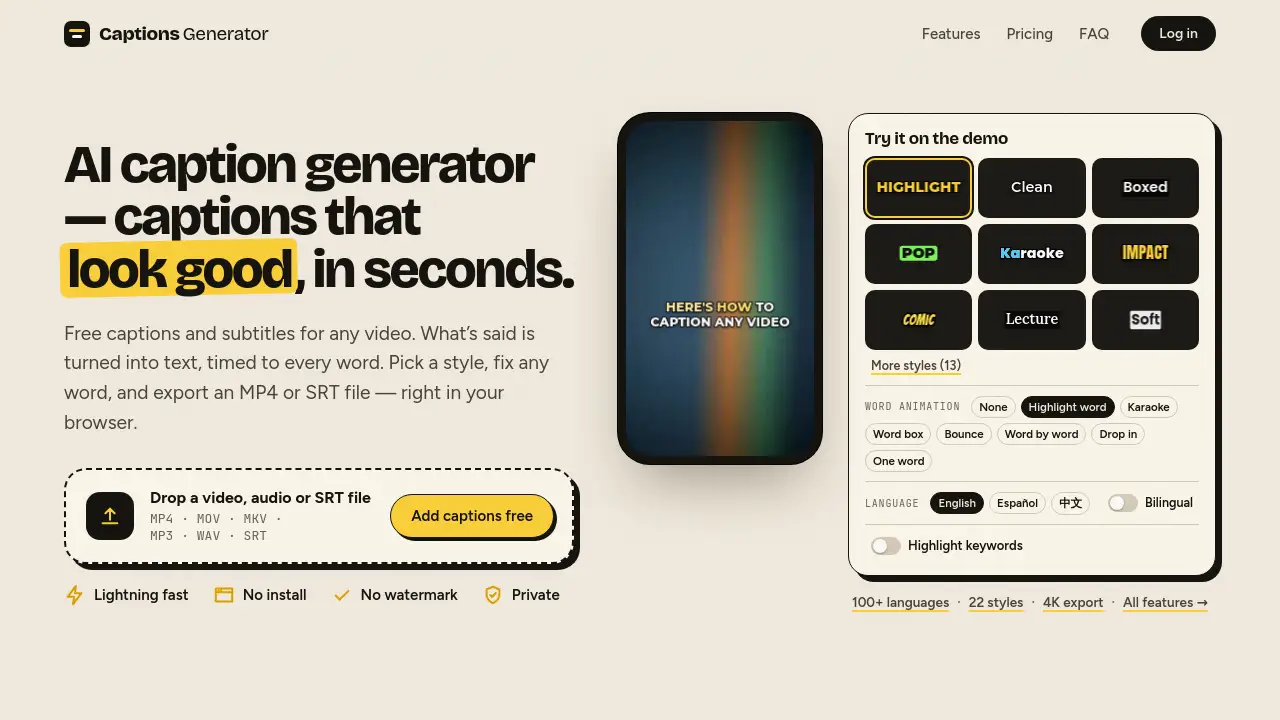
Captions Generator is a free AI caption generator for adding subtitles to video in seconds. It supports 100 languages, SRT/VTT downloads, no watermark, automatic captions, and browser-based editing for creators, educators, and teams.
What is Captions Generator?
Captions Generator is a browser-based AI caption generator that turns speech into timed captions and subtitles. It solves a common video problem: manually typing subtitles is slow, expensive, and easy to get wrong. This tool uses AI to transcribe audio, align every word to the timeline, and create captions that can be styled, translated, and exported.
As a free AI caption generator, it is designed for quick subtitle work rather than full video editing. Users upload a video, audio file, or SRT file, then edit text, choose a caption style, and download a captioned MP4 or subtitle files such as SRT, VTT, and TXT. It is suitable for social media creators, educators, podcasters, marketers, accessibility teams, and anyone who needs to add subtitles to video without installing software.
The platform emphasizes speed, privacy, and no watermark. Captions are rendered in the browser, and the service states that video files never leave the user’s device. Only the audio track is sent for transcription. This makes Captions Generator a practical option for short-form clips, online courses, interviews, and multilingual content.
Key Features of Captions Generator
AI Transcription with Word-Level Timing
Captions Generator automatically transcribes speech and times each word to the audio. This creates captions that appear exactly when they are spoken, which improves readability and viewer retention.
Auto Captions in 100+ Languages
The AI caption generator detects more than 100 languages automatically. It can also handle mixed-language sentences, such as English and Chinese in the same line, making it useful for global audiences.
Free Subtitle Translation and Bilingual Captions
Users can translate subtitles into 100+ languages for free. Pro users can also display bilingual captions with two languages at once, which is helpful for language learners and international viewers.
Custom Caption Styles and Animations
The tool offers ready-made caption styles, including highlight, karaoke, pop, comic, boxed, and neon looks. Free users get 8 styles, while Pro unlocks all 22 styles plus AI keyword highlights, custom fonts, and saved styles.
Burn-In Captions or SRT/VTT/TXT Downloads
Captions Generator lets users burn captions into the video or download separate subtitle files. SRT, VTT, and TXT exports work with YouTube, Premiere, CapCut, and other editors. Free exports are available in 1080p without a watermark, while Pro supports up to 4K.
Browser-Based Privacy and No Install
The caption generator runs in the browser, so there is no software to install. The video stays on the user’s device, and only the audio track is sent for transcription. This browser-based workflow is fast, private, and convenient.
Use Cases for Captions Generator
Social Media Clips
Creators can add subtitles to video for TikTok, Instagram Reels, and YouTube Shorts. Vertical 9:16 clips work like 16:9 videos, and caption placement is designed to avoid common app buttons.
Accessible Video Content
Captions help viewers who are deaf or hard of hearing follow every word. Adding subtitles also supports accessibility standards for online video and synchronized media.
Online Courses and Tutorials
Educators and course creators can use the AI caption generator to make lessons easier to follow. Captions can improve comprehension, especially for viewers watching without sound.
Podcast and Interview Repurposing
Podcasters can upload audio or video, generate captions, and export SRT files for clips or full episodes. This turns spoken content into searchable, shareable text.
Multilingual Audience Reach
With free translation and bilingual captions, creators can reach viewers abroad. A single video can be captioned in one language and translated into another without a separate subtitle service.
How to Use Captions Generator
- Upload a file. Drop a video, audio, or SRT file into Captions Generator. Supported formats include MP4, MOV, MKV, MP3, WAV, and SRT.
- Let AI transcribe. The AI caption generator detects the language, transcribes speech, and times every word automatically.
- Edit and style. Fix any word, choose a caption style, or translate the subtitles into another language.
- Export the result. Download a captioned MP4 or subtitle files in SRT, VTT, or TXT format.
The entire process is designed to be simple and fast, with no install and no watermark on free exports.
Target Audience for Captions Generator
- Content creators and YouTubers
- Social media managers and short-form video editors
- Educators, trainers, and online course creators
- Podcasters and interview producers
- Marketers and small business owners
- Accessibility teams and nonprofit organizations
- Language learners and multilingual creators
Is Captions Generator Free?
Captions Generator has a free plan and an optional Pro plan. The free account includes no watermark, 1080p MP4 export, 8 caption styles, SRT/VTT/TXT downloads, and translation into 100+ languages. Free users can edit videos up to 90 minutes but export videos up to 3 minutes and receive 30 minutes of captions per month.
| Plan | Price | Features |
|---|---|---|
| Free | $0 | Edit videos up to 90 minutes, export up to 3 minutes, 30 minutes of captions per month, no watermark, 1080p export, 8 caption styles, SRT/VTT/TXT downloads, 100+ language translation |
| Pro | $4.92/month | Billed $59 yearly, cancel anytime. Unlimited AI captions, videos up to 90 minutes, 4K export, all 22 styles, bilingual captions, AI keyword highlights, custom fonts, saved styles |
Captions Generator's Pros and Cons
| Aspect | Pros | Cons |
|---|---|---|
| Pricing | Free plan with no watermark and 1080p export | Pro needed for unlimited captions, 4K, bilingual captions, and advanced styles |
| Features | AI transcription, 100+ languages, free translation, SRT/VTT/TXT downloads, caption styles | Not a full video editor; editing is focused on captions |
| Privacy | Video stays on the user’s device; captions render in the browser | Audio is sent for transcription, so it is not fully offline |
| Ease of use | Simple upload, edit, style, and export workflow | Free video exports are limited to 3 minutes |
| Output | Burned-in MP4 or separate subtitle files for YouTube, Premiere, and CapCut | Custom fonts and saved styles require Pro |
Frequently Asked Questions about Captions Generator
Is Captions Generator really free?
Yes. The free plan includes no watermark, 1080p MP4 export, 8 caption styles, SRT/VTT/TXT downloads, and free translation into 100+ languages. Limits include 3-minute video exports and 30 minutes of captions per month.
How do I add subtitles to a video automatically?
Upload a video to Captions Generator. The AI caption generator transcribes the speech, times every word, and creates captions. Then edit the text, pick a style, and export a captioned MP4 or SRT file.
Which languages does Captions Generator support?
Transcription works in 100 languages with automatic detection. Translation also covers 100+ languages for free, and Pro adds bilingual captions that show two languages at once.
Can I download SRT or VTT files?
Yes. Captions Generator exports SRT, VTT, and TXT subtitle files. Users can also import an SRT or VTT file, restyle it, burn it into a video, or convert it to another format.
Is my video private?
The platform states that video files never leave the user’s device and captions are rendered in the browser. Only the audio track is sent for transcription, and the service says it does not store video or audio.
Does Captions Generator work for TikTok, Reels, and YouTube Shorts?
Yes. Captions are drawn at the size of the video, so vertical 9:16 clips work like 16:9 YouTube videos. Captions are also placed to avoid common app buttons and safe zones.
Captions Generator Tags
AI caption generator, Captions Generator, free AI caption generator, add subtitles to video, auto captions, subtitle generator, SRT VTT downloads, translate subtitles, burn in captions, video to SRT, audio to SRT, caption styles