Introduction
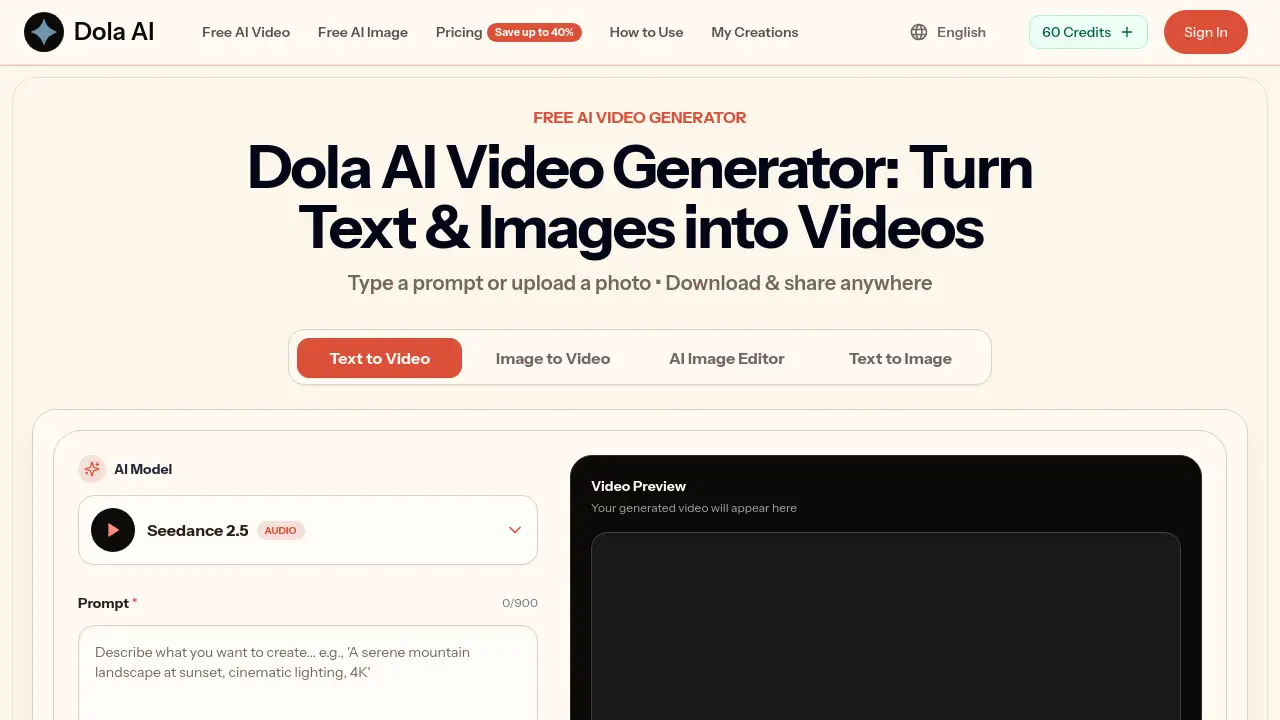
Dola AI video generator is a free online tool that turns text prompts and photos into short AI videos right in your browser. It creates watermark-free clips in seconds, making it easy for anyone to make social media videos, product clips, and more without editing software.
What is doa video?
doa video is the web application known officially as Dola AI Video Generator. Simply put, Dola AI video generator is an AI-powered tool that creates short videos from a text prompt or an uploaded photo. Instead of installing software or learning a complicated editor, users type an idea and let the AI handle the rest. The platform combines text to video, image to video, and text to image in one browser-based workspace.
The main problem Dola AI video generator solves is access. Many AI video tools are expensive, slow, or attach a watermark to every export. Dola AI video generator removes those barriers by offering free daily credits, fast generation, and clean downloads. Most images and short clips are ready in about 5–15 seconds, which lets users test many ideas quickly.
This free AI video generator is suitable for content creators, small business owners, marketers, and hobbyists who want quick visuals without a steep learning curve. Because Dola AI video generator runs entirely in the browser, there is no installation and no need for a powerful computer. Short-form video is now a core part of online marketing, and Dola AI video generator makes that format available to almost anyone.
Key Features of doa video
Text to Video
Type a few words describing a scene, and Dola AI video generator turns the text into a short motion clip. This is one of the fastest ways to test an idea without setting up a camera.
Image to Video
Upload a photo, and Dola AI video generator adds smooth, natural motion to it. This works well for product photos, portraits, and illustrations, turning a single image into a clip ready for Reels or Shorts.
Text to Image
Dola AI video generator also creates high-resolution images from a text prompt. Users can pick photorealistic, anime, cinematic, or illustrative styles.
Style Control
Dola AI video generator supports multiple styles in one place. Users choose a look, and the AI matches it across images and videos, helping keep brand content consistent.
Watermark-Free Downloads
Every export from Dola AI video generator is clean and ready to publish. No logo is stamped on the clip, so creators can share directly to YouTube Shorts, Instagram, TikTok, or a store page.
Free Daily Credits
Dola AI video generator gives new users free credits every day, enough to generate images and videos without paying. No credit card is required to start.
Browser-Based Workflow
Everything happens in the browser. Users of Dola AI video generator can switch between text to video, image to video, and canvas editing without jumping between apps.
Use Cases for doa video
Social Media Content
Creators use Dola AI video generator to make short, eye-catching clips for TikTok, Instagram Reels, and YouTube Shorts. A single prompt can produce a scroll-stopping video in seconds.
Product Videos
Online sellers use Dola AI video generator to turn plain product photos into clean video clips for Etsy, Amazon, or their own store. The AI adds gentle motion and professional-looking backgrounds without a studio setup.
Character and Concept Art
Game developers, illustrators, and writers use Dola AI video generator for text to image and image to video work, creating original characters, fantasy worlds, and concept art.
On-Brand Marketing Visuals
Marketers use Dola AI video generator to produce images, banner ads, email headers, and promo videos in one consistent style. This replaces the need to juggle several different tools.
How to Use doa video
Using Dola AI video generator takes only a few steps:
- Write a prompt or upload a photo. Describe what you want to see, or choose an image from your device. Dola AI video generator fills in the details.
- Pick a style and format. Choose from realistic, cinematic, anime, or a custom look. Then set the aspect ratio for TikTok, Reels, or YouTube Shorts.
- Set the clip length. Select a duration from about 4 seconds up to 15 seconds, depending on the model.
- Generate. Click the button and wait a few seconds for Dola AI video generator to produce the video.
- Download and share. Save the watermark-free clip and post it on any platform, or download the image as a high-resolution PNG or JPEG.
Target Audience for doa video
Dola AI video generator suits a wide range of users:
- Content creators who need a steady stream of short videos
- Small business owners and online sellers
- Social media managers handling multiple brand accounts
- Marketers producing ad creatives and promo visuals
- Game developers and illustrators exploring concepts
- Beginners with no design or editing experience
Is doa video Free?
Yes, Dola AI video generator has a free tier. Every user receives free daily credits that can be spent on image generation, video generation, and canvas editing. For higher volume, paid plans add more credits, priority processing, and a commercial use license.
| Plan | Price | Features |
|---|---|---|
| Free | $0 | Daily credits, AI image/video generation, watermark-free downloads |
| Basic | $19.9/month | Up to 40 videos/month, 800 credits, unlimited downloads, permanent history |
| Pro | $39.9/month | Up to 100 videos/month, 2,000 credits, priority queue, commercial use license |
| Enterprise | $99.9/month | Up to 300 videos/month, 6,000 credits, priority queue, commercial use license |
Dola AI video generator also offers annual plans that save up to 40%, plus one-time credit packs that never expire. The pricing page states that payments are secure and subscriptions can be canceled anytime.
doa video's Pros and Cons
| Aspect | Pros | Cons |
|---|---|---|
| Pricing | Free tier available, no credit card required | Paid plans may be costly for casual users |
| Ease of use | No skills needed, plain-language prompts | Output quality depends heavily on prompt detail |
| Speed | Most clips generated in 5–15 seconds | Longer videos can take more time |
| Export quality | Watermark-free, up to 4K downloads | Free tier has daily credit limits |
| Video length | Short clips designed for social media | Maximum length is around 15 seconds |
Dola AI video generator is strongest for quick, short-form content. The trade-off is that it is not designed for long-form video production.
Frequently Asked Questions about doa video
Is Dola AI video generator really free?
Yes. Dola AI video generator gives every user free daily credits for image and video generation. Paid plans are optional and add more credits.
Can I make videos from both text and photos?
Yes. Dola AI video generator supports text to video and image to video in the same tool, so both workflows are available.
Are the videos watermark-free?
Yes. Downloads from Dola AI video generator are clean and ready to share on any platform. No watermark is added.
Can I use the videos for commercial purposes?
Paid plans include a commercial use license. Free-tier output from Dola AI video generator is for personal and evaluation use.
How long are the generated videos?
Clips from Dola AI video generator range from a few seconds up to about 15 seconds, depending on the model and the length selected.
Do I need video editing skills?
No. Dola AI video generator does the work. Users only need to write a prompt or upload a photo.
doa video Tags
Dola AI video generator, free AI video generator, text to video, image to video, AI video maker, text to image, watermark-free AI video, Dola AI, AI short video generator, video from photo AI, online AI video tool, create AI video free