Introduction
The image to video tool from Flow AI Video turns a still photo into a short AI-generated clip. This online image to video generator lets users upload an image, enter a motion prompt, select an AI video model, and produce a video without editing skills. It is a practical option for creators who need quick visual content.
What is image to video?
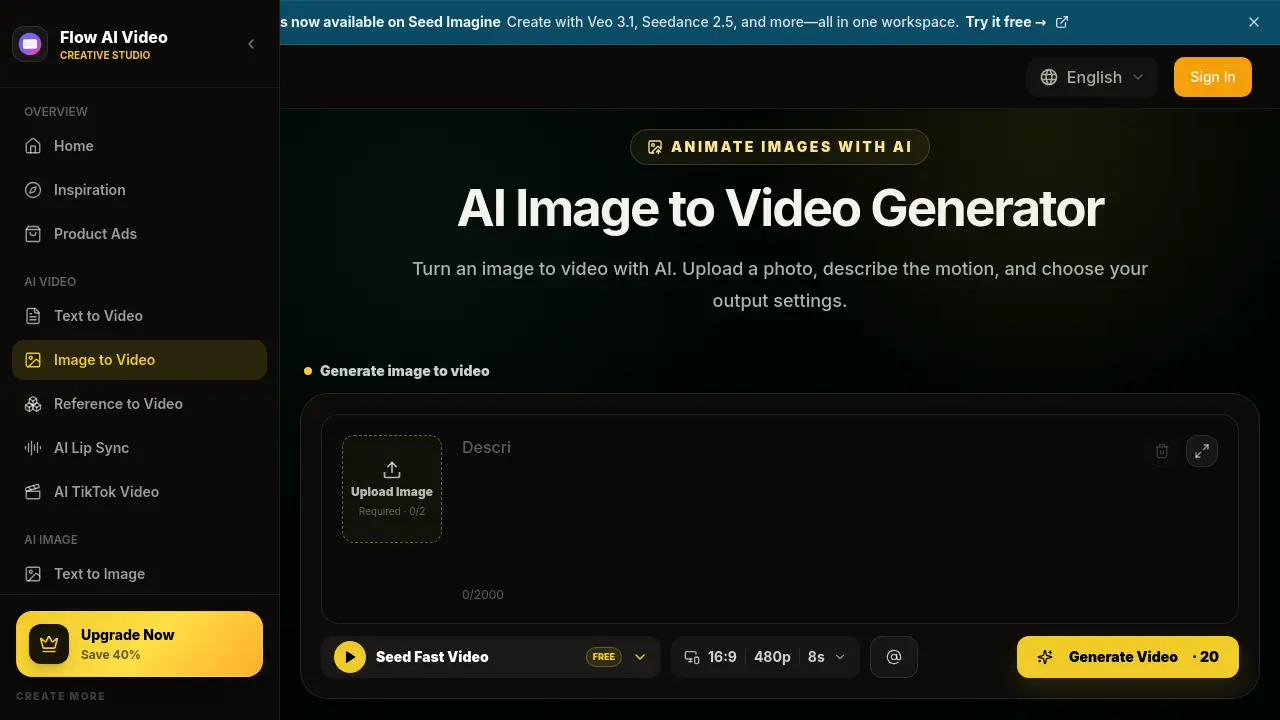
Flow AI Video's image to video tool is a web-based AI video generator designed to turn an image to video. The uploaded image controls the opening frame, subject identity, colors, and composition. A separate motion prompt tells the AI how the subject, camera, and background should move. This solves a common content problem: many creators have a strong still image but lack the time, equipment, or editing skills to make video. An image to video workflow fits content teams, advertisers, social media managers, and independent creators who want to turn still assets into moving content. Because the source image guides the look, the tool works well for consistent brand colors, product details, and character likeness. In short, this image to video generator changes the way people approach short-form visual production.
Key Features of image to video
Multiple AI video models in one place
Flow AI Video provides access to several AI video models through a single image to video interface. Users can keep the same photo and switch between models to compare motion quality and visual style. Available models can include Seedance, Veo, Sora, Wan, and other options, depending on the plan. This makes the AI video generator more flexible for different creative needs.
Motion controls built around the source image
The image to video tool lets users describe subject action, camera movement, and background activity. A simple motion prompt like "the model turns her head slowly" can create a natural clip without needing a video editor. Clear prompts help the AI video generator match the intended movement.
Start and end frame support
Some image to video models accept a second image as an end frame. This feature supports guided transitions between two poses, viewpoints, or compositions for more precise results. It is especially useful for creators who need a clear beginning and ending point in every AI video generator workflow.
Output settings before generation
Users can select aspect ratio, duration, and resolution before generating. The available output settings update based on the chosen model, so there are no surprises after the video is created. This keeps the image to video process simple and transparent.
Transparent credit cost
The Generate button shows the required credit cost before the request starts. This makes the image to video process clear and helps users manage their plan balance. Users can also see whether a model supports free video generation or requires dedicated credits.
Built-in examples and inspiration
The site includes image to video examples with motion prompts, so new users can see how language translates into movement. These examples help users write better prompts for the AI video generator.
Use Cases for image to video
Portrait Animation Videos
Turn a portrait or character image into a short clip with blinking, expression changes, hair movement, or a gentle head turn. This image to video use case helps creators bring still portraits to life.
Product Showcase Videos
Create a product reveal, slow rotation, light sweep, push-in, or orbit from one clean product photo. Ecommerce teams can use this AI video generator to turn a product image into a motion ad without a studio. This is a popular image to video workflow for online stores.
Social Media Videos
Make vertical image to video clips for TikTok, Instagram Reels, and YouTube Shorts from lifestyle, travel, or campaign photos. The AI video generator supports vertical formats during output settings, which saves time for social media editors.
AI Art Animation Videos
Animate illustrations and AI art with character movement, particles, weather, and layered depth. The original artwork guides the look, making this photo to video AI use case a favorite among digital artists.
Real Estate Walkthrough Videos
Turn an interior or property image into a slow walkthrough with camera movement, shifting light, moving curtains, or reflections. This image to video application helps property marketers show a space without filming on location.
Start-to-End Transition Videos
Use supported start and end frames to create a visual transition between two poses, viewpoints, or compositions. This image to video feature gives creators more control over the final shot and works well for storytelling.
How to Use image to video
Flow AI Video's image to video generator follows a simple workflow:
- Upload an image. Use a JPG, PNG, or WEBP file. Add an optional end frame if the selected model supports two images.
- Write a motion prompt. Describe how the subject and camera should move, such as "the woman smiles as the camera slowly zooms in."
- Choose a model and output settings. Select an AI video model, aspect ratio, resolution, and duration. The credit cost updates before generating.
- Generate and review. Click Generate Video to create the clip. Preview the result, then adjust the prompt or settings and generate again if needed.
Target Audience for image to video
This AI video generator is suitable for several groups who need quick, controlled video content from still images.
- Content creators who need short clips from still images
- Social media managers creating video for TikTok, Reels, and Shorts
- Ecommerce and product marketers producing quick product ads
- Digital artists who want to animate illustrations
- Real estate agents creating property walkthroughs
- Small business owners with limited video production budgets
Is image to video Free?
Flow AI Video starts with free credits, so new users can test the image to video generator before paying. The AI video generator also offers paid plans that can be canceled anytime. Annual billing is available and advertised as saving 50%.
| Plan | Price | Key Features |
|---|---|---|
| Basic | $19.9/month | 800 credits, up to 40 videos/month, no watermark, priority queue |
| Pro | $39.9/month | 2,000 credits, up to 200 videos/month, all Basic features |
| Enterprise | $99.9/month | 6,000 credits, up to 600 videos/month, commercial use license |
image to video's Pros and Cons
| Aspect | Pros | Cons |
|---|---|---|
| Pricing | Free credits available; clear monthly packages | Larger teams may need a higher plan for enough credits |
| Features | Multiple AI video models and start/end frame controls make the image to video workflow flexible | Complex motion can cause visual drift from the original image |
| Ease of use | Simple upload-prompt-generate process | Choosing among models and settings can feel overwhelming for beginners |
Frequently Asked Questions about image to video
What is an AI image to video generator?
An AI image to video generator turns a still image into a moving video clip. This AI video generator uses the uploaded image to guide the subject, composition, colors, and opening frame, while a text prompt directs subject movement, camera behavior, pace, and atmosphere.
How do I animate an image with AI?
Upload a clear photo, illustration, or product shot, then describe the movement you want to see. This photo to video AI workflow uses that image as the starting frame while your prompt guides subject motion, camera movement, and background activity.
Can image to video use one image or two?
Every image to video workflow can begin with one source image. Some AI video models also accept a second image as an end frame, letting you guide the final pose, viewpoint, or composition. The upload area shows the supported image count for the selected model.
Will the video keep my original image unchanged?
The source image guides the subject and opening composition, but generated frames can still vary as movement is created. In most image to video tools, exact frame-by-frame consistency is not guaranteed. Faces, hands, text, logos, and product geometry are more likely to drift when the motion is complex.
What resolution and duration options are available?
The available format, duration, and resolution depend on the selected AI video model. For example, Flow AI Video's tool supports settings such as 16:9 at 480p for 8 seconds. The image to video interface shows these choices before generation.
image to video Tags
image to video, AI video generator, turn image to video, photo to video AI, AI image to video, image to video generator, animate image with AI, video generator online, image animation tool, Flow AI Video, AI video models, image to video AI