Introduction
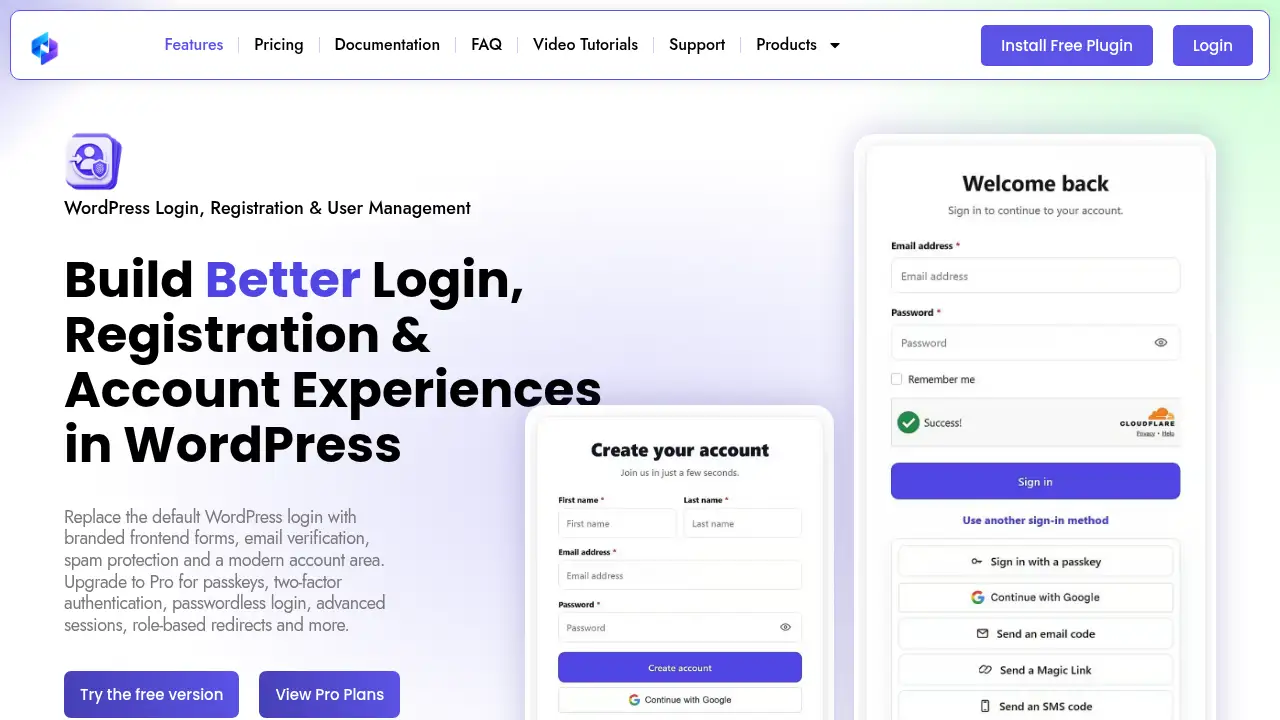
HMDIA Login and Registration is a WordPress login and registration plugin that replaces default WordPress authentication pages with branded frontend forms. It adds email verification, spam protection, and a user account area, while Pro plans include passkeys, two-factor authentication, passwordless login, and advanced session controls. This WordPress login and registration plugin is built for site owners who want a smoother sign-in experience without custom code. It keeps login, registration, and profile management on the front end, so visitors do not need to see the WordPress dashboard. The plugin also supports custom form design, role-based redirects, and a WooCommerce checkout verification add-on. For anyone comparing a WordPress login and registration plugin, HMDIA focuses on practical account workflows and modern authentication options.
What is HMDIA Login and Registration?
HMDIA Login and Registration is a WordPress login and registration plugin that customizes login, registration, and account pages. It solves the problem of generic WordPress login screens and dashboard-based account management by giving site owners branded frontend forms. This WordPress login and registration plugin includes email verification, spam protection, a frontend account area, form design controls, email notifications, role-based redirects, and session management. It suits membership sites, blogs, online stores, and any WordPress site that needs cleaner user management. Authentication is often a user’s first interaction with a site, so a clear login and registration flow can reduce friction. For teams that want a custom WordPress login without building one from scratch, this WordPress login and registration plugin offers a focused set of tools.
Key Features of HMDIA Login and Registration
HMDIA Login and Registration combines frontend forms, security checks, and account management in one WordPress login and registration plugin.
Custom Login and Registration Forms
Create branded login and registration forms with configurable fields, labels, buttons, colors, and spacing. This WordPress login and registration plugin supports popup forms for sign-in or registration without leaving the page.
Email Verification
Require users to verify their email before completing registration or accessing their account. Email verification helps reduce fake accounts and supports cleaner frontend registration workflows.
Spam Protection
Protect login and registration forms from bots, spam, and automated abuse. Built-in spam protection helps open registration sites run a WordPress login and registration plugin without constant manual cleanup.
Frontend User Account Area
Give users a frontend account area to update profiles, change passwords, manage security, and access add-ons. This keeps account management out of the WordPress dashboard for non-technical members.
Passkey Login and Passwordless Options
Pro plans include passkey login, Google Sign-In, magic link login, email OTP, and SMS OTP. These options let users sign in with Face ID, fingerprint, Windows Hello, security keys, Google accounts, or one-time codes.
Two-Factor Authentication
Add an extra security step with authenticator app 2FA and time-based verification codes. Two-factor authentication helps protect accounts even when a password is compromised.
Role-Based Redirects and Session Management
Send users to different pages after login or registration based on role. The WordPress login and registration plugin also supports session management, force logout, temporary login access, and suspicious activity alerts in Pro plans.
Contact Form and Form Design
Build branded contact forms with custom fields, saved submissions, and email notifications. Form design controls help match the WordPress login and registration plugin to the site brand.
WooCommerce Checkout Verification Add-on
Require customers to verify checkout email addresses, phone numbers, or both with one-time codes before ordering. This add-on connects the WordPress login and registration plugin to e-commerce workflows.
Use Cases for HMDIA Login and Registration
Membership Sites
Membership sites can use this WordPress login and registration plugin to create branded sign-up forms, verify emails, and give members a frontend account area.
Online Stores
WooCommerce stores can use the WordPress login and registration plugin to improve account flows and add checkout verification.
Blogs and Content Sites
Blogs that allow reader accounts can replace default WordPress login pages with custom frontend registration forms using the WordPress login and registration plugin.
Agencies and Developers
Agencies can use the WordPress login and registration plugin to deliver branded authentication pages without custom code.
Community and Internal Portals
Community portals can use role-based redirects, temporary login access, and user management to control access through the WordPress login and registration plugin.
How to Use HMDIA Login and Registration
- Install the free WordPress login and registration plugin, HMDIA Login and Registration, from the WordPress plugin directory or the official site.
- Open the plugin settings and create or customize login, registration, and account forms. Adjust fields, labels, colors, and buttons to match the brand.
- Configure email verification, spam protection, email notifications, and role-based redirects. These settings shape how the WordPress login and registration plugin handles new users.
- Publish the forms and test the frontend registration and login flow on desktop and mobile.
- Review Pro options if the site needs passkey login, two-factor authentication, magic link login, session management, or temporary login access. The official pricing page lists current plans for this WordPress login and registration plugin.
Target Audience for HMDIA Login and Registration
- WordPress site owners who want a WordPress login and registration plugin for a custom frontend login experience.
- Membership site operators who need email verification and a frontend account area from a WordPress login and registration plugin.
- WooCommerce store owners who want checkout verification and cleaner customer registration with a WordPress login and registration plugin.
- Agencies and freelance developers who build branded WordPress authentication flows.
- Community managers who need role-based redirects, session management, and user management.
- Security-conscious teams looking for passkey login and two-factor authentication options.
Is HMDIA Login and Registration Free?
HMDIA Login and Registration offers a free version through the WordPress plugin directory. The free version covers core login and registration forms, email verification, spam protection, form design, and a frontend account area. Pro plans add passkey login, Google Sign-In, authenticator app 2FA, magic link login, email OTP, SMS OTP, advanced session management, and role-based redirects. Exact Pro pricing is listed on the official pricing page. This WordPress login and registration plugin uses a free-core plus paid-upgrade model, so teams can test basic workflows before advanced security.
| Plan | Price | Features |
|---|---|---|
| Free | $0 | Core login and registration forms, email verification, spam protection, form design, frontend account area, contact form, email notifications. |
| Pro | See official pricing page | Passkey login, Google Sign-In, authenticator app 2FA, magic link login, email OTP, SMS OTP, advanced session management, role-based redirects, temporary login access, suspicious activity alerts. |
HMDIA Login and Registration's Pros and Cons
This WordPress login and registration plugin has clear strengths and a few trade-offs.
| Aspect | Pros | Cons |
|---|---|---|
| Pricing | Free version available for testing core features. | Advanced authentication and security features require Pro. |
| Features | Covers forms, email verification, spam protection, account area, and multiple login methods. | Pro feature boundaries and pricing need checking on the official site. |
| Ease of use | Frontend forms and account pages reduce dashboard exposure for users. | Initial form and notification setup may take time for complex sites. |
| Compatibility | Works within WordPress and offers a WooCommerce checkout verification add-on. | Limited to the WordPress ecosystem. |
| Security | Supports passkey login, 2FA, session management, and spam protection in Pro. | Some security options depend on external services such as authenticator apps or SMS providers. |
Frequently Asked Questions about HMDIA Login and Registration
What is HMDIA Login and Registration?
HMDIA Login and Registration is a WordPress login and registration plugin that replaces default WordPress authentication pages with branded frontend forms. It includes email verification, spam protection, a frontend account area, and optional Pro authentication features.
Does HMDIA Login and Registration have a free version?
Yes. The free version of this WordPress login and registration plugin is available from the WordPress plugin directory. It includes core forms, email verification, spam protection, form design, and a frontend account area. Pro plans add passkeys, two-factor authentication, passwordless login, and advanced session controls.
Can I customize the WordPress login and registration forms?
Yes. The WordPress login and registration plugin includes form design controls for fields, labels, buttons, colors, and spacing. Site owners can also create popup login and registration forms and customize notification emails.
Does HMDIA Login and Registration support passkeys and two-factor authentication?
Yes, in Pro plans. This WordPress login and registration plugin supports passkey login with Face ID, fingerprint, Windows Hello, or a security key. Authenticator app 2FA adds a time-based verification code step.
How does HMDIA Login and Registration stop spam?
The WordPress login and registration plugin includes spam protection for login and registration forms. It is designed to reduce bots, spam, and automated abuse on sites that allow open frontend registration.
Does HMDIA Login and Registration work with WooCommerce?
The WordPress login and registration plugin offers a WooCommerce Checkout Verification add-on. It can require customers to verify checkout email addresses, phone numbers, or both with one-time codes before placing an order.
HMDIA Login and Registration Tags
WordPress login and registration plugin, custom WordPress login, frontend registration, email verification WordPress, spam protection, two-factor authentication, passkey login, WordPress user management, frontend account area, role-based redirects, session management, WooCommerce checkout verification.