Introduction
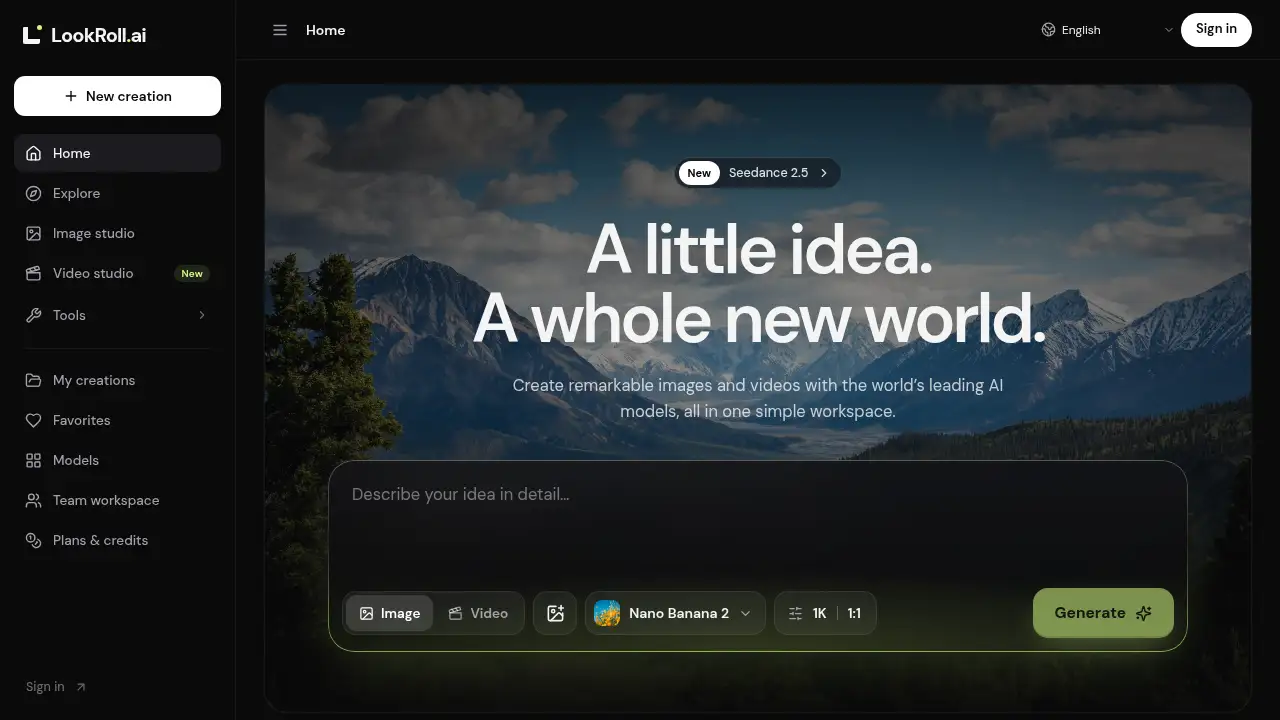
LookRoll AI is an all-in-one AI video and image generator.
What is LookRoll?
LookRoll AI is an AI creative workspace for generating images and videos with multiple leading AI models. It brings tools such as Gemini Omni, Veo 3.1, Kling 3.0, Seedance 2.5, GPT Image, and Nano Banana into one place. The platform aims to solve a common problem in AI content creation: creators often need to switch between separate tools for text-to-image, text-to-video, and image-to-video work.
With LookRoll AI, users can turn a prompt or reference image into a visual, adjust available settings, and keep saved results in one workspace. It is suitable for individual creators, marketing teams, designers, and studios that want a more organized AI image generator and AI video generator workflow. Because it supports several models in one AI creative workspace, LookRoll AI can help users compare options, reuse uploaded files, and move from idea to output with less friction.
Key Features of LookRoll
Multi-Model AI Creative Workspace
LookRoll AI combines several AI models in one AI creative workspace, including Veo 3.1, Kling 3.0, Seedance 2.5, and others. Users can choose a model without moving between separate creative tools.
AI Image Generator with Reference Inputs
Use the AI image generator to create product shots, portraits, concept art, and social visuals from text. On supported models, users can add reference images and choose available formats.
AI Video Generator with Flexible Settings
The AI video generator lets users create a scene from a prompt or animate a still image. Available duration, aspect ratio, resolution, and sound options depend on the selected model.
Credit Cost Preview
LookRoll AI shows an estimated credit cost before generation is submitted. This credit-based pricing approach helps users understand usage before creating an AI image or AI video.
Saved Creations and Upload History
Users can revisit saved creations and reuse uploaded files without starting over. This feature supports a smoother AI content creation workflow across multiple sessions.
Team Collaboration and Shared Projects
Team plans include email invitations, shared projects, shared credits, roles, comments, and review. This makes LookRoll AI useful for teams that need structured team collaboration.
Use Cases for LookRoll
Product Visuals and Marketing Content
Marketers can use the AI image generator to create product shots and campaign visuals from text prompts. Teams can also produce short AI video clips for landing pages or ads.
Social Media Content
Creators can generate portraits, social visuals, and short videos for platforms that need frequent fresh content. An AI video generator like LookRoll AI can help test ideas quickly.
Concept Art and Story Ideas
Artists and storytellers can explore characters, scenes, and visual styles in an AI creative workspace. Reference inputs can help guide the look of a concept without rebuilding every prompt.
Image-to-Video Animation
Users can animate a still image with a compatible model and adjust supported settings. This image-to-video workflow is useful for simple motion tests, previews, and creative experiments.
How to Use LookRoll
- Open LookRoll AI and choose whether to create an image or a video.
- Select an available AI model, such as Veo 3.1, Kling 3.0, Seedance 2.5, or another supported option.
- Write a prompt with a clear subject, action, and visual style, or upload a reference image where the model allows it.
- Adjust settings such as size, duration, aspect ratio, resolution, or sound based on the selected model.
- Check the estimated credit cost, submit the generation, and review the saved result in the AI creative workspace.
Target Audience for LookRoll
- Individual creators who need an AI image generator and AI video generator in one place
- Social media managers and content marketers producing frequent visuals
- Designers and artists exploring concept art, portraits, and product visuals
- Small businesses and ecommerce teams creating marketing assets
- Agencies and creative studios that need shared projects and team collaboration
- Storytellers and educators who want to test visual ideas with multiple AI models
Is LookRoll Free?
LookRoll AI does not provide free generation credits to new accounts. Users can explore the website and available models, but generating images or videos requires a subscription or a one-time credit pack. Subscription credits refresh monthly, including on annual plans. Unused subscription credits do not roll over, while one-time purchased credits do not expire.
| Plan | Price | Features |
|---|---|---|
| Starter | $11.94/month billed $143.28 yearly | 27,000 credits/month, all image and video models, private creations, 2 simultaneous generations |
| Creator | $23.94/month billed $287.28 yearly | 54,500 credits/month, all models, private creations, 2 simultaneous generations |
| Plus | $47.94/month billed $575.28 yearly | 109,500 credits/month, all models, private creations, 2 simultaneous generations |
| Pro | $89.94/month billed $1,079.28 yearly | 206,000 credits/month, 4 seats, shared credits, team features |
| Power | $179.94/month billed $2,159.28 yearly | 414,000 credits/month, 12 seats, shared credits, team features |
| Studio | $299.94/month billed $3,599.28 yearly | 692,000 credits/month, 28 seats, shared credits, team features |
Prices are in USD. Annual billing is shown at a discounted monthly equivalent. Subscriptions renew until cancelled, and one-time packs do not renew.
LookRoll's Pros and Cons
| Aspect | Pros | Cons |
|---|---|---|
| Model Access | Brings several leading AI models into one AI creative workspace | Available settings depend on the selected model |
| Workflow | Saves creations and upload history for easier reuse | New users may need time to understand model differences |
| Pricing | Offers monthly, annual, and one-time credit options | No free generation credits for new accounts |
| Collaboration | Team plans include shared projects, credits, roles, and comments | Team features are limited to higher-tier plans |
| Output Control | Shows estimated credit cost before generation | Credit usage changes with duration, resolution, and model settings |
Frequently Asked Questions about LookRoll
What can I create with LookRoll AI?
LookRoll AI can generate images from text, create videos from prompts, and animate images with compatible models. Common outputs include product visuals, portraits, social content, concept art, and short video scenes.
Do I need design or coding experience to use this AI video generator?
No coding is required. Users describe an idea, choose a model, adjust available settings, and generate. Clear prompts with a subject, action, and style usually help produce more useful results.
Can I use my own photos or videos as references?
Yes, on models that support reference inputs. The upload controls show allowed formats and limits, and upload history lets users reuse approved files. Prompts and reference files are screened before generation.
Is LookRoll AI free to use?
LookRoll AI is not free for generation. New accounts do not receive free generation credits. Users need a subscription or one-time credit pack before creating an AI image or AI video.
How do credits work on LookRoll AI?
Subscriptions provide a monthly credit allowance, and one-time packs add credits that do not expire. Estimated credit cost is shown before submission, and credits are returned when a generation fails.
Can teams collaborate in LookRoll AI?
Yes. Pro, Power, and Studio plans include team seats, shared projets, shared credits, roles, comments, and review. Owners and admins manage access and member limits.
LookRoll Tags
LookRoll AI, AI video generator, AI image generator, AI creative workspace, AI models, Veo 3.1, Kling 3.0, Seedance 2.5, text-to-video, image-to-video, team collaboration, AI content creation